

NVIDIA NeMo Agent Toolkit Workflow as an A2A Server#
Agent-to-Agent (A2A) Protocol is an open standard from the Linux Foundation that enables agent-to-agent communication and collaboration. You can publish NeMo Agent Toolkit workflows as A2A agents so they can be discovered and called by other A2A clients.
This guide covers how to publish NeMo Agent Toolkit workflows as A2A servers. For information on connecting to remote A2A agents, refer to A2A Client.
Note
Read First: This guide assumes familiarity with A2A client concepts. Please read A2A Client first for foundational understanding.
Installation#
A2A server functionality requires the nvidia-nat-a2a package. Install it with:
uv pip install "nvidia-nat[a2a]"
Basic Usage#
The nat a2a serve command starts an A2A server that publishes your workflow as an A2A agent.
Starting an A2A Server#
nat a2a serve --config_file examples/getting_started/simple_calculator/configs/config.yml
This command:
Loads the workflow configuration
Starts an A2A server on
http://localhost:10000(default)Publishes the workflow as an A2A agent with functions as skills
Exposes an Agent Card at
http://localhost:10000/.well-known/agent-card.json
Server Options#
You can customize the server settings using command-line flags:
nat a2a serve --config_file examples/getting_started/simple_calculator/configs/config.yml \
  --host 0.0.0.0 \
  --port 11000 \
  --name "Calculator Agent" \
  --description "A calculator agent for mathematical operations"
Configuration File Approach#
You can also configure the A2A server directly in your workflow configuration file using the general.front_end section:
general:
  front_end:
    _type: a2a
    name: "Calculator Agent"
    description: "A calculator agent for mathematical operations"
    host: localhost
    port: 10000
    public_base_url: "https://agents.example.com/calculator"  # Optional public URL for Agent Card
    version: "1.0.0"
Then start the server with:
nat a2a serve --config_file examples/getting_started/simple_calculator/configs/config.yml
Concurrency Control#
The A2A server includes built-in concurrency control to prevent resource exhaustion when handling multiple simultaneous requests. You can configure the maximum number of concurrent workflow executions:
general:
  front_end:
    _type: a2a
    name: "Calculator Agent"
    max_concurrency: 16  # Maximum concurrent workflow executions (default: 8)
When the limit is reached, additional requests wait in a queue until a workflow completes.
Additional Configuration Options#
You can get the complete list of configuration options and their schemas by running:
nat info components -t front_end -q a2a
Kubernetes and Ingress Deployments#
In Kubernetes deployments, the server bind address (host and port) is often not the public address that clients use. Set public_base_url so the generated Agent Card advertises the external URL:
general:
  front_end:
    _type: a2a
    host: 0.0.0.0
    port: 10000
    public_base_url: ${NAT_PUBLIC_BASE_URL}
Use your deployment tooling (for example Helm values or environment injection) to provide NAT_PUBLIC_BASE_URL at runtime.
How Workflows Map to A2A Agents#
When you publish a workflow as an A2A agent:
Workflow becomes an Agent: The entire workflow is exposed as a single A2A agent
Functions become Skills: Each tool (function) in the workflow becomes an A2A skill
Agent Card is auto-generated: Metadata is derived from workflow configuration
Natural language interface: The agent accepts natural language queries and delegates to appropriate functions
Example Mapping#
Workflow Configuration:
function_groups:
  calculator:
    _type: calculator  # Provides: add, subtract, multiply, divide

workflow:
  _type: react_agent
  tool_names: [calculator]
A2A Agent Card (Generated):
{
  "name": "Calculator Agent",
  "skills": [
    {"id": "calculator__add", "name": "add", "description": "Add two or more numbers"},
    {"id": "calculator__subtract", "name": "subtract", "description": "Subtract numbers"},
    {"id": "calculator__multiply", "name": "multiply", "description": "Multiply numbers"},
    {"id": "calculator__divide", "name": "divide", "description": "Divide numbers"}
  ]
}
Viewing the Agent Card#
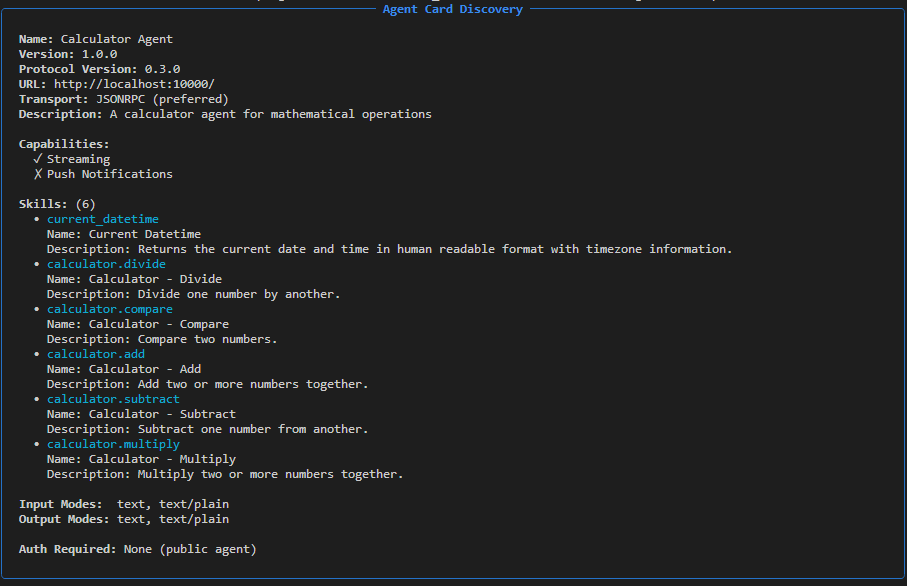
When you start an A2A server, it automatically generates an Agent Card that describes the agent’s capabilities. The Agent Card is available at:
http://<host>:<port>/.well-known/agent-card.json
You can view the Agent Card using the URL above or the CLI.
export A2A_SERVER_URL=http://localhost:10000
# Using curl
curl $A2A_SERVER_URL/.well-known/agent-card.json | jq

# Using nat CLI
nat a2a client discover --url $A2A_SERVER_URL
Sample output:
Invoking the Agent with the CLI#
# Call the agent
nat a2a client call --url $A2A_SERVER_URL --message "What is product of 42 and 67?"
Sample output:
Query: What is product of 42 and 67?

The product of 42 and 67 is 2814.0

(0.85s)
Examples#
The following example demonstrates A2A server usage:
Math Assistant A2A Example - NeMo Agent Toolkit workflow published as an A2A server. See
examples/A2A/math_assistant_a2a/README.md.
Troubleshooting#
Server Won’t Start#
Port Already in Use:
# Check what's using the port
lsof -i :10000

# Use a different port
nat a2a serve --config_file config.yml --port 11000
Security Considerations#
Authentication#
A2A servers can be protected using OAuth2 authentication with JWT token validation. The server validates incoming tokens by checking:
Token signature: Verified using JWKS from the authorization server
Issuer validation: Ensures token was issued by the expected authorization server
Expiration: Rejects expired tokens
Scopes: Validates required scopes are present in the token
Audience: Ensures token is intended for this specific server
For detailed authentication setup and configuration, see A2A Authentication Documentation.
Best Practices#
Use HTTPS in production: Always use TLS or SSL for production deployments
Configure token validation: Set appropriate issuer, audience, and required scopes
Short-lived tokens: Configure authorization server to issue short-lived access tokens
Monitor access: Track authentication events and token usage patterns
Protocol Compliance#
The A2A server is built on the official A2A Python SDK to ensure protocol compliance. For detailed protocol specifications, refer to the A2A Protocol Documentation.