

Agent Evaluation in NVIDIA NeMo Agent Toolkit#
Evaluation is the process of executing workflows (agents, tools, or pipelines) on curated test data and measuring their quality using quantitative metrics such as accuracy, reliability, and latency. Each of these metrics in turn is produced by an evaluator.
NeMo Agent Toolkit provides a set of evaluators to run and evaluate workflows. In addition to the built-in evaluators, the toolkit provides a plugin system to add custom evaluators.
Prerequisites#
Choose the installation mode that matches your evaluation workflow:
Standalone ATIF evaluation (
EvaluationHarnessplus ATIF-native custom evaluators): install basenvidia-nat-eval.Full
nat evalruntime (workflow execution, dataset readers such ascsv/parquet/xls, and config-driven evaluators): installnvidia-nat[eval].
For source installs:
uv pip install -e ".[eval]"
uv pip install "nvidia-nat-eval"
For package installs, use the NeMo Agent Toolkit metapackage to run nat eval:
uv pip install "nvidia-nat[eval]"
If you plan to run profiling via nat eval (for example, when eval.general.profiler is enabled), install the profiler package as well:
uv pip install -e ".[profiler]"
uv pip install "nvidia-nat-profiler"
Evaluating a Workflow#
To evaluate a workflow, you can use the nat eval command. The nat eval command takes a workflow configuration file as input. It runs the workflow using the dataset specified in the configuration file. The workflow output is then evaluated using the evaluators specified in the configuration file.
Note: If you would like to set up visualization dashboards for this initial evaluation, please refer to the Visualizing Evaluation Results section below.
To run and evaluate the simple example workflow, use the following command:
nat eval --config_file=examples/evaluation_and_profiling/simple_web_query_eval/configs/eval_config.yml
Note
If you encounter rate limiting ([429] Too Many Requests) during evaluation, you have two options:
Reduce concurrency: Set the
eval.general.max_concurrencyvalue either in the YAML directly or through the command line with:--override eval.general.max_concurrency 1.Deploy NIM locally: Download and deploy NIM on your local machine to avoid rate limitations entirely. To deploy NIM locally:
Follow the NVIDIA NIM deployment guide to download and run NIM containers locally
Update your configuration to point to your local NIM endpoint by setting the
base_urlparameter in the LLM configuration:llms: nim_rag_eval_llm: _type: nim model_name: meta/llama-3.1-70b-instruct max_tokens: 8 base_url: http://localhost:8000/v1
Local deployment provides unlimited throughput and eliminates external API rate limits
Understanding the Evaluation Configuration#
The eval section in the configuration file specifies the dataset and the evaluators to use. The following is an example of an eval section in a configuration file:
examples/evaluation_and_profiling/simple_web_query_eval/configs/eval_config.yml:
eval:
  general:
    output_dir: ./.tmp/nat/examples/getting_started/simple_web_query/
    dataset:
      _type: json
      file_path: examples/evaluation_and_profiling/simple_web_query_eval/data/langsmith.json
  evaluators:
    accuracy:
      _type: ragas
      metric: AnswerAccuracy
      llm_name: nim_rag_eval_llm
The dataset section specifies the dataset to use for running the workflow. The built-in dataset types are json, jsonl, csv, xls, parquet, and custom. The dataset file path is specified using the file_path key. Additional dataset formats can be added via the plugin system.
Evaluation outputs (what you will get)#
Running nat eval produces a set of artifacts in the configured output directory. These files fall into four groups: workflow outputs, configuration outputs, evaluator outputs, and profiler observability outputs.
Workflow outputs (always available)#
workflow_output.json: Per-sample execution results including question, expectedanswer,generated_answer, andintermediate_steps. Use this to inspect or debug individual runs.
Configuration outputs (always available)#
For reproducibility and debugging, the evaluation system saves the configuration used for each run:
config_original.yml: The original configuration file as provided, before any modificationsconfig_effective.yml: The final configuration with all command-line overrides applied (the actual configuration used to run the evaluation)config_metadata.json: Metadata about the evaluation run, including all command-line arguments such as--overrideflags,--dataset,--reps,--endpoint, and a timestamp
These files allow you to reproduce the exact evaluation conditions or compare configurations between different runs.
Note
When evaluating remote workflows using the --endpoint flag, the saved configuration captures the evaluation settings (dataset, evaluators, endpoint URL) but does not reflect the workflow configuration running on the remote server. To fully reproduce a remote evaluation, you need both the saved evaluation configuration and access to the same workflow configuration on the remote endpoint.
Evaluator outputs (only when configured)#
Each evaluator produces another unique output file (<evaluator-name>_output.json) only when that evaluator is explicitly configured in eval.evaluators
For example, if the evaluators are configured as follows:
eval:
  evaluators:
    trajectory_accuracy:
      _type: trajectory
      llm_name: nim_trajectory_eval_llm
    accuracy:
      _type: ragas
      metric: AnswerAccuracy
      llm_name: nim_rag_eval_llm
    groundedness:
      _type: ragas
      metric: ResponseGroundedness
      llm_name: nim_rag_eval_llm
    relevance:
      _type: ragas
      metric: ContextRelevance
      llm_name: nim_rag_eval_llm
Then the evaluator outputs will be:
trajectory_accuracy_output.json: Scores and reasoning from the trajectory evaluator for each dataset entry, plus an average score.accuracy_output.json: Ragas AnswerAccuracy scores and reasoning per entry, plus an average score.groundedness_output.json: Ragas ResponseGroundedness scores and reasoning per entry, plus an average score.relevance_output.json: Ragas ContextRelevance scores and reasoning per entry, plus an average score.
Profiler and observability outputs (only when profiler is enabled)#
These files are generated when profiler settings are configured under eval.profiler:
standardized_data_all.csv: One row per request with standardized profiler metrics (latency, token counts, model names, error flags). Load this in pandas for quick analysis.workflow_profiling_metrics.json: Aggregated profiler metrics (means, percentiles, and summary statistics) across the run. Describes operations types, operational periods, concurrency scores, and bottleneck scores.workflow_profiling_report.txt: Human-readable profiler summary including latency, token efficiency, and bottleneck highlights. Highlights key metrics with a nested call profiling report and concurrency spike analysis.gantt_chart.png: A timeline (Gantt) visualization of events for the run (LLM/tool spans). Useful for quick performance inspections and presentations.all_requests_profiler_traces.json: Full per-request trace events suitable for offline analysis or ingestion into observability backends.inference_optimization.json: Inference optimization signals (token efficiency, caching signals, prompt-prefix analysis) whencompute_llm_metricsis enabled.
Understanding the Dataset Format#
The dataset file provides a list of questions and expected answers. The following is an example of a dataset file:
examples/evaluation_and_profiling/simple_web_query_eval/data/langsmith.json:
[
  {
    "id": "1",
    "question": "What is langsmith",
    "answer": "LangSmith is a platform for LLM application development, monitoring, and testing"
  },
  {
    "id": "2",
    "question": "How do I prototype with langsmith",
    "answer": "To prototype with LangSmith, you can quickly experiment with prompts, model types, retrieval strategy, and other parameters"
  }
]
Understanding the Evaluator Configuration#
The evaluators section of the config file specifies the evaluators to use for evaluating the workflow output. The evaluator configuration includes the evaluator type, the metric to evaluate, and any additional parameters required by the evaluator.
Display all evaluators#
To display all existing evaluators, run the following command:
nat info components -t evaluator
Ragas Evaluator#
Ragas is an open-source evaluation framework that enables end-to-end evaluation of LLM workflows. NeMo Agent Toolkit provides an evaluation interface to interact with Ragas.
examples/evaluation_and_profiling/simple_web_query_eval/configs/eval_config.yml:
eval:
  evaluators:
    accuracy:
      _type: ragas
      metric: AnswerAccuracy
      llm_name: nim_rag_eval_llm
    groundedness:
      _type: ragas
      metric: ResponseGroundedness
      llm_name: nim_rag_eval_llm
    relevance:
      _type: ragas
      metric: ContextRelevance
      llm_name: nim_rag_eval_llm
The following ragas metrics are recommended for RAG workflows:
AnswerAccuracy: Evaluates the accuracy of the answer generated by the workflow against the expected answer or ground truth.
ContextRelevance: Evaluates the relevance of the context retrieved by the workflow against the question.
ResponseGroundedness: Evaluates the groundedness of the response generated by the workflow based on the context retrieved by the workflow.
These metrics use a judge LLM for evaluating the generated output and retrieved context. The judge LLM is configured in the llms section of the configuration file and is referenced by the llm_name key in the evaluator configuration.
examples/evaluation_and_profiling/simple_web_query_eval/configs/eval_config.yml:
llms:
  nim_rag_eval_llm:
    _type: nim
    model_name: meta/llama-3.1-70b-instruct
    max_tokens: 8
For these metrics, it is recommended to use 8 tokens for the judge LLM. The judge LLM returns a floating point score between 0 and 1 for each metric where 1.0 indicates a perfect match between the expected output and the generated output.
Evaluation is dependent on the judge LLM’s ability to accurately evaluate the generated output and retrieved context. This is the leadership board for the judge LLM:
    1) nvidia/Llama-3_3-Nemotron-Super-49B-v1
    2) mistralai/mixtral-8x22b-instruct-v0.1
    3) mistralai/mixtral-8x7b-instruct-v0.1
    4) meta/llama-3.1-70b-instruct
    5) meta/llama-3.3-70b-instruct
For a complete list of up-to-date judge LLMs, refer to the Ragas NV metrics leadership board
For more information on the prompt used by the judge LLM, refer to the Ragas NV metrics. The prompt for these metrics is not configurable. If you need a custom prompt, you can use the Tunable RAG Evaluator or implement your own evaluator using the Custom Evaluator documentation.
Trajectory Evaluator#
This evaluator uses the intermediate steps generated by the workflow to evaluate the workflow trajectory. The evaluator configuration includes the evaluator type and any additional parameters required by the evaluator.
examples/evaluation_and_profiling/simple_web_query_eval/configs/eval_config.yml:
eval:
  evaluators:
    trajectory:
      _type: trajectory
      llm_name: nim_trajectory_eval_llm
A judge LLM is used to evaluate the trajectory produced by the workflow, taking into account the tools available during execution. It returns a floating-point score between 0 and 1, where 1.0 indicates a perfect trajectory.
To configure the judge LLM, define it in the llms section of the configuration file, and reference it in the evaluator configuration using the llm_name key.
It is recommended to set max_tokens to 1024 for the judge LLM to ensure sufficient context for evaluation.
Note: Trajectory evaluation may result in frequent LLM API calls. If you encounter rate-limiting errors (such as [429] Too Many Requests error), you can reduce the number of concurrent requests by adjusting the max_concurrency parameter in your config. For example:
eval:
  general:
    max_concurrency: 2
This setting reduces the number of concurrent requests to avoid overwhelming the LLM endpoint.
Summary Output#
The nat eval command writes a summary of the evaluation results to the console. The summary includes the workflow status, total runtime, and the average score for each evaluator.
Sample summary output:
=== EVALUATION SUMMARY ===
Workflow Status: COMPLETED
Total Runtime: 28.96s
Workflow Runtime (p95): 7.77s
LLM Latency (p95): 1.64s

Per evaluator results:
| Evaluator           |   Avg Score | Output File                     |
|---------------------|-------------|---------------------------------|
| relevance           |        1    | relevance_output.json           |
| groundedness        |        1    | groundedness_output.json        |
| accuracy            |        0.55 | accuracy_output.json            |
| trajectory_accuracy |        0.9  | trajectory_accuracy_output.json |
Workflow Output#
The nat eval command runs the workflow on all the entries in the dataset. The output of these runs is stored in workflow_output.json under the output_dir specified in the configuration file.
examples/evaluation_and_profiling/simple_web_query_eval/configs/eval_config.yml:
eval:
  general:
    output_dir: ./.tmp/nat/examples/getting_started/simple_web_query/
If additional output configuration is needed you can specify the eval.general.output section in the configuration file. If the eval.general.output section is specified, the dir configuration from that section overrides the output_dir specified in the eval.general section.
eval:
  general:
    output:
      dir: ./.tmp/nat/examples/getting_started/simple_web_query/
      cleanup: false
Note
If cleanup is set to true, the entire output directory will be removed after the evaluation is complete. This is useful for temporary evaluations where you don’t need to retain the output files. Use this option with caution, as it will delete all evaluation results including workflow outputs and evaluator outputs.
Here is a sample workflow output generated by running an evaluation on the simple example workflow:
./.tmp/nat/examples/getting_started/simple_web_query/workflow_output.json:
  {
    "id": "1",
    "question": "What is langsmith",
    "answer": "LangSmith is a platform for LLM application development, monitoring, and testing",
    "generated_answer": "LangSmith is a platform for LLM (Large Language Model) application development, monitoring, and testing. It provides features such as automations, threads, annotating traces, adding runs to a dataset, prototyping, and debugging to support the development lifecycle of LLM applications.",
    "intermediate_steps": [
      {
        >>>>>>>>>>>>>>> SNIPPED >>>>>>>>>>>>>>>>>>>>>>
      }
    ],
    "expected_intermediate_steps": []
  },
The contents of the file have been snipped for brevity.
Evaluator Output#
Each evaluator provides an average score across all the entries in the dataset. The evaluator output also includes the score for each entry in the dataset along with the reasoning for the score. The score is a floating point number between 0 and 1, where 1 indicates a perfect match between the expected output and the generated output.
The output of each evaluator is stored in a separate file under the output_dir specified in the configuration file.
Here is a sample evaluator output generated by running evaluation on the simple example workflow:
./.tmp/nat/examples/getting_started/simple_web_query/accuracy_output.json:
{
  "average_score": 0.6666666666666666,
  "eval_output_items": [
    {
      "id": 1,
      "score": 0.5,
      "reasoning": {
        "question": "What is langsmith",
        "answer": "LangSmith is a platform for LLM application development, monitoring, and testing",
        "generated_answer": "LangSmith is a platform for LLM application development, monitoring, and testing. It supports various workflows throughout the application development lifecycle, including automations, threads, annotating traces, adding runs to a dataset, prototyping, and debugging.",
        "retrieved_contexts": [
          >>>>>>> SNIPPED >>>>>>>>
        ]
      }
    },
    {
      "id": 2,
      "score": 0.75,
      "reasoning": {
        "question": "How do I prototype with langsmith",
        "answer": "To prototype with LangSmith, you can quickly experiment with prompts, model types, retrieval strategy, and other parameters",
        "generated_answer": "LangSmith is a platform for LLM application development, monitoring, and testing. It supports prototyping, debugging, automations, threads, and capturing feedback. To prototype with LangSmith, users can quickly experiment with different prompts, model types, and retrieval strategies, and debug issues using tracing and application traces. LangSmith also provides features such as automations, threads, and feedback capture to help users develop and refine their LLM applications.",
        "retrieved_contexts": [
          >>>>>>> SNIPPED >>>>>>>>
        ]
      }
    }
  ]
}
The contents of the file have been snipped for brevity.
Visualizing Evaluation Results#
You can visualize the evaluation results using the Weights and Biases (W&B) Weave dashboard.
Step 1: Install the Weave plugin#
To install the Weave plugin, with one of the following commands, depending on whether you installed the NeMo Agent Toolkit from source or from a package.
uv pip install -e ".[weave]"
uv pip install "nvidia-nat[weave]"
Step 2: Enable logging to Weave in the configuration file#
Edit your evaluation config, for example:
examples/evaluation_and_profiling/simple_web_query_eval/src/nat_simple_web_query_eval/configs/eval_config_llama31.yml:
general:
  telemetry:
    tracing:
      weave:
        _type: weave
        project: "nat-simple"
When running experiments with different configurations, the project name should be the same to allow for comparison of runs. The workflow_alias can be configured to differentiate between runs with different configurations. For example to run two evaluations with different LLM models, you can configure the workflow_alias as follows:
examples/evaluation_and_profiling/simple_web_query_eval/src/nat_simple_web_query_eval/configs/eval_config_llama31.yml:
eval:
  general:
    workflow_alias: "nat-simple-llama-31"
examples/evaluation_and_profiling/simple_web_query_eval/src/nat_simple_web_query_eval/configs/eval_config_llama33.yml:
eval:
  general:
    workflow_alias: "nat-simple-llama-33"
Step 3: Run evaluation using the configuration file#
Run evaluation with the different configuration files:
nat eval --config_file examples/evaluation_and_profiling/simple_web_query_eval/src/nat_simple_web_query_eval/configs/eval_config_llama31.yml
nat eval --config_file examples/evaluation_and_profiling/simple_web_query_eval/src/nat_simple_web_query_eval/configs/eval_config_llama33.yml
Step 4: View evaluation results in Weave dashboard#
As the workflow runs, you will find a Weave URL (starting with a 🍩 emoji). Click on the URL to access your logged trace timeline. Select the Eval tab to view the evaluation results.
To compare multiple runs, select the desired runs and click the Compare button. This will show a summary of evaluation metrics across those runs.
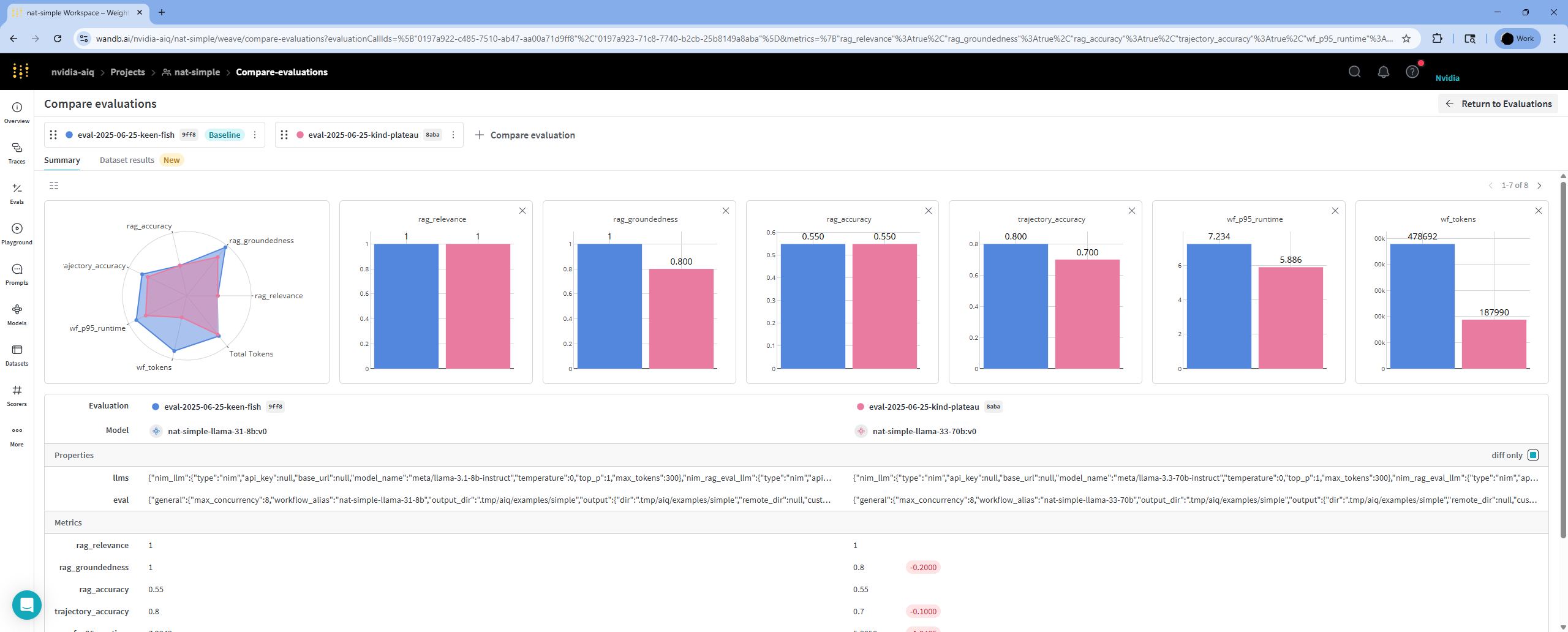
To inspect results for individual dataset entries, go to the Dataset Results tab. You can select any available metric to compare per-metric scores.
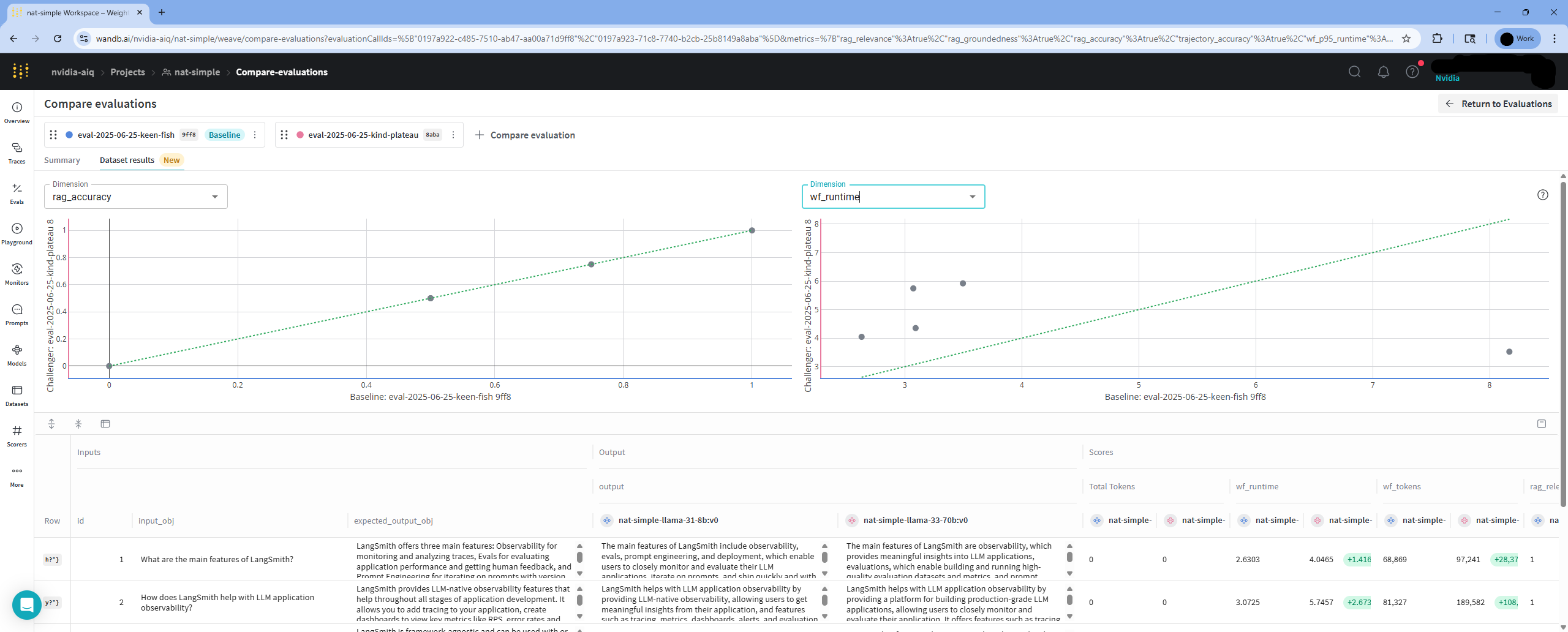 Note: Plotting metrics for individual dataset entries is only available across two runs.
Evaluation Callbacks#
The evaluation system provides a callback interface that allows observability providers to hook into the evaluation lifecycle. Callbacks enable providers to create structured experiments, link workflow runs to dataset examples, and attach evaluator scores in their respective platforms.
Note
Evaluation callback registration is a provisional public plugin surface. The register_eval_callback decorator is
available from nat.plugin_api, but callback protocol and result model types remain eval subsystem APIs until that
runtime contract is promoted deliberately.
EvalCallback Protocol#
Any class implementing the following methods can be registered as an evaluation callback:
Lifecycle Hook |
When It Fires |
What a Callback Can Do |
|---|---|---|
|
After the eval dataset is loaded, before any workflow runs begin |
Create a dataset or experiment in the observability provider, map eval items to provider-specific examples |
|
After all items are evaluated and scores are computed |
Link workflow traces to dataset examples, attach evaluator scores as feedback, record metadata |
The on_eval_complete callback receives an EvalResult object containing:
metric_scores: A dictionary of evaluator names to average scores across all dataset entries.items: A list ofEvalResultItemobjects, each containing the item’s input, expected output, actual output, per-evaluator scores, and reasoning.
Registration#
Callbacks are registered via the @register_eval_callback(config_type=...) decorator, keyed to a telemetry exporter configuration type. When that exporter is configured in general.telemetry.tracing, the callback is automatically constructed and registered with no additional user configuration needed.
For example, a provider registers its callback by decorating a factory function:
from nat.plugin_api import register_eval_callback

@register_eval_callback(config_type=MyTelemetryExporter)
def _build_my_eval_callback(config, **kwargs):
    return MyEvaluationCallback(project=config.project)
When the user configures the corresponding telemetry exporter in their workflow YAML, the callback is created and registered automatically.
Built-in Implementation#
LangSmith implements this callback pattern to create structured experiments in the LangSmith Datasets & Experiments UI. See the LangSmith integration guide for details on what LangSmith tracks during evaluation.
Other observability providers can implement the same EvalCallback protocol to add their own experiment tracking during evaluation.
Evaluating Remote Workflows#
You can evaluate remote workflows by using the nat eval command with the --endpoint flag. In this mode the workflow is run on the remote server specified in the --endpoint configuration and evaluation is done on the local server.
Launch NeMo Agent Toolkit on the remote server with the configuration file:
nat serve --config_file=examples/getting_started/simple_web_query/configs/config.yml
Run the evaluation with the --endpoint flag and the configuration file with the evaluation dataset:
nat eval --config_file=examples/evaluation_and_profiling/simple_web_query_eval/configs/eval_config.yml --endpoint http://localhost:8000
Evaluation Endpoint#
You can also evaluate workflows using the NeMo Agent Toolkit evaluation endpoint. The evaluation endpoint is a REST API that allows you to evaluate workflows using the same configuration file as the nat eval command. The evaluation endpoint is available at /evaluate on the NeMo Agent Toolkit server. For more information, refer to the NeMo Agent Toolkit Evaluation Endpoint documentation.
Adding Custom Evaluators#
You can add custom evaluators to evaluate the workflow output. To add a custom evaluator, you need to implement the evaluator and register it with the NeMo Agent Toolkit evaluator system. See the Custom Evaluator documentation for more information.
Adding Custom Dataset Loaders#
You can add support for additional dataset formats by creating a custom dataset loader plugin. See the Custom Dataset Loader documentation for more information.
Overriding Evaluation Configuration#
You can override the configuration in the eval_config.yml file using the --override command line flag. The following is an example of overriding the configuration:
nat eval --config_file examples/evaluation_and_profiling/simple_web_query_eval/configs/eval_config.yml \
        --override llms.nim_rag_eval_llm.temperature 0.7 \
        --override llms.nim_rag_eval_llm.model_name meta/llama-3.1-70b-instruct
Evaluation Details#
NeMo Agent Toolkit provides a set of evaluators to run and evaluate the workflows. In addition to the built-in evaluators, the toolkit provides a plugin system to add custom evaluators.
Example:
nat eval --config_file=examples/evaluation_and_profiling/simple_web_query_eval/configs/eval_config.yml
Using Datasets#
Run and evaluate the workflow on a specified dataset. The built-in dataset file types are json, jsonl, csv, xls, parquet, and custom. You can also add support for additional dataset formats via the dataset loader plugin system.
Download and use datasets provided by NeMo Agent Toolkit examples by running the following.
git lfs fetch
git lfs pull
The dataset used for evaluation is specified in the configuration file through the eval.general.dataset. For example, to use the langsmith.json dataset, the configuration is as follows:
eval:
  general:
    dataset:
      _type: json
      file_path: examples/evaluation_and_profiling/simple_web_query_eval/data/langsmith.json
Dataset Format#
Each dataset file contains a list of records. Each record is a dictionary with keys as the column names and values as the data. For example, a sample record in a json dataset file is as follows:
{
"id": "q_1",
"question": "What is langsmith",
"answer": "LangSmith is a platform for LLM application development, monitoring, and testing"
},
A dataset entry are either structured or unstructured.
For structured entries, the default names of the columns are id, question, and answer,
where the libraries know that question is an input and answer is the output. You can
change the column names and their configurations in the config.yml file
with eval.general.dataset.structure.
eval:
  general:
    dataset:
      structure:
        id: "my_id"
        question: "my_question"
        answer: "my_answer"
For unstructured entries, the entire dictionary is the input to the workflow but the libraries don’t know the individual columns. The input and the workflow output goes through evaluation, where custom evaluators can handle unstructured entries. The following is an example configuration for an unstructured dataset:
eval:
  general:
    dataset:
      _type: parquet
      file_path: hf://datasets/princeton-nlp/SWE-bench_Lite/data/test-00000-of-00001.parquet
      id_key: instance_id
      structure: # For swe-bench the entire row is the input
        disable: true
Accessing Additional Dataset Fields in Evaluators#
In some evaluation scenarios, you may have additional fields in your dataset that are not consumed by the workflow but are required by the evaluator. These fields are automatically available during evaluation via the full_dataset_entry field in the EvalInputItem object. The entire dataset entry is passed as a dictionary to the evaluator, making all dataset fields available for custom evaluators that require access to fields like labels or metadata which are not part of the workflow’s inputs but are relevant for scoring or analysis.
Filtering Datasets#
While evaluating large datasets, you can filter the dataset to a
smaller subset by allowing or denying entries with the eval.general.dataset.filter
in the config.yml file. The filter is a dictionary with keys as the column names and
values as the filter values.
The following is an example configuration, where evaluation
runs on a subset of the swe-bench-verified dataset, which has 500 entries. The configuration runs the
evaluation on two entries with instance identifications (instance_id), sympy__sympy-20590
and sympy__sympy-21055. The evaluation iteratively develops and debugs the workflows.
eval:
    dataset:
      _type: parquet
      file_path: hf://datasets/princeton-nlp/SWE-bench_Verified/data/test-00000-of-00001.parquet
      id_key: instance_id
      structure:
        disable: true
      filter:
        allowlist:
          field:
            instance_id:
              - sympy__sympy-20590
              - sympy__sympy-21055
The swe-bench verified dataset has 500 entries but above configuration runs the workflow and evaluation on only two entries with instance_id sympy__sympy-20590 and sympy__sympy-21055. This is useful for iterative development and troubleshooting of the workflow.
You can also skip entries from the dataset. Here is an example configuration to skip entries with instance_id sympy__sympy-20590 and sympy__sympy-21055:
eval:
    dataset:
      _type: parquet
      file_path: hf://datasets/princeton-nlp/SWE-bench_Verified/data/test-00000-of-00001.parquet
      id_key: instance_id
      structure:
        disable: true
      filter:
        denylist:
          field:
            instance_id:
              - sympy__sympy-20590
              - sympy__sympy-21055
Custom Dataset Format#
You can use a dataset with a custom format by providing a custom dataset parser function.
Example:
examples/evaluation_and_profiling/simple_calculator_eval/configs/config-custom-dataset-format.yml:
eval:
  general:
    dataset:
      _type: custom
      file_path: examples/evaluation_and_profiling/simple_calculator_eval/data/simple_calculator_nested.json
      function: nat_simple_calculator_eval.scripts.custom_dataset_parser.extract_nested_questions
      kwargs:
        difficulty: "medium"
        max_rows: 5
This example configuration uses a custom dataset parser function to:
extract the nested questions from the example dataset
filter them by difficulty
return only the first five questions
The example dataset simple_calculator_nested.json is a nested JSON file with questions and answers. The custom dataset parser function is a Python function that takes the dataset file_path, optional kwargs and returns an EvalInput object. Signature of the sample custom dataset parser function is as follows:
def extract_nested_questions(file_path: Path, difficulty: str = None, max_rows: int = None) -> EvalInput:
EvalInput is a Pydantic model that contains a list of EvalInputItem objects.
EvalInputItem is a Pydantic model that contains the fields for an item in the dataset.
The custom dataset parser function should fill the following fields in the EvalInputItem object:
id: The id of the item. Every item in the dataset must have a unique id of typestrorint.input_obj: This is the question.expected_output_obj: This is the ground truth answer.full_dataset_entry: This is the entire dataset entry and is passed as is to the evaluator.
To run the evaluation using the custom dataset parser, run the following command:
nat eval --config_file=examples/evaluation_and_profiling/simple_calculator_eval/configs/config-custom-dataset-format.yml
Custom Pre-evaluation Process Function#
You can provide a custom function to process the eval input after the workflow runs but before evaluation begins. This allows you to modify, filter, or enrich the evaluation data.
Example:
examples/evaluation_and_profiling/simple_calculator_eval/configs/config-with-custom-post-process.yml:
eval:
  general:
    output:
      dir: .tmp/nat/examples/simple_calculator/eval-with-post-process
      custom_pre_eval_process_function: nat_simple_calculator_eval.scripts.custom_post_process.normalize_calculator_outputs
    dataset:
      _type: json
      file_path: examples/getting_started/simple_calculator/src/nat_simple_calculator/data/simple_calculator.json
This example configuration uses a custom pre-evaluation process function to normalize numerical outputs for consistent evaluation.
The custom pre-evaluation process function is a Python function that takes an EvalInputItem object and returns a modified EvalInputItem object.
Helper Function: You can use the copy_with_updates() method in the EvalInputItem object to easily update only specific fields while preserving all others:
## Update only the output_obj field
return item.copy_with_updates(output_obj="new output")

## Update multiple fields
return item.copy_with_updates(
    output_obj="new output",
    expected_output_obj="new expected"
)
Signature of the sample custom pre-evaluation process function is as follows:
def normalize_calculator_outputs(item: EvalInputItem) -> EvalInputItem:
Common use cases for custom pre-evaluation process functions include:
Data normalization: Standardize formats for consistent evaluation
Quality filtering: Remove incomplete or invalid workflow outputs
Metadata enhancement: Add processing information to dataset entries
Output transformation: Modify generated answers before evaluation
To run the evaluation using the custom pre-evaluation process function, run the following command:
nat eval --config_file=examples/evaluation_and_profiling/simple_calculator_eval/configs/config-with-custom-post-process.yml
NeMo Agent Toolkit Built-in Evaluators#
NeMo Agent Toolkit provides the following built-in evaluator:
ragas- An evaluator to run and evaluate workflows using the public Ragas API.trajectory- An evaluator to run and evaluate the LangChain/LangGraph agent trajectory.tunable_rag_evaluator- A customizable LLM evaluator for flexible RAG workflow evaluation.langsmith- Built-inopenevalsevaluators (e.g.,exact_match,levenshtein_distance).langsmith_custom- Import any LangSmith-compatible evaluator by Python dotted path.langsmith_judge- LLM-as-judge evaluator powered byopenevals.
Ragas Evaluator#
Ragas is an open-source evaluation framework that enables end-to-end evaluation of LLM workflows. NeMo Agent Toolkit provides an evaluation interface to interact with Ragas.
Ragas provides a set of evaluation metrics to configure in the config.yml file
by adding an evaluator section with typeragas.
Example:
eval:
  evaluators:
    accuracy:
      _type: ragas
      metric: AnswerAccuracy
      llm_name: nim_rag_eval_llm
    groundedness:
      _type: ragas
      metric: ResponseGroundedness
      llm_name: nim_rag_eval_llm
    relevance:
      _type: ragas
      metric: ContextRelevance
      llm_name: nim_rag_eval_llm
    factual_correctness:
      _type: ragas
      metric:
        FactualCorrectness:
          kwargs:
            mode: precision
      llm_name: nim_rag_eval_large_llm # requires more tokens
In the example four ragas evaluators are configured to evaluate various ragasmetrics. The metric can be a string or a dictionary. If the metric is a dictionary, the kwargs provided are passed to the metric function.
The following ragas metrics are recommended for RAG like workflows -
AnswerAccuracy: Evaluates the accuracy of the answer generated by the workflow against the expected answer or ground truth.
ContextRelevance: Evaluates the relevance of the context retrieved by the workflow against the question.
ResponseGroundedness: Evaluates the groundedness of the response generated by the workflow based on the context retrieved by the workflow.
Agent Trajectory Evaluator#
The trajectory evaluator uses LangChain/LangGraph agent trajectory evaluation to evaluate the workflow. To use the trajectory evaluator, add the following configuration to the config.yml file.
eval:
  evaluators:
    trajectory:
      _type: trajectory
      llm_name: nim_trajectory_eval_llm
Tunable RAG Evaluator#
The tunable RAG evaluator is a customizable LLM evaluator that allows for flexible evaluation of RAG workflows. It includes a default scoring mechanism based on an expected answer description rather than a ground truth answer.
The judge LLM prompt is tunable and can be provided in the config.yml file.
A default scoring method is provided as follows:
Coverage: Evaluates if the answer covers all mandatory elements of the expected answer.
Correctness: Evaluates if the answer is correct compared to the expected answer.
Relevance: Evaluates if the answer is relevant to the question.
These weights can be optionally tuned by setting the default_score_weights parameter in the config.yml file. If not set, each score will be equally weighted.
The default scoring can be overridden by setting the config boolean default_scoring to false and providing your own scoring mechanism which you describe in your custom judge LLM prompt.
Note: if you do choose to use the default scoring method, you are still able to tune the judge LLM prompt.
Example:
examples/evaluation_and_profiling/simple_calculator_eval/configs/config-tunable-rag-eval.yml:
eval:
  evaluators:
    tuneable_eval:
      _type: tunable_rag_evaluator
      llm_name: nim_rag_eval_llm
      # (optional) retry control params for handling rate limiting
      llm_retry_control_params:
        stop_after_attempt: 3
        # set initial backoff (seconds)
        initial_backoff_delay_seconds: 1
        # Add jitter to exponential backoff
        has_exponential_jitter: true
      default_scoring: false
      default_score_weights:
        coverage: 0.5
        correctness: 0.3
        relevance: 0.2
      judge_llm_prompt: >
        You are an intelligent evaluator that scores the generated answer based on the description of the expected answer.
        The score is a measure of how well the generated answer matches the description of the expected answer based on the question.
        Take into account the question, the relevance of the answer to the question and the quality compared to the description of the expected answer.

        Rules:
        - The score must be a float of any value between 0.0 and 1.0 on a sliding scale.
        - The reasoning string must be concise and to the point. It should be 1 sentence and 2 only if extra description is needed. It must explain why the score was given and what is different between the generated answer and the expected answer.
Note: In your evaluation dataset, make sure that the answer field is a description of the expected answer with details on what is expected from the generated answer.
Example:
examples/evaluation_and_profiling/simple_calculator_eval/configs/config-tunable-rag-eval.yml:
{
  "id": 1,
  "question": "What is the product of 3 and 7, and is it greater than the current hour?",
  "answer": "Answer must have the answer of product of 3 and 7 and whether it is greater than the current hour"
}
Sample Usage:
nat eval --config_file=examples/evaluation_and_profiling/simple_calculator_eval/configs/config-tunable-rag-eval.yml
LangSmith Evaluators#
NeMo Agent Toolkit integrates with LangSmith and OpenEvals to provide three evaluator types. To use these evaluators, install the LangChain integration package with one of the following commands, depending on whether you installed the NeMo Agent Toolkit from source or from a package.
uv pip install -e ".[langchain]"
uv pip install "nvidia-nat[langchain]"
Built-in openevals Evaluator#
Uses a built-in openevals evaluator selected by short name. Available evaluators: exact_match, levenshtein_distance.
Example:
eval:
  evaluators:
    exact:
      _type: langsmith
      evaluator: exact_match
To pass additional dataset fields to the evaluator (beyond the standard inputs/outputs/reference_outputs), use extra_fields. Keys are the kwarg names passed to the evaluator; values are the field names looked up in the dataset entry:
eval:
  general:
    dataset:
      pass_full_entry: true
  evaluators:
    match_with_context:
      _type: langsmith
      evaluator: exact_match
      extra_fields:
        context: retrieved_context
Note
extra_fields requires pass_full_entry: true in the dataset configuration so that the full dataset entry is available to the evaluator.
Custom Evaluator#
Imports any LangSmith-compatible evaluator by Python dotted path. The calling convention is auto-detected:
RunEvaluator class — subclasses of
langsmith.evaluation.evaluator.RunEvaluator(run, example)function — receives synthetic LangSmithRunandExampleobjects(inputs, outputs, reference_outputs)function —openevals-style keyword arguments
Example:
eval:
  evaluators:
    my_evaluator:
      _type: langsmith_custom
      evaluator: my_package.evaluators.my_function
extra_fields is supported for evaluators using the (inputs, outputs, reference_outputs) convention.
LLM-as-Judge Evaluator#
Uses openevals create_llm_as_judge to score workflow outputs with a judge LLM. Supports prebuilt prompts from openevals (e.g., correctness, hallucination) and custom prompt templates.
Important: The judge LLM must support structured output (JSON schema mode). Models that do not support structured output will produce parsing errors.
Example with a prebuilt prompt:
eval:
  evaluators:
    correctness:
      _type: langsmith_judge
      prompt: correctness
      llm_name: judge_llm
      feedback_key: correctness
Example with a custom prompt and scoring options:
eval:
  evaluators:
    custom_judge:
      _type: langsmith_judge
      prompt: >
        You are evaluating whether the answer addresses the user's question.
        Inputs: {inputs}
        Outputs: {outputs}
        Reference: {reference_outputs}
      llm_name: judge_llm
      feedback_key: relevance
      continuous: true
      use_reasoning: true
Parameter |
Default |
Description |
|---|---|---|
|
(required) |
Prebuilt |
|
(required) |
Name of the judge LLM defined in the |
|
|
Metric name in evaluation output. |
|
|
If true, score is a float between 0 and 1. Mutually exclusive with |
|
|
Explicit list of allowed score values (e.g., |
|
|
Whether the judge provides chain-of-thought reasoning. |
|
|
Optional system message added to the beginning of the prompt. |
|
|
List of few-shot examples to calibrate the judge. Each entry should have |
|
|
Python dotted path to a TypedDict or Pydantic model for custom structured output. |
|
|
Dot-notation path to the score in custom |
|
|
Additional keyword arguments forwarded to |
|
|
Maps evaluator arguments to dataset field names (requires |
The langsmith_judge evaluator also inherits retry configuration from RetryMixin:
Parameter |
Default |
Description |
|---|---|---|
|
|
Automatically retry on transient errors. |
|
|
Number of retry attempts. |
|
|
HTTP status codes that trigger retry. |
|
|
Error messages that trigger retry. |
Adding Custom Evaluators#
You can add custom evaluators to evaluate the workflow output. To add a custom evaluator, you need to implement the evaluator and register it with the NeMo Agent Toolkit evaluator system. See the Custom Evaluator documentation for more information.
Running multiple repetitions#
You can run multiple repetitions of the evaluation by running a command line option --reps. For example, to run the evaluation 5 times, run the following command:
nat eval --config_file=examples/evaluation_and_profiling/simple_web_query_eval/configs/eval_config.yml --reps=5
This will allow you to get an average score across multiple runs and analyze the variation in the generated outputs.
Running evaluation on large datasets#
Similar to how evaluators are run in parallel, entries in the dataset are also processed in parallel. Concurrency is configurable using the eval.general.max_concurrency parameter in the config.yml file. The default value is 8. Increase or decrease the value based on the available resources.
eval:
  general:
    max_concurrency: 4
Pickup where you left off#
When running the evaluation on a large dataset, it is recommended to resume the evaluation from where it was left off. This is particularly useful while using overloaded services that may timeout while running the workflow. When that happens a workflow interrupted warning is issued and workflow output is saved to a file.
You can then re-run evaluation on that output file along with --skip_completed_entries options.
Pass-1:
nat eval --config_file=examples/evaluation_and_profiling/simple_web_query_eval/configs/eval_config.yml
This pass results in workflow interrupted warning. You can then do another pass.
Pass-2:
cp .tmp/nat/examples/evaluation_and_profiling/simple_web_query_eval/eval/workflow_output.json .tmp/simple_workflow_output.json
nat eval --config_file=examples/evaluation_and_profiling/simple_web_query_eval/configs/eval_config.yml --skip_completed_entries --dataset=.tmp/simple_workflow_output.json
Running evaluation offline#
You can evaluate a dataset with previously generated answers via the --skip_workflow option. In this case the dataset has both the expected answer and the generated_answer.
cp .tmp/nat/examples/evaluation_and_profiling/simple_web_query_eval/eval/workflow_output.json .tmp/simple_workflow_output.json
nat eval --config_file=examples/evaluation_and_profiling/simple_web_query_eval/configs/eval_config.yml --skip_workflow --dataset=.tmp/simple_workflow_output.json
This assumes that the workflow output was previously generated and stored in .tmp/nat/examples/evaluation_and_profiling/simple_web_query_eval/eval/workflow_output.json
Running the workflow over a dataset without evaluation#
You can do this by running nat eval with a workflow configuration file that includes an eval section with no evaluators.
eval:
  general:
    output_dir: ./.tmp/nat/examples/getting_started/simple_web_query/
    dataset:
      _type: json
      file_path: examples/evaluation_and_profiling/simple_web_query_eval/data/langsmith.json
Evaluation output#
The output of the workflow is stored as workflow_output.json in the output_dir provided in the config.yml -
eval:
  general:
    output_dir: ./.tmp/nat/examples/getting_started/simple_web_query/
Here is a sample workflow output snipped generated by running evaluation on the simple example workflow -
  {
    "id": "1",
    "question": "What is langsmith",
    "answer": "LangSmith is a platform for LLM application development, monitoring, and testing",
    "generated_answer": "LangSmith is a platform for LLM (Large Language Model) application development, monitoring, and testing. It provides features such as automations, threads, annotating traces, adding runs to a dataset, prototyping, and debugging to support the development lifecycle of LLM applications.",
    "intermediate_steps": [
      {
        >>>>>>>>>>>>>>> SNIPPED >>>>>>>>>>>>>>>>>>>>>>
      }
    ],
    "expected_intermediate_steps": []
  },
The output of the evaluators are stored in distinct files in the same output_dir as <evaluator_name>_output.json. An evaluator typically provides an average score and a score per-entry. Here is a sample accuracy output -
{
  "average_score": 0.6666666666666666,
  "eval_output_items": [
    {
      "id": 1,
      "score": 0.5,
      "reasoning": {
        "user_input": "What is langsmith"
      }
    },
    {
      "id": 2,
      "score": 0.75,
      "reasoning": {
        "user_input": "How do I prototype with langsmith"
      }
    },
    {
      "id": 3,
      "score": 0.75,
      "reasoning": {
        "user_input": "What are langsmith automations?"
      }
    }
  ]
}
Workflow Output Intermediate Step Filtering#
The workflow_output.json file contains the intermediate steps for each entry in the dataset. The intermediate steps are filtered using the eval.general.output.workflow_output_step_filter parameter in the config.yml file. The default value for the filter is [LLM_END, TOOL_END]. You can customize the filter by providing a list of intermediate step types to include in the output file.
Example:
examples/evaluation_and_profiling/simple_web_query_eval/configs/eval_config.yml can be modified to include the intermediate steps in the output by adding the following configuration:
eval:
  general:
    output:
    workflow_output_step_filter: [LLM_END, TOOL_START, TOOL_END]
Customizing the output#
You can customize the output of the pipeline by providing custom scripts. One or more Python scripts can be provided in the eval.general.output_scripts section of the config.yml file.
The custom scripts are executed after the evaluation is complete. They are executed as Python scripts with the kwargs provided in the eval.general.output.custom_scripts.<script_name>.kwargs section.
The kwargs typically include the file or directory to operate on. To avoid overwriting contents it is recommended to provide a unique output file or directory name for the customization. It is also recommended that changes be limited to the contents of the output directory to avoid unintended side effects.
Example:
eval:
  general:
    output:
      dir: ./.tmp/nat/examples/simple_output/
      custom_scripts:
        convert_workflow_to_csv:
          script: examples/evaluation_and_profiling/simple_web_query_eval/scripts/workflow_to_csv.py
          kwargs:
            # The input and output are relative to the output directory
            input: workflow_output.json
            output: workflow.csv
Remote Storage#
Evaluating remote datasets#
You can evaluate a remote dataset by provide the information needed to download the dataset in the eval.general.dataset section of the config.yml file. The following is an example configuration to evaluate a remote dataset.
eval:
  general:
    dataset:
      _type: json
      # Download dataset from remote storage using S3 credentials
      remote_file_path: input/langsmith.json
      file_path: ./.tmp/nat/examples/simple_input/langsmith.json
      s3:
        endpoint_url: http://10.185.X.X:9000
        bucket: nat-simple-bucket
        access_key: fake_access_key
        secret_key: fake_secret_key
The remote_file_path is the path to the dataset in the remote storage. The file_path is the local path where the dataset will be downloaded. The s3 section contains the information needed to access the remote storage.
Preserving outputs across multiple runs#
By default, evaluation outputs are written to the same directory specified in eval.general.output.dir. This means that running the evaluation multiple times will overwrite previous results. To keep the outputs from each run separate, enable the append_job_id_to_output_dir option in the job_management section:
eval:
  general:
    output:
      dir: ./.tmp/nat/examples/simple_output/
      job_management:
        append_job_id_to_output_dir: true
      cleanup: false
When append_job_id_to_output_dir is set to true, a unique job ID (job_{UUID}) is automatically generated for each evaluation run and appended to the output directory path. This results in:
Local output path:
./.tmp/nat/examples/getting_started/simple_web_query/jobs/job_{unique-job-id}/Remote output path (if S3 is configured):
output/jobs/job_{unique-job-id}/
The cleanup option is used to control the cleanup of the output directory. If cleanup is set to true, the entire output directory and all job sub-directories are deleted at the beginning of the evaluation. Therefore, cleanup must be set to false if you want to preserve the output directory and job sub-directories.
Uploading output directory to remote storage#
You can upload the contents of the entire output directory to remote storage by providing the information needed to upload the output directory in the eval.general.output section of the config.yml file. The following is an example configuration to upload the output directory to remote storage.
For connecting with S3 using endpoint URL:
eval:
  general:
    output:
      # Upload contents of output directory to remote storage using custom endpoint url & S3 credentials
      remote_dir: output
      s3:
        endpoint_url: http://10.185.X.X:9000
        bucket: nat-simple-bucket
        access_key: fake-access-key
        secret_key: fake-secret-key
For connecting with default S3 you can use region_name instead of endpoint_url:
eval:
  general:
    output:
      # Upload contents of output directory to remote storage using S3 credentials
      remote_dir: output
      s3:
        region_name: us-west-2
        bucket: nat-simple-bucket
        access_key: fake-access-key
        secret_key: fake-secret-key
Cleanup output directory#
The contents of the output directory can be deleted before running the evaluation pipeline by specifying the eval.general.output.cleanup section in the config.yml file. The following is an example configuration to clean up the output directory before running the evaluation pipeline.
eval:
  general:
    output:
      dir: ./.tmp/nat/examples/simple_output/
      cleanup: true
Output directory cleanup is disabled by default for easy troubleshooting.
Job eviction from output directory#
When running multiple evaluations, especially with append_job_id_to_output_dir enabled, the output directory can accumulate a large number of job folders over time. You can control this growth using a job eviction policy.
Configure job eviction with the following options in the config.yml file:
eval:
  general:
    output:
      dir: ./.tmp/nat/examples/simple_output/
      cleanup: false
      job_management:
        append_job_id_to_output_dir: true
        max_jobs: 5
        eviction_policy: TIME_CREATED
Configuration notes:
max_jobssets the maximum number of job directories to keep. The oldest ones will be evicted based on the selected policy. Default is 0, which means no limit.eviction_policycontrols how “oldest” is determined—either by creation time (TIME_CREATED) or last modification time (TIME_MODIFIED). Default is TIME_CREATED.
Profiling and Performance Monitoring of NeMo Agent Toolkit Workflows#
You can profile workflows using the NeMo Agent Toolkit evaluation system. For more information, see the Profiler documentation.