

Configuration YAML Schema Reference
This reference documents all configuration options for config.yml, derived from the authoritative Pydantic schema in nemoguardrails/rails/llm/config.py.
Models Configuration
The models key defines LLM providers and models used by the NVIDIA NeMo Guardrails library.
Model Schema
Model Attributes
Model Types
The type field is a free-form string identifier. Certain types have special handling in the runtime, while custom types can be defined and referenced in flows via $model=<type>.
Reserved Types
These types have special handling in the runtime:
Commonly-Used Types
The following types are commonly used with guardrails:
Custom Types
You can define any custom type and reference it in flows. For example:
The runtime validates that any $model=<type> reference in flows has a matching model defined in the configuration.
Engines
Starting with v0.22, the library serves engines through either the built-in OpenAI-compatible client or LangChain. Use the built-in client whenever the underlying wire protocol is OpenAI-compatible. Opt into LangChain only for engines whose API is not OpenAI-compatible, such as Vertex AI, Anthropic, Cohere, and the in-process Hugging Face pipeline. For the full mapping, refer to Inference Providers. For migration recipes, refer to Migrating to 0.22.
Built-in Engines
These engines work with pip install nemoguardrails and do not require extra provider packages. Pass parameters.base_url to point at a self-hosted or alternative endpoint.
For OpenAI-compatible providers without a dedicated engine entry (vLLM, TGI, OpenRouter, Together.ai, Fireworks.ai, Groq, DeepSeek, llama.cpp server, and similar), use engine: openai with parameters.base_url and parameters.api_key.
LangChain Engines
To use one of these engines, set NEMOGUARDRAILS_LLM_FRAMEWORK=langchain and install the matching langchain-* provider package.
Embedding Engines
Model Cache Configuration
Rails Configuration
The rails key configures guardrails that control LLM behavior.
Rails Schema
Rail Types
The following table summarizes the available rail types and their trigger points.
The following diagram shows the guardrails process described in the table above in detail.
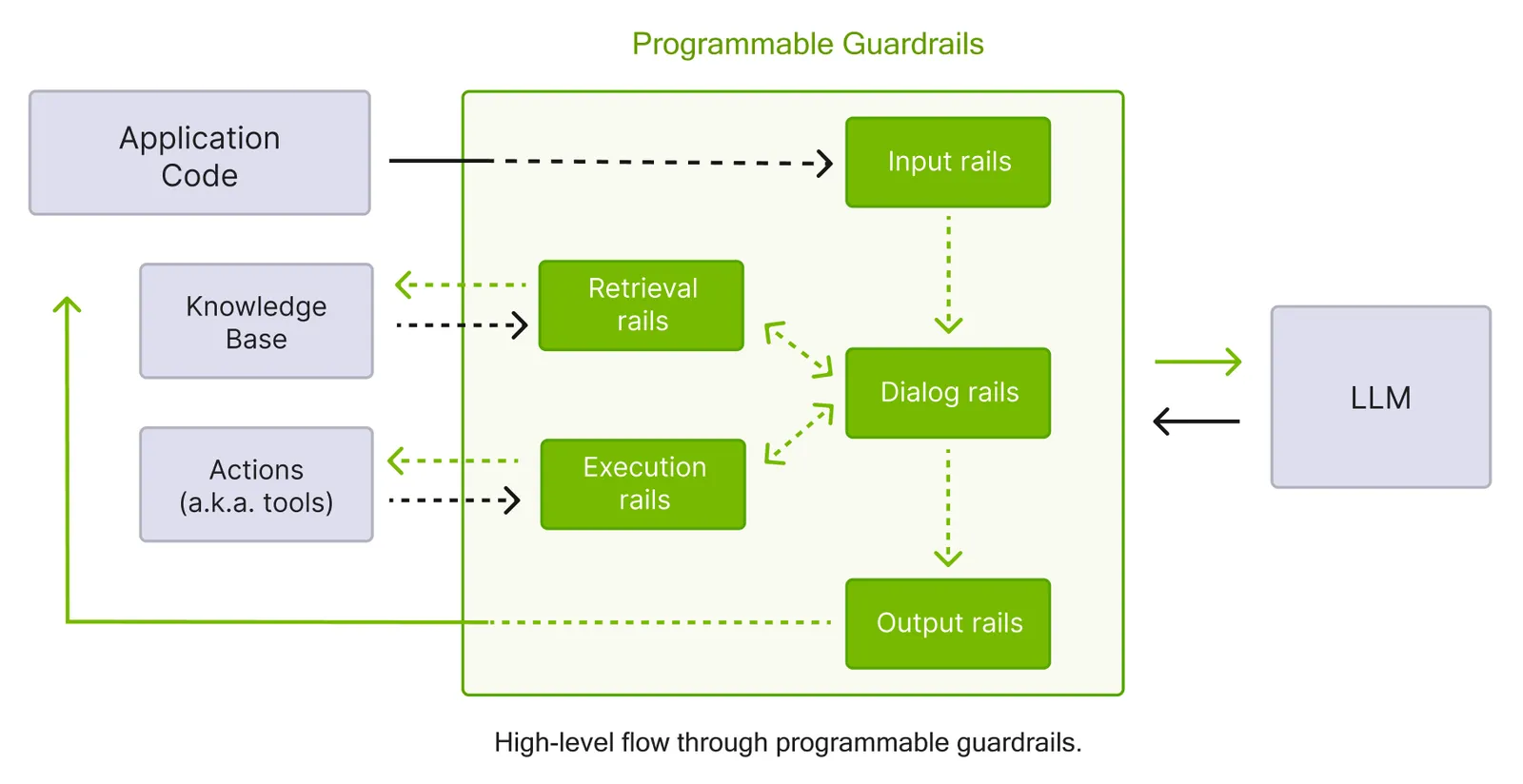
Input Rails
Process user messages before they reach the LLM.
Built-in Input Flows
Output Rails
Process LLM responses before returning to users.
Output Streaming Configuration
Built-in Output Flows
Retrieval Rails
Process chunks retrieved from knowledge base.
Dialog Rails
Control conversation flow after user intent is determined.
Execution Rails
Control tool and action invocations.
Action Rails
Control custom action and tool invocations.
Tool Rails
Validate tool calls and tool results when you use the IORails engine.
The tool_output rails check the tool calls a model emits, and the tool_input rails check the tool results returned to the model.
Each section accepts only its own flow name: tool_output accepts tool call validation, and tool_input accepts tool result validation.
These rails run only on the IORails engine, which accepts the parallel field for symmetry with other rails but does not honor it for tool rails.
For configuration details and behavior, see Tool Calling.
Rails Config Section
The rails.config section contains configuration for specific built-in rails.
Jailbreak Detection
Sensitive Data Detection (Presidio)
Injection Detection
Fact Checking
Content Safety
The multilingual feature supports the following languages:
If the detected language is not in this list, English is used as the fallback. For more information, refer to Multilingual Content Safety.
Third-Party Integrations
AutoAlign
For more information, refer to AutoAlign Integration.
Patronus
For more information, refer to Patronus Evaluate API Integration.
Clavata
For more information, refer to Clavata Integration.
Pangea AI Guard
For more information, refer to Pangea AI Guard Integration.
Trend Micro
For more information, refer to Trend Micro Integration.
Cisco AI Defense
For more information, refer to Cisco AI Defense Integration.
Private AI
For more information, refer to Private AI Integration.
Fiddler Guardrails
For more information, refer to Fiddler Guardrails Integration.
Guardrails AI
For more information, refer to Guardrails AI Integration.
Prompts Configuration
Define prompts for LLM tasks.
Available Tasks
The following table lists all available tasks you can specify to prompts.task.
Available Prompt Message Types
The following table lists all available message types you can specify to prompts.messages.type.
Other Configuration Options
Instructions
Sample Conversation
Knowledge Base
Core Settings
Tracing
Streaming
Import Paths
Complete Example
The following YAML example demonstrates a complete config.yml file that wires together a main language model, a dedicated content safety model, and an embeddings model. It configures rails for input and output content safety checks, points to a local NIM service for jailbreak detection, defines a content safety prompt, provides general instructions for the assistant, and enables response streaming from both the main and content safety models.