

Introduction
General Context
Colang is an event-based modeling language to enable the design of highly flexible conversational interactions between a human and a bot. Since learning a new language is not an easy task, Colang was designed as a mix of natural language and Python. If you are familiar with Python, you should feel confident using Colang after seeing a few examples, even without any explanation. Under the hood, Colang scripts are interpreted by a Python runtime that is currently part of NeMo Guardrails.
To enable the control of an event-driven interactive system, ranging from a simple text or voice-based chatbot to complex interactive avatars or robots, the Colang interpreter is usually located at the heart of the interactive system in between the system’s input and output components:
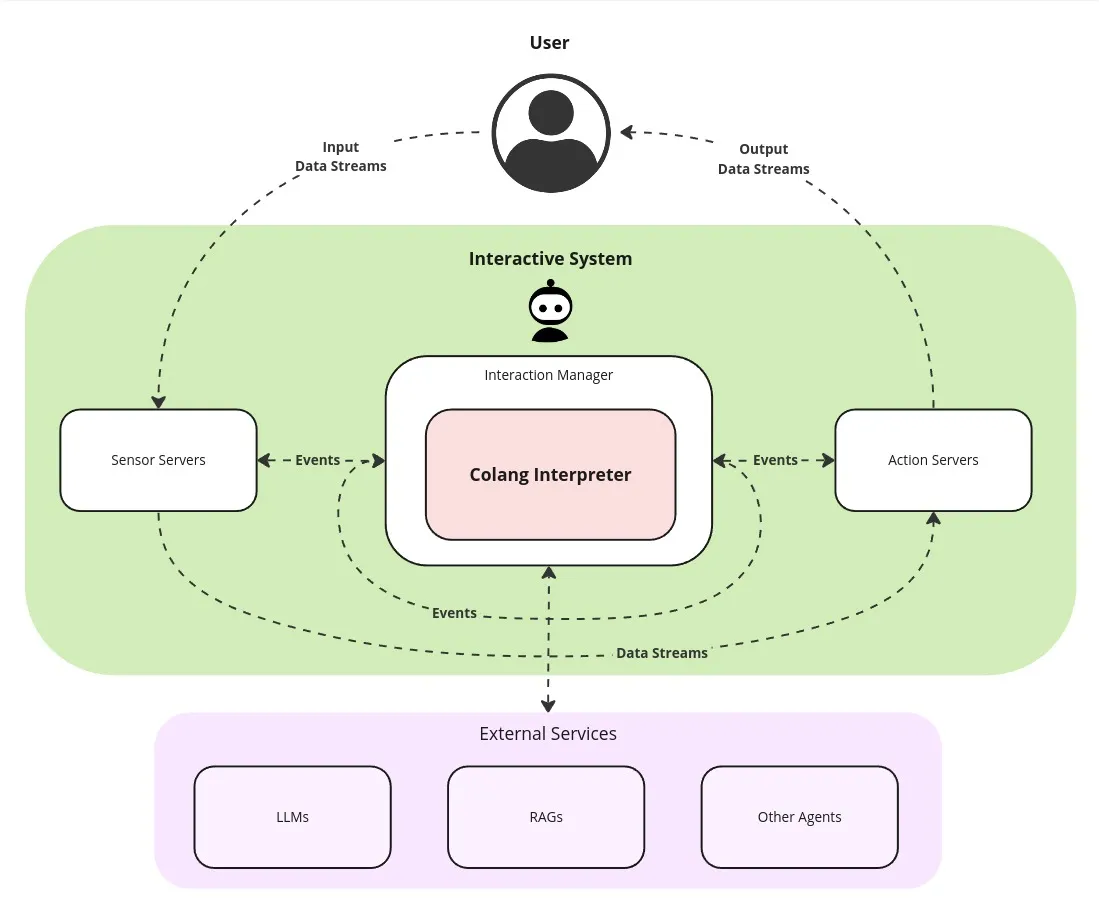 At the core, the Colang interpreter just processes events, detecting and generating event sequences based on the production rules defined in the Colang scripts. With the help of a large language model (LLM) and retrieval-augmented generation (RAG) services this becomes very powerful, capable of handling complex real-time interactions between a user and the system. The Unified Multimodal Interaction Management specification (UMIM) defines in more detail how these events can be organized in a more structured way using actions. It proposes a new standard for the event-based communication between interaction managers and the components of the interactive system.
Setup & Running the Examples
In this guide, we will walk you through all the aspects of Colang with the help of different examples. You can immediately try them out yourself using the provided chat command line interface (CLI) of NeMo Guardrails which is a simple example of an interactive system.
First install NeMo Guardrails:
Then start a Colang example with the CLI:
All examples can be found in the NeMo Guardrails repository under nemoguardrails/examples/v2_x/language_reference/. Note, that all Colang files (*.co) and configuration files (*.yaml or *.yml) will be loaded and parsed inside the specified directory. That’s why each example has its own directory.
In the following examples, input and output are distinguished by the presence or absence of prompts (>): to repeat the example, you must type everything after the prompt when the prompt appears; lines that do not begin with a prompt are output from the interpreter.
Hello World Example
At its core, Colang defines interaction patterns as sequences of events grouped into so-called flows. Like in many programming languages, the main flow (flow main) defines the entry point to a Colang script and will be started/activated first:
introduction/hello_world/main.co
The event pattern defined in this first example flow waits for an event named InputEvent before generating the event named HelloWorld. Running this in the chat interface, looks like this:
Once you enter the correct event InputEvent you will see the generated event HelloWorld. Any other event that you type in (using / to indicate a custom event input) will be ignored. The main flow will automatically restart once the pattern has finished.
Let’s redo the previous example based on UMIM events that represent user and bot utterances:
introduction/hello_world_umim/main.co
When running this example, we can trigger the bot utterance “Hello World!” in two ways, either before by entering the raw event /UtteranceUserActionFinished() or by typing anything without the leading / character. Then, it will be directly interpreted as a user utterance action event UtteranceUserActionFinished(final_transcript="Hi"):
First Interaction Pattern
Let’s now build a longer interaction pattern:
introduction/interaction_sequence/main.co
Running this example will result in a multi-turn interaction:
Note that we can specify for every match statement not only the type of event we are expecting but also the expected parameters of that event. An event matching statement will only be considered successful and advance if the user utterance is identical to the parameter values specified.
Equipped with this basic knowledge, you can now learn more about the ways of Event Generation & Matching.