

Colang Architecture Guide
This document provides more details on the architecture and the approach that the NeMo Guardrails library takes for implementing guardrails.
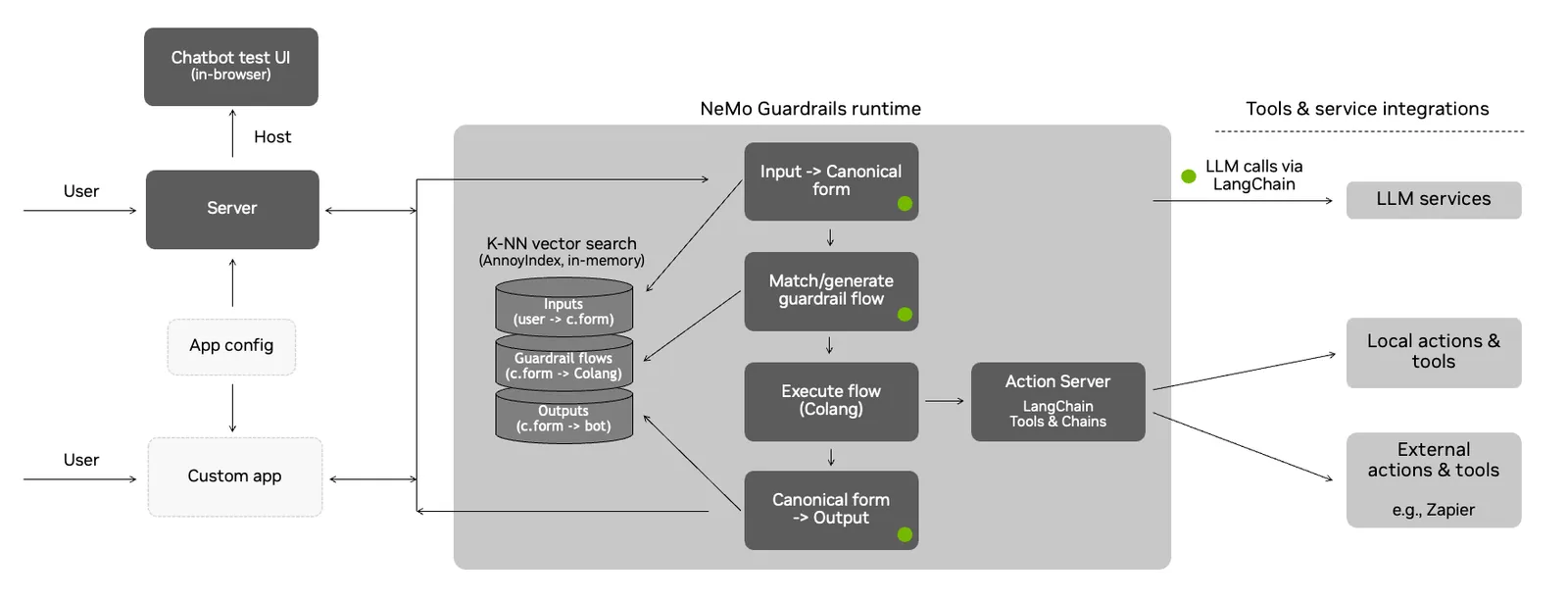
The Guardrails Process
This section explains in detail the process under the hood, from the utterance sent by the user to the bot utterance that is returned.
The guardrails runtime uses an event-driven design (i.e., an event loop that processes events and generates back other events). Whenever the user says something to the bot, an UtteranceUserActionFinished event is created and sent to the runtime.
The process has three main stages:
- Generate canonical user message
- Decide next step(s) and execute them
- Generate bot utterance(s)
Each of the above stages can involve one or more calls to the LLM.
Canonical User Messages
The first stage is to generate the canonical form for the user utterance. This canonical form captures the user’s intent and allows the guardrails system to trigger any specific flows.
This stage is itself implemented through a colang flow:
The generate_user_intent action will do a vector search on all the canonical form examples included in the guardrails configuration, take the top 5 and include them in a prompt, and ask the LLM to generate the canonical form for the current user utterance.
Note: The prompt itself contains other elements, such as the sample conversation and the current history of the conversation.
Once the canonical form is generated, a new UserIntent event is created.
Decide Next Steps
Once the UserIntent event is created, there are two potential paths:
- There is a pre-defined flow that can decide what should happen next; or
- The LLM is used to decide the next step.
When the LLM is used to decide the next step, a vector search is performed for the most relevant flows from the guardrails configuration. As in the previous step, the top 5 flows are included in the prompt, and the LLM is asked to predict the next step.
This stage is implemented through a flow as well:
Regardless of the path taken, there are two categories of next steps:
- The bot should say something (
BotIntentevents) - The bot should execute an action (
StartInternalSystemActionevents)
When an action needs to be executed, the runtime will invoke the action and wait for the result. When the action finishes, an InternalSystemActionFinished event is created with the result of the action.
Note: The default implementation of the runtime is async, so the action execution is only blocking for a specific user.
When the bot should say something, the process will move to the next stage, i.e., generating the bot utterance.
After an action is executed or a bot message is generated, the runtime will try again to generate another next step (e.g., a flow might instruct the bot to execute an action, say something, then execute another action). The processing will stop when there are no more next steps.
Generate Bot Utterances
Once the BotIntent event is generated, the generate_bot_message action is invoked.
Similar to the previous stages, the generate_bot_message action performs a vector search for the most relevant bot utterance examples included in the guardrails configuration. Next, they get included in the prompt, and we ask the LLM to generate the utterance for the current bot intent.
Note: If a knowledge base is provided in the guardrails configuration (i.e., a kb/ folder), then a vector search is also performed for the most relevant chunks of text to include in the prompt as well (the retrieve_relevant_chunks action).
The flow implementing this logic is the following:
Once the bot utterance is generated, a new StartUtteranceBotAction event is created.
Complete Example
An example stream of events for processing a user’s request is shown below.
The conversation between the user and the bot:
The stream of events processed by the guardrails runtime (a simplified view with unnecessary properties removed and values truncated for readability):
Extending the Default Process
The event-driven design allows us to hook into the process and add additional guardrails.
For example, we can add an additional fact-checking guardrail (through the check_facts action) after a question about the report.
For advanced use cases, you can also override the default flows mentioned above (i.e. generate user intent, generate next step, generate bot message)
Example Prompt
Below is an example of how the LLM is prompted for the canonical form generation step:
Notice the various sections included in the prompt: the general instruction, the sample conversation, the most relevant examples of canonical forms and the current conversation.
Interaction with LLMs
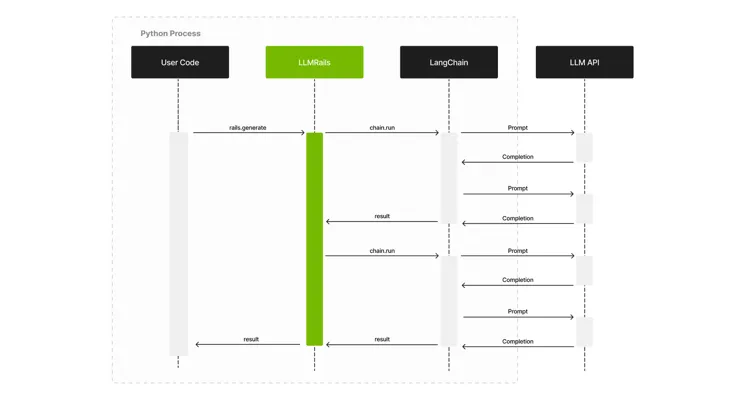
This library relies on LangChain for the interaction with LLMs. Below is a high-level sequence diagram showing the interaction between the user’s code (the one using the guardrails), the LLMRails, LangChain and the LLM API.
Server Architecture
This library provides a guardrails server with an interface similar to publicly available LLM APIs. Using the server, integrating a guardrails configuration in your application can be as easy as replacing the initial LLM API URL with the Guardrails Server API URL.
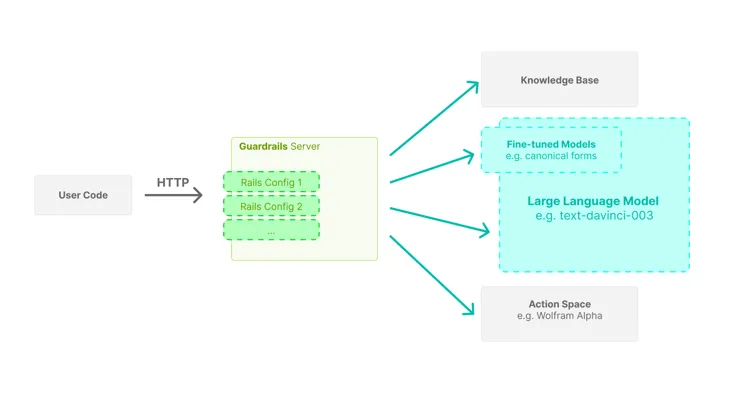
The server is designed with high concurrency in mind, hence the async implementation using the Guardrails API.