

FP8 Training in NeMo AutoModel
NeMo AutoModel supports FP8 quantization using TorchAO and torch.compile to accelerate training on compatible hardware.
FP8 (8-bit floating point) quantization can provide substantial speedups for models where the majority of GEMMs are sufficiently large. The speedup from using FP8 tensor cores must outweigh the overhead of dynamic quantization.
Requirements for FP8 Training in NeMo AutoModel
To enable FP8 training in NeMo AutoModel, the following hardware and software requirements must be met:
-
Hardware:
An NVIDIA H100 GPU or newer is required. These GPUs feature FP8 tensor cores that accelerate training. -
Software:
The TorchAO library must be installed. -
Configuration:
Bothtorch.compileandfp8must be enabled in your training configuration.
Important:torch.compileis essential for achieving meaningful speedup with TorchAO FP8 training.
Install TorchAO
Make sure you have TorchAO installed. Follow the installation guide for TorchAO.
Usage
Configure FP8
To enable FP8 quantization with torch.compile, you need both FP8 and compilation enabled in your configuration:
FP8 Config Parameters
Scaling Strategies
Tensorwise Scaling (Default)
- Single scale per tensor
- Good performance, moderate accuracy
- Recommended for most use cases
Rowwise Scaling
- Scale per row for better accuracy
- Slower than tensorwise
- Better numerical stability
For more on scaling strategies, refer to the TorchAO FP8 documentation.
Filter Modules
You can exclude specific modules from FP8 conversion using filter_fqns:
Speed and Convergence
FP8 quantization provides measurable performance improvements while maintaining model convergence:
- Speed: Over 1.2x training speedup on 8xH100 with tensorwise scaling.
- Convergence: FP8 training achieves loss parity with BF16 training.
- Memory: FP8 training achieves on par memory usage with BF16 baseline.
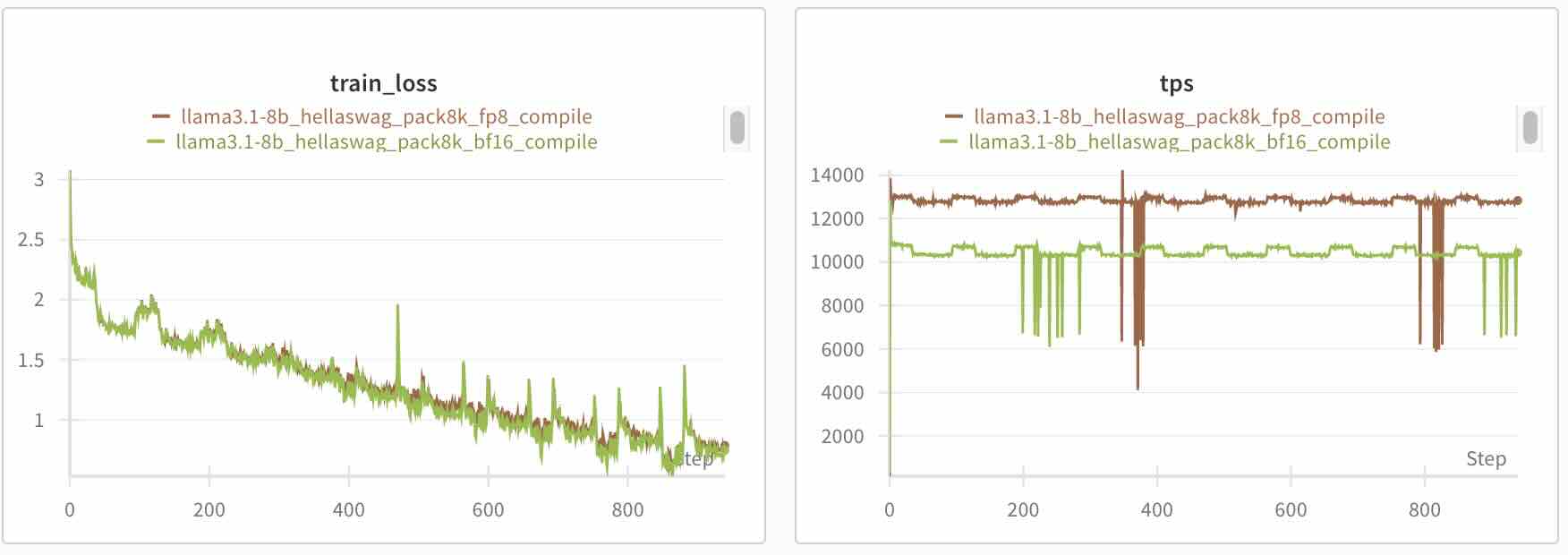
Figure: Loss curves comparing FP8 tensorwise scaling + torch.compile vs. BF16 + torch.compile training on 8xH100 with 8k sequence length, demonstrating virtually identical convergence behavior with 1.24x speedup
Ready-to-Use Recipes
We provide FP8 training configs for popular models:
- Llama: Llama 3.1 8B
- Mistral: Mistral 7B, Mistral Nemo 2407
- Qwen: Qwen 2.5 7B
- Phi: Phi 4
Check out our examples directory for more recipes and configurations.
To run any of these FP8 training recipes, use the following command:
For example, to train Llama 3.1 8B with FP8:
Performance Considerations
FP8 requires specific conditions to be effective:
- Input tensors must have dimensions divisible by 16
- Use compatible hardware (H100+)
- Train with
torch.compile
FP8 works best when the majority of GEMM operations are sufficiently large such that the speedup achieved by using FP8 tensor cores is greater than the overhead of dynamic quantization.
Ideal Conditions for FP8 Performance
- Linear layers are large and compute-intensive
- The model consists of fewer small operations and more large matrix multiplications
- You have modern (H100+) hardware optimized for FP8 acceleration
- Moderate numerical precision is acceptable and slight approximations won’t affect outcomes