Pretrain Megatron Core Datasets with NeMo AutoModel

View as Markdown

Introduction

Pretraining builds a base large language model (LLM) by training a randomly initialized model to predict the next token across massive, unlabeled datasets.

Robust pretraining establishes a foundation of linguistic competence and world knowledge that scales with data, parameters, and compute. This base model then serves as the necessary starting point for later fine-tuning or domain-specific adaptation.

NeMo AutoModel provides an end-to-end recipe to run LLM pretraining with Hugging Face–native models and Megatron Core-style datasets.

Model and Dataset Context

This guide explains how to pretrain OpenAI’s GPT2-124M model on a FineWeb-Edu subset of 10 billion tokens.

About the FineWeb-Edu Dataset

FineWeb-Edu is a dataset consisting of 1.3T tokens of educational web pages filtered from the larger FineWeb dataset. The educational web pages were filtered from the main dataset using a fine-tuned BERT-like classifier. You can find more information about the filtering process in the FineWeb-Edu blog post.

The following example shows the data format:

{
"id": "<urn:uuid:673b1bf6-2c30-40ae-992b-c387d00a836a>",
"dump": "CC-MAIN-2013-20",
"text": "No. 24; Updated March 2011
Click here to download and print a PDF version of this document.
Parents are usually the first to recognize that their child has a problem with emotions or behavior. Still, the decision to seek professional help can be difficult and painful for a parent. The first step is to gently try to talk to the child. An honest open talk about feelings can often help. Parents may choose to consult with the child's physicians, teachers, members of the clergy, or other adults who know the child well. These steps may resolve the problems for the child and family.
Following are a few signs which may indicate that a child and adolescent psychiatric evaluation will be useful ...",
"url": "https://www.aacap.org/AACAP/Families_and_Youth/Facts_for_Families/FFF-Guide/When-to-Seek-Help-for-Your-Child-024.aspx",
"date": null,
"file_path": "s3://commoncrawl/crawl-data/CC-MAIN-2013-20/segments/1368696381249/warc/CC-MAIN-20130516092621-00000-ip-10-60-113-184.ec2.internal.warc.gz",
"language": "en",
"language_score": 0.927742,
"token_count": 755,
"score": 3.375,
"int_score": 3,
}

Download the FineWeb-Edu Dataset

This guide uses the FineWeb-Edu 10BT sample, which is a collection of approximately 10 billion tokens randomly drawn from the full FineWeb-Edu dataset. To prepare the data, run the following commands:

# run this inside the AutoModel directory
git clone https://github.com/facebookresearch/lingua.git
uv venv lingua/.venv
source lingua/.venv/bin/activate
uv pip install -r lingua/requirements.txt
MEMORY_GB=16
DATA_DIR=./fineweb_edu
python lingua/setup/download_prepare_hf_data.py fineweb_edu_10bt "$MEMORY_GB" --data_dir "$DATA_DIR" --seed 42 --nchunks 1

Set MEMORY_GB to the amount of system memory allocated to terashuf (the tool used for sample shuffling), and set DATA_DIR to the root directory where the data will be stored. For example:

python lingua/setup/download_prepare_hf_data.py fineweb_edu_10bt 16 --data_dir ./fineweb_edu --seed 42 --nchunks 1

The expected directory structure is as follows:

$ tree fineweb_edu/
fineweb_edu/
├── fineweb_edu_10bt
├── datatrove
├── completions
├── 00000
├── 00001
├── 00002
├── 00003
├── 00004
├── 00005
...
└── 00063
├── executor.json
├── logs
├── task_00000.log
├── task_00001.log
├── task_00002.log
├── task_00003.log
├── task_00004.log
├── task_00005.log
...
└── task_00063.log
├── stats
├── 00000.json
├── 00001.json
├── 00002.json
├── 00003.json
├── 00004.json
├── 00005.json
...
└── 00063.json
└── stats.json
├── fineweb_edu_10bt.chunk.00000.jsonl
...
├── fineweb_edu_10bt.chunk.00013.jsonl
├── sample
└── 10BT
├── 000_00000.parquet
...
└── 013_00000.parquet
└── terashuf
├── LICENSE
├── Makefile
├── README.md
├── terashuf
└── terashuf.cc
└── fineweb_edu_10bt_shuffled
├── fineweb_edu_10bt.chunk.00.jsonl
└── fineweb_edu_10bt.val.jsonl

Preprocess to a Megatron Core Dataset

NeMo AutoModel provides a tool that tokenizes data and saves it in the Megatron Core dataset format. Use the tool as follows:

uv run tools/preprocess_megatron_dataset.py --input "fineweb_edu/fineweb_edu_10bt/fineweb_edu_10bt.chunk.*.jsonl" --json-keys text --output-prefix processed_data --output-path fineweb_edu/megatron_gpt2/ --workers 8 --pretrained-model-name-or-path openai-community/gpt2 --append-eod

The directory should look like this:

$ tree fineweb_edu/megatron_gpt2/
fineweb_edu/megatron_gpt2/
├── processed_data_0_text_document.bin
├── processed_data_0_text_document.idx
├── processed_data_10_text_document.bin
├── processed_data_10_text_document.idx
├── processed_data_11_text_document.bin
├── processed_data_11_text_document.idx
├── processed_data_12_text_document.bin
├── processed_data_12_text_document.idx
├── processed_data_13_text_document.bin
├── processed_data_13_text_document.idx
├── processed_data_1_text_document.bin
├── processed_data_1_text_document.idx
├── processed_data_2_text_document.bin
├── processed_data_2_text_document.idx
├── processed_data_3_text_document.bin
├── processed_data_3_text_document.idx
├── processed_data_4_text_document.bin
├── processed_data_4_text_document.idx
├── processed_data_5_text_document.bin
├── processed_data_5_text_document.idx
├── processed_data_6_text_document.bin
├── processed_data_6_text_document.idx
├── processed_data_7_text_document.bin
├── processed_data_7_text_document.idx
├── processed_data_8_text_document.bin
├── processed_data_8_text_document.idx
├── processed_data_9_text_document.bin
└── processed_data_9_text_document.idx
1 directory, 28 files

Set --workers to the number of CPU cores to use for parallel tokenization.

Use a Recipe for Pretraining

This example demonstrates how to pretrain an LLM by using the NeMo AutoModel library. It uses the LLM training recipe, specifically TrainFinetuneRecipeForNextTokenPrediction. This recipe orchestrates loading, dataset preparation, optimizer setup, distributed training, checkpointing, and logging.

What is a Recipe?

A recipe in NeMo AutoModel is a self-contained orchestration module that wires together all components needed to perform a specific task, such as pretraining. It is equivalent to a Trainer class but is highly modular, stateful, and reproducible.

The TrainFinetuneRecipeForNextTokenPrediction class is one such recipe. It inherits from BaseRecipe and implements:

  • setup(): Builds all training components from the config.

  • run_train_validation_loop(): Executes training and validation steps.

  • Additional responsibilities: Checkpoint handling, logging, and RNG setup.

Recipe Config Example

The following is a complete configuration based on examples/llm_pretrain/megatron_pretrain_gpt2.yaml:

# Copyright (c) 2025, NVIDIA CORPORATION. All rights reserved.
#
# Licensed under the Apache License, Version 2.0 (the "License");
# you may not use this file except in compliance with the License.
# You may obtain a copy of the License at
#
# http://www.apache.org/licenses/LICENSE-2.0
#
# Unless required by applicable law or agreed to in writing, software
# distributed under the License is distributed on an "AS IS" BASIS,
# WITHOUT WARRANTIES OR CONDITIONS OF ANY KIND, either express or implied.
# See the License for the specific language governing permissions and
# limitations under the License.
# To run this recipe, please use the following command:
# uv run automodel examples/llm_pretrain/megatron_pretrain_gpt2.yaml --nproc-per-node 8
# Adjust --nproc-per-node to the number of GPUs available on your host machine.
recipe: TrainFinetuneRecipeForNextTokenPrediction
# The model section is responsible for configuring the model we want to finetune.
# Since we want to use the GPT2-124M model, we pass `openai-community/gpt2` to the
# `pretrained_model_name_or_path` option.
model:
_target_: nemo_automodel.NeMoAutoModelForCausalLM.from_config
config:
_target_: transformers.AutoConfig.from_pretrained
pretrained_model_name_or_path: openai-community/gpt2
# As mentioned earlier, we are using the FineWeb-Edu dataset. NeMo AutoModel provides the MegatronPretraining
# class which prepares the dataset by loading, packing, and shuffling. We use the "train" split for
# training.
dataset:
_target_: nemo_automodel.components.datasets.llm.megatron_dataset.MegatronPretraining
paths: fineweb_edu/megatron_gpt2/processed_data_*_text_document* # REPLACE THIS
index_mapping_dir: fineweb_edu/megatron_gpt2/mapping_dir # REPLACE THIS
tokenizer:
_target_: nemo_automodel._transformers.auto_tokenizer.NeMoAutoTokenizer.from_pretrained
pretrained_model_name_or_path: openai-community/gpt2
seq_length: 1024
split: "0.99, 0.01, 0.00" # train, validation, test
splits_to_build: "train" # has to be one of train, validation, test
dataloader:
_target_: torchdata.stateful_dataloader.StatefulDataLoader
collate_fn: torch.utils.data.default_collate
dataloader_type: "single" # or "cyclic"
# Similarly, for validation we use the "validation" split
validation_dataset:
_target_: nemo_automodel.components.datasets.llm.megatron_dataset.MegatronPretraining
paths: fineweb_edu/megatron_gpt2/processed_data_*_text_document* # REPLACE THIS
index_mapping_dir: fineweb_edu/megatron_gpt2/mapping_dir # REPLACE THIS
tokenizer:
_target_: nemo_automodel._transformers.auto_tokenizer.NeMoAutoTokenizer.from_pretrained
pretrained_model_name_or_path: openai-community/gpt2
seq_length: 1024
split: "0.99, 0.01, 0.00" # train, validation, test
splits_to_build: "validation" # has to be one of train, validation, test
num_val_samples: 1024
step_scheduler:
global_batch_size: 512
local_batch_size: 32
ckpt_every_steps: 1000 # checkpoints state every 1000 steps
val_every_steps: 250 # validates every 250 steps
num_epochs: 1
max_steps: 18500
dist_env:
backend: nccl
timeout_minutes: 1
seed: 1111
checkpoint:
enabled: true
checkpoint_dir: checkpoints/
model_save_format: torch_save # torch_save or safetensors
save_consolidated: false # Sharded torch-save checkpoints; use the DCP-to-HF export script when HF weights are needed.
# For distributed processing, we use FSDP2.
distributed:
strategy: fsdp2
dp_size: null
dp_replicate_size: null # dp_shard_size = dp_size / dp_replicate_size when set. For DDP use strategy: ddp.
tp_size: 1
cp_size: 1
sequence_parallel: false
loss_fn:
_target_: nemo_automodel.components.loss.masked_ce.MaskedCrossEntropy
validation_dataloader:
_target_: torchdata.stateful_dataloader.StatefulDataLoader
collate_fn: torch.utils.data.default_collate
dataloader_type: "single"
# We will use the standard AdamW optimizer, but you can specify any optimizer you want, by changing
# the import path using the _target_ option.
optimizer:
_target_: torch.optim.AdamW
betas: [0.9, 0.95]
lr: 0.0006
weight_decay: 0.1
# We will use a cosine LR schedule with 700 warm-up steps.
# This means the LR will linearly increase to a maximum of 6e-4, after which
# it will decay to 0 over the course of training.
lr_scheduler:
lr_decay_style: cosine
lr_warmup_steps: 700
min_lr: 0.0
# Uncomment and configure for W&B logging
# wandb:
# project: <your_wandb_project>
# entity: <your_wandb_entity>
# name: <your_wandb_exp_name>
# dir: <your_wandb_save_dir>

To add weights to the dataset blends, pass a list. For example, paths: ["30", "fineweb_edu/megatron_gpt2/processed_data_0_text_document", "70", "fineweb_edu/megatron_gpt2/processed_data_1_text_document"].

Balance Sampling and Domain Objectives

Sampling weights control how often a domain appears in a batch. They do not need to be the same as the domain’s desired contribution to the optimization objective. Configure both values with domain_mixture:

See the complete runnable megatron_pretrain_gpt2_domain_mixture.yaml example for the full model, dataset, validation, optimizer, and scheduler setup.

dataset:
_target_: nemo_automodel.components.datasets.llm.megatron_dataset.MegatronPretraining
paths:
- "70"
- /data/web/processed_text_document
- "30"
- /data/code/processed_text_document
# Keep the tokenizer, sequence length, split, and index mapping settings
# from the complete recipe above.
domain_mixture:
domains:
# Order must match the weighted paths above.
- name: web
sampling_weight: 0.70
objective_weight: 0.50
- name: code
sampling_weight: 0.30
objective_weight: 0.50
# Add one validation dataset per domain. The suffix becomes the domain name.
validation_dataset_web:
_target_: nemo_automodel.components.datasets.llm.megatron_dataset.MegatronPretraining
paths: /data/web/processed_text_document
# Use the validation settings from the complete recipe above.
validation_dataset_code:
_target_: nemo_automodel.components.datasets.llm.megatron_dataset.MegatronPretraining
paths: /data/code/processed_text_document
# Use the validation settings from the complete recipe above.
checkpoint:
best_metric_key: weighted

For a domain with normalized sampling weight (q_i) and objective weight (w_i), the recipe multiplies each supervised token loss by (w_i / q_i). This keeps one optimizer and learning-rate schedule while making the expected training loss equal to the requested weighted domain objective. The recipe logs achieved supervised-token fractions for each domain, reports every per-domain validation loss, and reports their objective-weighted aggregate as weighted.

The sampling_weight values must match the explicit weights in the MegatronPretraining dataset’s dataset.paths, and domain order must match the blend order. Domain names are positional labels and are not inferred from path text. JSON blend files and implicit unweighted blends are not supported. Sequence packing is not supported with domain_mixture because packed batches do not currently preserve per-token domain IDs. Pipeline parallelism is also not currently supported because its target contract does not carry per-token objective weights. Context parallelism is disabled until its distributed gradient contract is covered by parity tests. The configured loss must use reduction: sum. The built-in masked, fused-linear, and chunked cross-entropy losses accept these objective weights.

TEParallelCrossEntropy is not supported: its Triton backward reads the upstream gradient as a single scalar, so per-token weights would apply the first sample’s multiplier to the whole microbatch — the reported loss would look correct while the gradients were wrong. The recipe rejects that loss at setup rather than weighting it incorrectly.

Only the cross-entropy term is domain-weighted. A MoE auxiliary/router loss is scaled independently of loss magnitude, so its strength relative to the weighted CE varies with each microbatch’s domain composition; an aux_loss_coeff tuned without domain_mixture may need revisiting.

The logged domain_mixture/<name>_label_tokens counts exclude labels equal to -100. Datasets that mark padding through a separate loss_mask rather than by writing ignore_index into labels (Megatron’s GPT dataset does this) therefore report one supervised token per position, so the logged fraction equals the raw sample fraction.

Load Large Models

In distributed training, the typical model-loading pipeline has each GPU load the entire model and then retain only the shard it needs. This approach becomes problematic when the model size exceeds the memory capacity of a single GPU. For example, a 70B-parameter model requires about 140 GB of memory for its parameters when using the BF16 data type (2 bytes per parameter). Because most widely used GPUs are limited to 80 GB, the full model cannot be loaded directly onto a single device.

In these scenarios, you can pass is_meta_device: true in the model config. The model is then instantiated using PyTorch’s Meta device, which loads no data but stores the parameter metadata necessary for sharding the model. After the model is sharded, only the weights required by each model shard are loaded.

Run the Pretraining Recipe

If you saved or plan to use the provided configuration at examples/llm_pretrain/megatron_pretrain_gpt2.yaml, run the following command:

uv run automodel examples/llm_pretrain/megatron_pretrain_gpt2.yaml --nproc-per-node 2

Sample Output

During training, stepwise logs report loss, memory usage, and tokens per second. The recipe saves checkpoints under the configured checkpoints/ directory.

For each training batch, the pretraining recipe logs the current loss, along with current peak memory usage and tokens per second (TPS).

As training progresses, you should observe the model loss beginning to converge. To verify your results, compare your convergence curves with the baseline benchmarks in the llm.c repository.
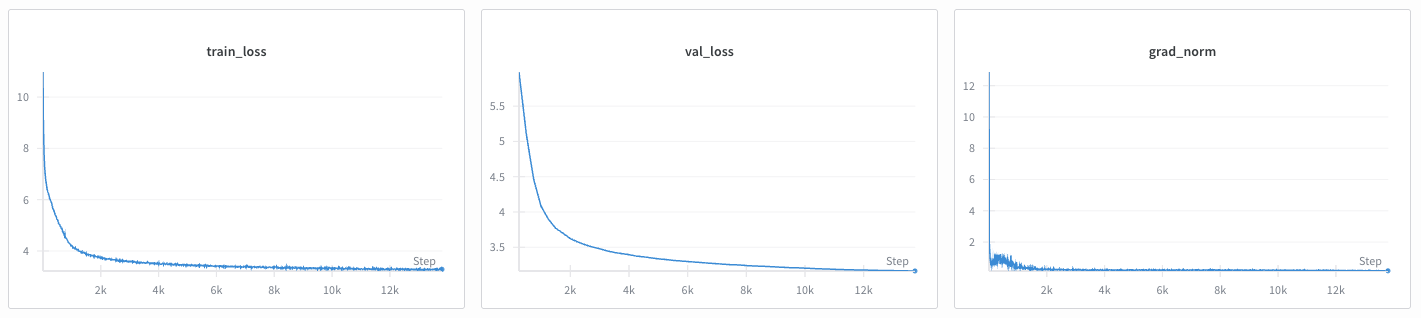
Example of GPT-2 training convergence on FineWeb-Edu-10B
Example of GPT-2 training convergence on FineWeb-Edu-10B.