Fine-Tune MiniMax-M3
Fine-Tune MiniMax-M3
Introduction
MiniMaxAI/MiniMax-M3 is MiniMaxAI’s 428B A22B Mixture-of-Experts first vision-language model combining long-context reasoning, agentic workflows, and creative capabilities in a single platform. The multimodal MoE model evolved from MiniMax M2 along three axes — width, attention, and visual grounding.
MiniMax-M3 enables advanced use cases such as long-form video understanding, extended coding tasks (8+ hours), and high-quality design workflows.
To set up your environment to fine-tune this model with NeMo AutoModel, follow the installation guide.
Model Overview
Architecture
- Model type: 428B total / 22B active MoE vision-language model.
- Language module: MiniMax-M2.7 backbone with 60 layers (3 dense + 57 MoE), 64 attention heads, 128 experts, block-sparse DSA attention on the MoE layers and a 512k context length.
- Vision module: CLIP-style ViT with 32 layers and dynamic resolution image input from 336×336 up to 2016×2016
- Precision targets: BF16 and MXFP8
- Hardware target: trained on Hopper GPUs.
Data
Multimodal Supervised Fine-Tuning Data
Use image/video instruction data that matches the target agent workflow. Good candidates include:
- frontend mockup-to-project examples,
- screenshot-debugging conversations,
- structured data-processing tasks with visual context,
- image/video question-answer pairs for bounded task execution.
For a full walkthrough of how multimodal datasets are preprocessed and integrated into NeMo AutoModel, including chat-template conversion and collate functions, see the Multi-Modal Dataset Guide.
Launch Training
NeMo AutoModel supports several ways to launch training: the AutoModel CLI with Slurm, interactive sessions, torchrun, and more. For full details on Slurm batch jobs, multi-node configuration, and environment variables, see the Run on a Cluster guide.
Standalone Slurm Skeleton
Before running, make sure your cluster environment is configured following the Run on a Cluster guide.
Use the checked-in full SFT recipe or LoRA recipe.
Before you start:
- Clone or mirror the model checkpoint locally before launching a multi-node run.
- Ensure
HF_HOMEpoints to a shared cache visible from all nodes. - Cache the dataset locally if running with
HF_DATASETS_OFFLINE=1. - Configure the
wandbsection in the recipe to record loss, throughput, and memory curves.
Training Results
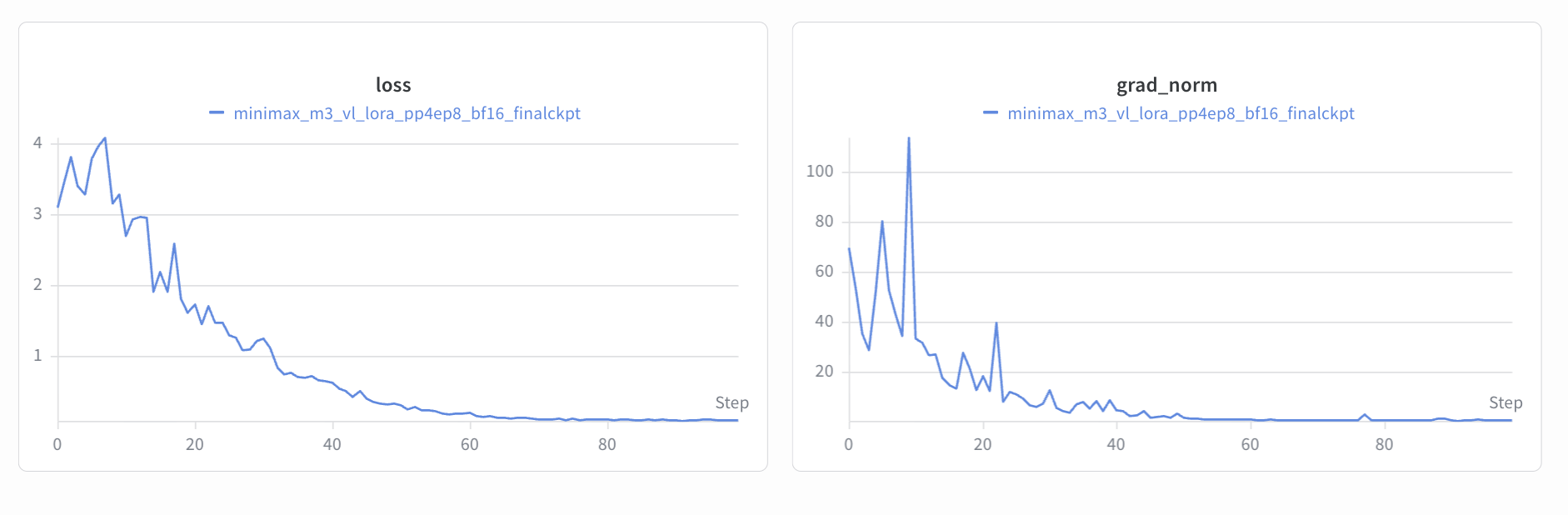
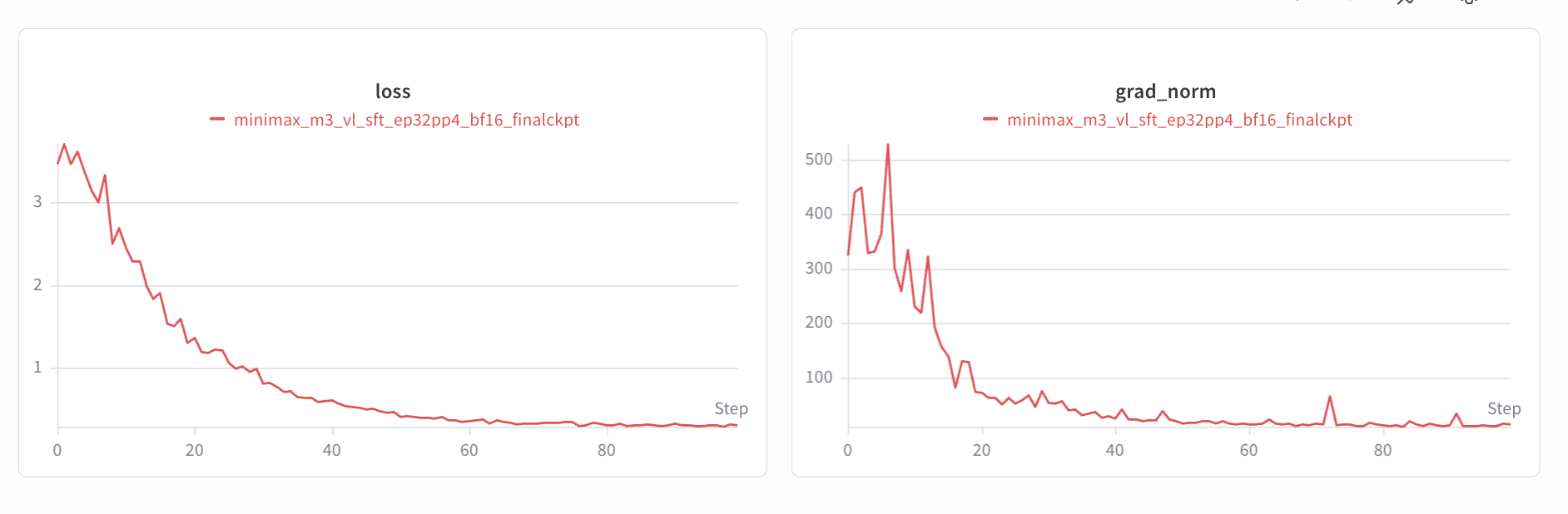
The SFT and LoRA fine-tuning loss curves are shown below.
SFT
LoRA