

Create an Application
In this section, we’ll address:
- How to define an Application class.
- How to configure an Application.
- How to define different types of workflows.
- How to build and run your application.
This section covers basics of applications running as a single fragment. For multi-fragment applications, refer to the distributed application documentation.
Defining an Application Class
The following code snippet shows an example Application code skeleton:
C++
Python
- We define the
Appclass that inherits from the Application (holoscan::Application) base class. - We create an instance of the
Appclass inmain()using the make_application() (holoscan::make_application) function. - The run() (
holoscan::Fragment::run) method starts the application which will execute its compose() (holoscan::Fragment::compose) method where the custom workflow will be defined.
This is also illustrated in the hello_world example.
It is also possible to instead launch the application asynchronously (i.e., non-blocking for the thread launching the application), as shown below:
C++
Python
This can be done simply by replacing the call to run() (holoscan::Fragment::run) with run_async() (holoscan::Fragment::run_async) which returns a std::future. Calling future.get() will block until the application has finished running and throw an exception if a runtime error occurred during execution.
This is also illustrated in the ping_simple_run_async example.
Configuring an Application
An application can be configured at different levels:
- providing the GXF extensions that need to be loaded (when using GXF operators).
- configuring parameters for your application, including for: a. the operators in the workflow. b. the scheduler of your application.
The sections below will describe how to configure each of them, starting with a native support for YAML-based configuration for convenience.
YAML configuration support
Holoscan supports loading arbitrary parameters from a YAML configuration file at runtime, making it convenient to configure each item listed above, or other custom parameters you wish to add on top of the existing API. For C++ applications, it also provides the ability to change the behavior of your application without needing to recompile it.
Usage of the YAML utility is optional. Configurations can be hardcoded in your program, or done using any parser that you choose.
Here is an example YAML configuration:
Ingesting these parameters can be done using the two methods below:
C++
Python
- The
holoscan::Fragment::configmethod takes the path to the YAML configuration file. If the input path is relative, it will be relative to the current working directory. An exception will be thrown if the file does not exist. - The
holoscan::Fragment::from_configmethod returns anholoscan::ArgListobject for a given key in the YAML file. It holds a list ofholoscan::Argobjects, each of which holds a name (key) and a value. - If the
ArgListobject has only oneArg(when the key is pointing to a scalar item), it can be converted to the desired type using theholoscan::ArgList::asmethod by passing the type as an argument. - The key can be a dot-separated string to access nested fields.
- The
holoscan::Fragment::config_keysmethod returns an unordered set of the key names accessible viaholoscan::Fragment::from_config.
This is also illustrated in the video_replayer example.
With both from_config and kwargs, the returned ArgList/dictionary will include both the key and its associated item if that item value is a scalar. If the item is a map/dictionary itself, the input key is dropped, and the output will only hold the key/values from that item.
Loading GXF extensions
If you use operators that depend on GXF extensions for their implementations (known as GXF operators), the shared libraries (.so) of these extensions need to be dynamically loaded as plugins at runtime.
The SDK already automatically handles loading the required extensions for the built-in operators in both C++ and Python, as well as common extensions (listed here). To load additional extensions for your own operators, you can use one of the following approach:
YAML
C++
Python
To be discoverable, paths to these shared libraries need to either be absolute, relative to your working directory, installed in the lib/gxf_extensions folder of the holoscan package, or listed under the HOLOSCAN_LIB_PATH or LD_LIBRARY_PATH environment variables.
Please see other examples in the system tests in the Holoscan SDK repository.
Configuring operators
Operators are defined in the compose() method of your application. They are not instantiated
(with the initialize method) until an application’s run() method is called.
Operators have three type of fields which can be configured: parameters, conditions, and resources.
Configuring operator parameters
Operators could have parameters defined in their setup method to better control their behavior (see details when creating your own operators). The snippet below would be the implementation of this method for a minimal operator named MyOp, that takes a string and a boolean as parameters; we’ll ignore any extra details for the sake of this example:
C++
Python
Given an instance of an operator class, you can print a human-readable description of its specification to inspect the parameter fields that can be configured on that operator class:
C++
Python
Given this YAML configuration:
We can configure an instance of the MyOp operator in the application’s compose method like this:
C++
Python
This is also illustrated in the ping_custom_op example.
If multiple ArgList are provided with duplicate keys, the latest one overrides them:
C++
Python
Configuring operator conditions
By default, operators with no input ports will continuously run, while operators with input ports will run as long as they receive inputs (as they’re configured with the MessageAvailableCondition).
To change that behavior, one or more other conditions’ classes can be passed to the constructor of an operator to define when it should execute.
For example, we set three conditions on this operator my_op:
C++
Python
This is also illustrated in the conditions examples.
You’ll need to specify a unique name for the conditions if there are multiple conditions applied to an operator.
Configuring operator resources
Some resources can be passed to the operator’s constructor, typically an allocator passed as a regular parameter.
For example:
C++
Python
Native resource creation
The resources bundled with the SDK are wrapping an underlying GXF component. However, it is also possible to define a “native” resource without any need to create and wrap an underlying GXF component. Such a resource can also be passed conditionally to an operator in the same way as the resources created in the previous section.
For example:
C++
Python
To create a native resource, implement a class that inherits from Resource (holoscan::Resource)
The setup method can be used to define any parameters needed by the resource.
This resource can be used with a C++ operator, just like any other resource. For example, an operator could have a parameter holding a shared pointer to MyNativeResource as below.
The compute method above demonstrates how the templated resource method can be used to retrieve a resource.
and the resource could be created and passed via a named argument in the usual way
As with GXF-based resources, it is also possible to pass a native resource as a positional argument to the operator constructor.
For a concreate example of native resource use in a real application, see the volume_rendering_xr application on Holohub. This application uses a native XrSession resource type which corresponds to a single OpenXR session. This single “session” resource can then be shared by both the XrBeginFrameOp and XrEndFrameOp operators.
There is a minimal example of native resource use in the examples folder.
Configuring the scheduler
The scheduler controls how the application schedules the execution of the operators that make up its workflow.
The default scheduler is a single-threaded GreedyScheduler. An application can be configured to use a different scheduler Scheduler (C++ (holoscan::Scheduler)/Python (holoscan.core.Scheduler)) or change the parameters from the default scheduler, using the scheduler() function (C++ (holoscan::Fragment::scheduler)/Python (holoscan.core.Fragment.scheduler)).
This page documents the scheduler-related APIs (signatures, parameters, minimal snippets). For guidance on which scheduler to choose, end-to-end tuning recipes, and common pitfalls, see Choosing a Scheduler, Scheduler Recipe Multi Branch Low Latency, and Scheduler Pitfalls.
For applications that need to run multiple operators in parallel, use the EventBasedScheduler (recommended). The MultiThreadScheduler is retained as a legacy polling-based alternative and is not recommended for new code. The EventBasedScheduler waits for an event indicating that an operator is ready to execute (lower CPU overhead than polling) and offers options for running time-critical operators under real-time scheduling policies supported by the Linux kernel (see Real-time scheduling with thread pools).
The code snippet below shows how to set and configure a non-default scheduler:
C++
Python
- We create an instance of a holoscan::Scheduler derived class by using the
holoscan::Fragment::make_schedulerfunction. Like operators, parameters can come from explicitholoscan::Args orholoscan::ArgList, or from a YAML configuration. - The
holoscan::Fragment::schedulermethod assigns the scheduler to be used by the application.
Note that an explicit static cast to the int64_t type of the underlying Parameter<int64_t> worker_thread_number_ is shown here for “worker_thread_number”. As of Holoscan v3.9, this explicit static cast is no longer required and any integer type would be automatically cast to the required parameter type (as long as the value is within the representable range).
The EventBasedScheduler also supports a pin_cores parameter that restricts the default thread pool threads to specific CPU cores:
This is also illustrated in the multithread example.
The pin_cores parameter for CPU core affinity is only supported with EventBasedScheduler. The legacy MultiThreadScheduler does not support core pinning for either the default or user-defined thread pools. The ways to set CPU affinity are as follows:
- For the default thread pool (size determined by
worker_thread_number): Use the scheduler’spin_coresparameter. - For user-defined thread pools: Use the
pin_coresparameter viaThreadPool’sadd()oradd_realtime()method.
See Configuring worker thread pools below for details.
The EventBasedScheduler also has a separate dispatcher thread in addition to its worker threads. That dispatcher thread can be pinned to a single CPU core by setting GXF_EBS_DISPATCHER_CPU_CORE=<core-id> before launching the application. This setting is separate from the pin_cores parameter and only affects the dispatcher thread.
You can optionally combine dispatcher CPU affinity with Linux real-time scheduling by setting:
GXF_EBS_DISPATCHER_SCHED_POLICYtoSCHED_FIFOorSCHED_RRGXF_EBS_DISPATCHER_SCHED_PRIORITYto a valid priority for the selected policy
For example:
For guidance on choosing dispatcher vs. worker priorities (e.g. dispatcher=99, worker=80) and a worked multi-branch example, see Scheduler Recipe Multi Branch Low Latency.
Configuring worker thread pools
The EventBasedScheduler (and the legacy MultiThreadScheduler) discussed in the previous section automatically creates an internal default thread pool with a number of worker threads determined by the worker_thread_number parameter. In some scenarios, it may be desirable for users to assign operators to specific user-defined thread pools.
Understanding default and user-defined thread pools
The scheduler’s worker_thread_number parameter creates a default thread pool with that many worker threads. Any operators not explicitly assigned to a user-defined thread pool will use this default pool. When you create user-defined thread pools via make_thread_pool(), these create additional worker threads beyond those in the default pool.
For example:
- Scheduler configured with
worker_thread_number=4→ 4 default threads - User creates
make_thread_pool("pool1", 2)→ 2 additional threads - User creates
make_thread_pool("pool2", 3)→ 3 additional threads - Total threads: 4 (default) + 2 (pool1) + 3 (pool2) = 9 worker threads
Operators assigned to user-defined thread pools execute on those pools’ threads. Operators not assigned to any user-defined thread pool execute on the default pool’s threads.
Creating and using thread pools
Assume I have three operators, op1, op2 and op3, that I want to assign to a thread pool. I would also like to pin op2 and op3 to specific threads within the pool. The example below shows the code for configuring thread pools to achieve this from the Fragment compose method.
C++
Python
We create thread pools via calls to the holoscan::Fragment::make_thread_pool method. The first argument is a user-defined name for the thread pool while the second is the number of threads initially in the thread pool. This make_thread_pool method returns a shared pointer to a holoscan::ThreadPool object. The holoscan::ThreadPool::add method of that object can then be used to add a single operator or a vector of operators to the thread pool.
The add method has the following parameters:
pin_operator(bool): Whether the operator should be pinned to always run on a specific thread within the thread poolpin_cores(optional vector of uint32_t): CPU core IDs to restrict the thread’s execution. If omitted or empty, the thread can migrate between any CPU cores
The add method also accepts an optional third parameter, pin_cores, to specify CPU core affinity:
Note that this example demonstrates a 1:1 mapping where each operator has its own dedicated thread with exclusive CPU core affinity, rather than a shared pool of cores across multiple operators.
This provides both entity-to-thread pinning (operator always runs on the same thread) and CPU core affinity (thread is restricted to specific CPU cores). If pin_cores is omitted or empty, the thread can migrate between any CPU cores as determined by the OS scheduler.
CPU core pinning for user-defined thread pools (via pin_cores parameter in add() or add_realtime()) is only supported when using EventBasedScheduler. The legacy MultiThreadScheduler ignores this parameter.
It is not necessary to define user-defined thread pools for Holoscan applications. The scheduler automatically creates a default thread pool with worker_thread_number threads (as specified when configuring the scheduler). Any operators not explicitly assigned to a user-defined thread pool will use this default pool. User-defined thread pools provide explicit control over thread pinning and CPU affinity for specific operators.
One case where separate thread pools must be used is in order to support pinning of operators involving separate GPU devices. Only a single GPU device should be used from any given thread pool. Operators associated with a GPU device resource are those using one of the CUDA-based allocators like
BlockMemoryPool, CudaStreamPool, RMMAllocator or StreamOrderedAllocator.
A concrete example of a simple application with two pairs of operators in separate thread pools is given in the thread pool resource example.
Note that any given operator can only belong to a single thread pool. Assigning the same operator to multiple thread pools may result in errors being logged at application startup time.
There is also a related boolean parameter, strict_thread_pinning that can be passed as a holoscan::Arg to the legacy MultiThreadScheduler constructor (MultiThreadScheduler-only; legacy). When this argument is set to false and an operator is pinned to a specific thread, it is allowed for other operators to also run on that same thread whenever the pinned operator is not ready to execute. When strict_thread_pinning is true, the thread can ONLY be used by the operator that was pinned to the thread. The EventBasedScheduler always pins strictly and exposes no such parameter.
If a thread pool is configured by the single-thread GreedyScheduler is used a warning will be logged indicating that the user-defined thread pools would be ignored. Only EventBasedScheduler (and the legacy MultiThreadScheduler) can make use of the thread pools.
Linux real-time scheduling with thread pools
The EventBasedScheduler offers additional features to pin an operator to a dedicated worker thread scheduled by real-time scheduling policies supported in the Linux kernel. The configuration can be done by using the add_realtime() method (in contrast to the add() method) in ThreadPool to assign an operator with a real-time scheduling policy along with the parameters required for the selected scheduling policy.
The add_realtime() method includes the same pin_cores parameter as the regular add() method, allowing you to restrict the dedicated thread to specific CPU cores in addition to configuring real-time scheduling policies.
The supported real-time scheduling policies are:
- SCHED_FIFO (
SchedulingPolicy::kFirstInFirstOut): First-in-first-out scheduling policy that provides priority execution. Operators with this policy will run until completion or until preempted by a higher priority Linux process or thread. Operators with the same priority underSCHED_FIFOare scheduled in a first-in-first-out fashion. - SCHED_RR (
SchedulingPolicy::kRoundRobin): Round-robin scheduling policy that provides execution with CPU time sharing for operators with the same priority level in a round-robin fashion. - SCHED_DEADLINE (
SchedulingPolicy::kDeadline): Earliest Deadline First scheduling policy that ensures operators meet their specified deadlines. This policy requires setting runtime, deadline, and period parameters.
For more detailed information about Linux kernel schedulers, refer to the Ubuntu Real-time documentation.
-
SCHED_DEADLINE Behavior: Since SCHED_DEADLINE inherently enforces periodic execution, adding a
PeriodicConditionto these operators is unnecessary. -
Operator Conditions Still Apply: Real-time scheduling policies work alongside existing operator conditions. While real-time policies reduce overall scheduling latency, the actual operator execution start timing may still be constrained by conditions defined in the application’s graph structure.
-
Understanding the Scope: The Holoscan SDK integrates with Linux kernel real-time scheduling policies but cannot guarantee real-time performance across your entire application. This feature offers a way to reduce scheduling overhead for specific time-sensitive operators, but the overall system behavior depends on your application design and the underlying Linux kernel configuration.
Using real-time scheduling policies requires appropriate Linux kernel configuration and may require running sudo sysctl -w kernel.sched_rt_runtime_us=-1 beforehand to disable the real-time runtime limit.
Container Requirements:
- SCHED_DEADLINE: Requires root privileges and
--cap-add=CAP_SYS_NICEwhen running in a container - SCHED_FIFO/SCHED_RR: May require
--ulimit rtprio=99when running in a container (can replace 99 with the highest value actually used for thesched_priorityargument toadd_realtime())
See Rt Scheduling Prerequisites for the full host-and-container setup checklist, including host CPU isolation.
Here’s an example of configuring operators to run with real-time policies:
C++
Python
Application Workflows
Operators are initialized according to the topological order of its fragment-graph. When an application runs, the operators are executed in the same topological order. Topological ordering of the graph ensures that all the data dependencies of an operator are satisfied before its instantiation and execution. Currently, we do not support specifying a different and explicit instantiation and execution order of the operators.
One-operator Workflow
The simplest form of a workflow would be a single operator.
The graph above shows an Operator (C++ (holoscan::Operator)/Python (holoscan.core.Operator)) (named MyOp) that has neither inputs nor output ports.
- Such an operator may accept input data from the outside (e.g., from a file) and produce output data (e.g., to a file) so that it acts as both the source and the sink operator.
- Arguments to the operator (e.g., input/output file paths) can be passed as parameters as described in the section above.
We can add an operator to the workflow by calling add_operator (C++ (holoscan::Fragment::add_operator)/Python (holoscan.core.Fragment.add_operator)) method in the compose() method.
The following code shows how to define a one-operator workflow in compose() method of the App class (assuming that the operator class MyOp is declared/defined in the same file).
C++
Python
Linear Workflow
Here is an example workflow where the operators are connected linearly:
In this example, SourceOp produces a message and passes it to ProcessOp. ProcessOp produces another message and passes it to SinkOp.
We can connect two operators by calling the add_flow() method (C++ (holoscan::Fragment::add_flow)/Python (holoscan.core.Fragment.add_flow)) in the compose() method.
The add_flow() method (C++ (holoscan::Fragment::add_flow)/Python (holoscan.core.Fragment.add_flow)) takes the source operator, the destination operator, and the optional port name pairs.
The port name pair is used to connect the output port of the source operator to the input port of the destination operator.
The first element of the pair is the output port name of the upstream operator and the second element is the input port name of the downstream operator.
An empty port name ("") can be used for specifying a port name if the operator has only one input/output port.
If there is only one output port in the upstream operator and only one input port in the downstream operator, the port pairs can be omitted.
The following code shows how to define a linear workflow in the compose() method of the App class (assuming that the operator classes SourceOp, ProcessOp, and SinkOp are declared/defined in the same file).
C++
Python
Complex Workflow (Multiple Inputs and Outputs)
You can design a complex workflow like below where some operators have multi-inputs and/or multi-outputs:
C++
Python
If there is a cycle in the graph with no implicit root operator, the root
operator is either the first operator in the first call to add_flow method (C++ (holoscan::Fragment::add_flow)/Python (holoscan.core.Fragment.add_flow)), or the
operator in the first
call to add_operator method (C++ (holoscan::Fragment::add_operator)/Python (holoscan.core.Fragment.add_operator)).
C++
If there is a cycle in the graph with an implicit root operator which has no input port, then the initialization and execution orders of the operators are still topologically sorted as far as possible until the cycle needs to be explicitly broken. An example is given below:
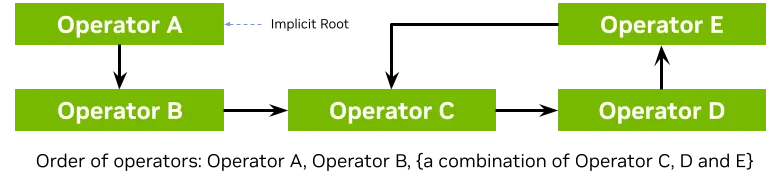
Creating and Using Subgraphs
A Subgraph (C++ (holoscan::Subgraph)/Python (holoscan.core.Subgraph)) encapsulates a group of related operators and their connections behind a clean interface, enabling modular application design and code reuse.
Features of Subgraphs
Subgraphs enable:
- Reusable components: Create a subgraph once and instantiate it multiple times within an application
- Encapsulation: Hide internal complexity behind well-defined interface ports
- Modular design: Organize complex applications into logical, maintainable components
- Hierarchical composition: Nest subgraphs within other subgraphs for multi-level decomposition
- Flexible connections: Connect subgraphs to other subgraphs or operators using the same
add_flowAPI
Creating a Subgraph
A Subgraph is created by inheriting from the Subgraph base class and implementing the compose() method. Within compose(), you create operators, define flows between them, and expose interface ports that external components can connect to.
The APIs used to add operators, conditions and resources to a subgraph look the same as the ones for adding them to a Fragment or Application. A unique aspect of Subgraph creation as compared to defining a Fragment/Application is the definition of “interface ports” (described further below).
C++
Python
Key points:
- The constructor takes a
Fragment*andnamewhich are passed to the base class - Operators created with
make_operatorare automatically qualified with the subgraph name. Specifically, the operator added to the fragment via a subgraph will have a name that is the subgraphnamefollowed by an underscore and then the operator name provided withinSubgraph::compose. add_flowdefines internal connections between operators (and/or nested subgraphs)add_interface_port,add_output_interface_port, andadd_input_interface_portexpose ports for external connections
Subgraphs are a convenience for graph composition but do not affect operator scheduling. At runtime, an application using subgraphs will behave exactly the same as one composed without them. Any add_operator and add_flow calls within a subgraph directly add nodes (with qualified names) and edges to the operator graph maintained by the Fragment passed to the subgraph constructor. It is this final, flattened fragment that the application runs.
Interface Ports
Interface ports define the external API of a subgraph. They map external port names to internal operator ports, allowing external components to connect to the subgraph without knowing its internal structure.
There are three methods for adding interface ports:
add_interface_port: General method that auto-detects port direction. If the internal port name uniquely identifies an input or output, the direction is inferred automatically. You can also explicitly specify the direction via theis_inputparameter if needed.add_input_interface_port: Convenience method for input ports (data flows into the subgraph)add_output_interface_port: Convenience method for output ports (data flows out of the subgraph)
In most cases, add_interface_port with auto-detection is sufficient since port names are typically unique to either inputs or outputs. Use the explicit convenience methods when you need to be certain about direction or when the port name exists as both input and output on the operator.
C++
Python
Interface ports support both single-receiver and multi-receiver patterns, depending on the underlying operator’s port configuration. Because interface ports map to an existing operator port, the conditions or other properties defined for the operator port automatically apply to the interface port.
It is not supported to define an input interface port with the same name as an output interface port. This differs from Operators, where such naming is currently allowed but not recommended, as it can lead to ambiguous logging when port names are not unique.
Instantiating and Connecting Subgraphs
Once defined, subgraphs are instantiated from a Fragment or Application using make_subgraph (C++) or the Subgraph constructor (Python) and connected like regular operators using add_flow. For cases where the concrete subgraph type is determined at runtime (e.g., via a factory), add_subgraph can be used instead—see Factory Pattern with add_subgraph below.
C++
Python
The Fragment::make_subgraph (holoscan::Fragment::make_subgraph) and Subgraph::make_subgraph (holoscan::Subgraph::make_subgraph) methods create and then automatically call compose() on the newly created subgraph. The application author will not need to call compose manually.
Qualified Naming
When a subgraph is instantiated, all operators within it are automatically assigned qualified names by prepending the instance name. This ensures uniqueness when the same subgraph class is used multiple times.
For example, if PingTxSubgraph contains a "transmitter" operator:
- Instance
"tx1"creates operator"tx1_transmitter" - Instance
"tx2"creates operator"tx2_transmitter"
This naming scheme extends to nested subgraphs, creating hierarchical names like "parent_child_operator".
Note that it is the qualified name that will show up in tools such as NSight Systems traces, data flow tracking output, GXF JobStatistics reports, and DataLogger topic names. This ensures that it is possible to uniquely distinguish which instance of an operator any given log message or measurement corresponds to.
For the Python API, it is important while in Subgraph.compose(), to pass self and not self.fragment as the first argument to any operator constructors. The later would bypass the qualified naming logic and may lead to composition errors due to duplicate node names if there is more than one instance of the subgraph.
Mixed Connections
Subgraphs can be connected to both other subgraphs and regular operators interchangeably. As for operator-to-operator connections, in cases where there is only a single port or interface port on the operator/subgraph on either end of a connection, the port name mapping can be omitted.
C++
Python
Nested Subgraphs
Subgraphs can contain other subgraphs, enabling hierarchical composition. Nested subgraphs are created using make_subgraph within a parent subgraph’s compose() method. Interface ports from nested subgraphs can be exposed as the parent subgraph’s interface ports.
C++
Python
Multi-Receiver Pattern
Subgraphs support the multi-receiver pattern when the underlying operator port is configured with IOSpec::kAnySize (C++) or IOSpec.ANY_SIZE (Python). This allows multiple sources to connect to a single input interface port of the subgraph.
C++
Python
Complete working examples demonstrating subgraph functionality are available in the subgraph examples directory, including the ping_multi_receiver example that showcases reusable subgraphs, interface ports, qualified naming, and multi-receiver patterns.
Subgraph Configuration
Subgraphs can have their own configuration files, separate from the main application configuration. This enables self-contained, reusable subgraphs that carry their own default settings.
C++
Python
Subgraph configuration files support the same YAML format as application configuration, but GXF extension loading is not supported from subgraph configs—extensions should be loaded from the main application configuration only.
Broadcast to Multiple Internal Operators
Input interface ports can broadcast incoming data to multiple internal operators. This is useful when the same input data needs to be processed by different operators within the subgraph. Unlike the multi-receiver pattern (which allows multiple external sources to connect to one port), broadcast sends data from one external source to multiple internal destinations.
C++
Python
When data flows into the "data_in" interface port, it is delivered to all three processor operators.
Subgraphs Without Interface Ports
Some subgraphs may not need external connections—they are self-contained pipelines. These subgraphs can be created normally; since make_subgraph (C++) and the Subgraph constructor (Python) compose the subgraph immediately and take ownership, no add_flow call is needed.
C++
Python
Factory Pattern with add_subgraph
When the concrete subgraph type is determined at runtime (e.g., via a factory method), use add_subgraph instead of the templated make_subgraph. The add_subgraph method takes ownership of the subgraph, registers its name for duplicate detection, and composes it if not already composed.
C++
Python
Within a nested subgraph’s compose(), add_subgraph also handles name qualification automatically. The factory should construct the subgraph with an unqualified name, and add_subgraph will qualify it with the parent’s prefix:
In C++, add_subgraph within a subgraph’s compose() expects the subgraph to not yet be composed—it will qualify the name and call compose() automatically. In Python, subgraphs are composed during construction, so add_subgraph accepts already-composed subgraphs and validates that the name is properly qualified.
Accessing Subgraph Operators
The operators() method returns all operators within a subgraph, including those in nested subgraphs. This is useful for inspection, debugging, or programmatic access to operators after composition.
C++
Python
Listing Subgraphs
Fragment::subgraphs() (C++) / Fragment.subgraphs (Python) returns the top-level subgraphs owned by the fragment. Each subgraph in turn exposes Subgraph::nested_subgraphs() / Subgraph.nested_subgraphs for its direct children. Together these allow walking the subgraph hierarchy—for example, to build a collapsible view in a graph visualization tool.
C++
Python
Additional Convenience Methods
Subgraphs expose add_data_logger and register_service methods as shortcuts that delegate to the parent fragment. These methods are equivalent to calling fragment()->add_data_logger() (C++) or self.fragment.add_data_logger() (Python) directly. The registered loggers and services apply to the fragment as a whole, not just the subgraph.
C++
Python
See the Data Logging section for details on configuring data loggers. For service registration, see Fragment::register_service (holoscan::Fragment::register_service) (C++) or Fragment.register_service (holoscan.core.Fragment.register_service) (Python).
Dynamic Flow Control for Complex Workflows
As of Holoscan v3.0, the dynamic flow control feature is available, enabling operators to modify their connections with other operators at runtime. This allows for the creation of complex workflows with conditional branching, loops, and dynamic routing patterns.
Key features include:
- Implicit input/output execution ports for execution dependency control
- The Start operator concept (
start_op()(C++ (holoscan::Fragment::start_op)/Python (holoscan.core.Fragment.start_op))) for managing workflow entry points - Dynamic flow modification using
set_dynamic_flows()(C++ (holoscan::Fragment::set_dynamic_flows)/Python (holoscan.core.Application.set_dynamic_flows)) andadd_dynamic_flow()(C++ (holoscan::Operator::add_dynamic_flow)/Python (holoscan.core.Operator.add_dynamic_flow)) methods - Flow information management via the
FlowInfo(C++ (holoscan::Operator::FlowInfo)/Python (holoscan.core.FlowInfo)) class
For details, please refer to the Dynamic Flow Control section of the user guide.
Application Execution Control APIs
Holoscan provides APIs for controlling the execution of operators at the application or fragment level.
stop_execution
The stop_execution() (C++ (holoscan::Fragment::stop_execution)/Python (holoscan.core.Fragment.stop_execution)) method allows an application to stop the execution of a specific operator or the entire application:
C++
Python
When called with an operator name, this method stops the execution of the specified operator. When called with an empty string (the default), it stops all operators in the fragment, effectively shutting down the application.
Example usage to stop a specific operator:
Example usage to stop the entire application:
Example usage to access stop_execution() method from within an operator:
For a complete example of how to use these methods to implement advanced monitoring behavior, see the operator_status_tracking example, which demonstrates:
- A source operator that runs for a limited number of iterations
- A monitor operator that independently tracks the status of other operators
- Automatic application shutdown when all processing operators have completed
Fragment Services
The Fragment Service feature is marked as experimental. The API may change in future releases.
Fragment services provide a mechanism to share resources and functionality across operators within a fragment or application. They are useful for managing shared state, configuration, or services that multiple operators need to access.
Registering a Service
Services are registered with the fragment in the compose() method using register_service:
C++
Python
Retrieving a Service
Operators can retrieve registered services using the service() method:
C++
Python
Best Practices for Cross-Language Service Lookup
When implementing custom fragment services that will be used in applications with both C++ and Python operators, implement the service in C++ and provide Python bindings.
Why? When a fragment service is implemented purely in Python (by subclassing DefaultFragmentService or Resource), the service type information is not preserved during registration. This causes service<MyService>() lookups from C++ operators to fail because the C++ runtime cannot find the service by its expected type.
Recommended approach: Implement your service class in C++ and expose it to Python via pybind11 bindings:
C++ Service Implementation
Python Binding
Multiple Inheritance: If your service class uses multiple inheritance (e.g., inherits from both Resource and DistributedAppService), you must add py::multiple_inheritance() to the binding:
Without this flag, pybind11 cannot properly handle runtime casts to non-primary base classes. This can cause silent failures where a service intended to be registered as a FragmentService gets registered only as a Resource, breaking distributed application behavior.
With this approach, the service can be instantiated and registered in Python, and retrieved by type from both Python and C++ operators.
When pure Python services are acceptable: If your application only uses Python operators to access the service, a pure Python implementation is sufficient.
- Fragment::register_service (
holoscan::Fragment::register_service) (C++) / Fragment.register_service (holoscan.core.Fragment.register_service) (Python) for registration API details - Fragment Service Examples for complete working examples
- PoseTreeManager C++ class and its Python binding for a production example of a C++ service with multiple inheritance
Building and running your Application
C++
Python
You can build your C++ application using CMake, by calling find_package(holoscan) in your CMakeLists.txt to load the SDK libraries. Your executable will need to link against:
holoscan::core- any operator defined outside your
main.cppwhich you wish to use in your app workflow, such as: - SDK built-in operators under the
holoscan::opsnamespace. - operators created separately in your project with
add_library. - operators imported externally using with
find_libraryorfind_package.
This is also illustrated in all the examples:
- in
CMakeLists.txtfor the SDK installation directory -/opt/nvidia/holoscan/examples. - in
CMakeLists.min.txtfor the SDK source directory.
Once your CMakeLists.txt is ready in <src_dir>, you can build in <build_dir> with the command line below. You can optionally pass Holoscan_ROOT if the SDK installation you’d like to use differs from the PATHS given to find_package(holoscan) above.
You can then run your application by running <build_dir>/my_app.
Dynamic Application Metadata
As of Holoscan v2.3 (for C++) or v2.4 (for Python) it is possible to send metadata alongside the data emitted from an operator’s output ports. This metadata can then be used and/or modified by any downstream operators. The subsections below describe how this feature can be used.
Enabling application metadata
As of Holoscan v3.0, the metadata feature is enabled by default (in older releases it had to be explicitly enabled). If the application author does not wish to use the metadata feature it will not hurt to leave the feature enabled. To avoid even the minor overhead of checking for metadata in received messages, the feature can be explicitly disabled as shown below.
C++
Python
None of the built-in operators provided by the SDK itself currently require that the feature be enabled, but it is possible that some third-party operators might require it in order to work as expected. An example is the V4L2FormatTranslateOp defined as part of the v4l2_camera example (video format information is stored in the metadata).
Note that the enable_metadata method exists on the Application, Fragment and Operator classes. Calling this method on the application sets the default for all fragments of a distributed application. Calling the method on an individual fragment sets the default to be used for that fragment (overrides the application-level default). Similarly, calling the method on an individual operator overrides the setting for that specific operator within a fragment.
Understanding Metadata Flow
Each operator in the workflow has an associated MetadataDictionary (C++ (holoscan::MetadataDictionary)/Python (holoscan.core.MetadataDictionary)) object. The metadata lifecycle within a single compute() call is as follows:
-
Clear: At the start of each operator’s
compute()(C++ (holoscan::Operator::compute)/Python (holoscan.core.Operator.compute)) call, this metadata dictionary is automatically cleared (i.e., metadata does not persist from previous compute calls). -
Receive: When any call to
receive()(C++ (holoscan::InputContext::receive)/Python (holoscan.core.InputContext.receive)) is made, any metadata found in the input message will be merged into the operator’s local metadata dictionary according to the operator’sMetadataPolicy(C++ (holoscan::MetadataPolicy)/Python (holoscan.core.MetadataPolicy)). -
Modify: The operator’s compute method can read, append to, or remove metadata as explained in the next section.
-
Emit: Whenever the operator emits data via a call to
emit()(C++ (holoscan::OutputContext::emit)/Python (holoscan.core.OutputContext.emit)), the current state of the operator’s metadata dictionary will be transmitted on that port alongside the data passed via the first argument to the emit call. Any downstream operators will then receive this metadata via their input ports.
Metadata is only populated from upstream messages when receive() is called. If an operator does not call receive() on an input port, any metadata on that port will not be accessible via metadata().
Working With Metadata from Operator::compute
Within the operator’s holoscan::Operator::compute method, the holoscan::Operator::metadata method can be called to get a shared pointer to the holoscan::MetadataDictionary of the operator. The metadata dictionary provides a similar API to a std::unordered_map (C++) or dict (Python) where the keys are strings (std::string for C++) and the values can store any object type (via a C++ holoscan::MetadataObject holding a std::any).
C++
Python
Templated holoscan::MetadataObject::get and holoscan::MetadataObject::set method are provided as demonstrated below to allow directly setting values of a given type without having to explicitly work with the internal holoscan::MetadataObject type.
See the holoscan.core.MetadataDictionary API docs for all available methods.
Deep Copying Metadata
In some cases, you may want to create an independent snapshot of the metadata dictionary, for example to store it in a queue or buffer for later processing. The holoscan::MetadataDictionary class supports deep copying to create fully independent copies.
C++
Python
Use the holoscan::MetadataDictionary::deep_copy method to create an independent copy of the metadata dictionary:
The deep copy creates independent holoscan::MetadataObject instances, so modifications to the original or the copy do not affect each other.
Important limitation: When metadata values are stored as std::shared_ptr<T> (e.g., std::shared_ptr<std::vector<int>>), deep_copy() only copies the shared pointer, not the pointed-to data. Both the original and the copy will share the same underlying data. To avoid this, store values by-value (e.g., std::vector<int> directly) rather than wrapped in shared_ptr. For example:
Metadata Update Policies
C++
Python
The operator class also has a holoscan::Operator::metadata_policy method that can be used to set a holoscan::MetadataPolicy to use when handling duplicate metadata keys across multiple input ports of the operator. The available options are:
- “update” (
MetadataPolicy::kUpdate): replace any existing key from a priorreceivecall with one present in a subsequentreceivecall. - “inplace_update” (
MetadataPolicy::kInplaceUpdate): Update the value stored within an existingMetadataObjectin-place if the key already exists (in contrast tokUpdatewhich always replaces the existingMetadataObjectwith a new one). - “reject” (
MetadataPolicy::kReject): Reject the new key/value pair when a key already exists due to a priorreceivecall. - “raise” (
MetadataPolicy::kRaise): Throw astd::runtime_errorif a duplicate key is encountered. This is the default policy.
The metadata policy would typically be set during holoscan::Application::compose as in the following example:
The policy applied as in the example above only applies to the operator on which it was set. The default metadata policy can also be set for the application as a whole via Application::metadata_policy (C++ (holoscan::Application::metadata_policy)/Python (holoscan.core.Application.metadata_policy)) or for individual fragments of a distributed application via Fragment::metadata_policy (C++ (holoscan::Fragment::metadata_policy)/Python (holoscan.core.Fragment.metadata_policy)).
Use of Metadata in Distributed Applications
Sending metadata between two fragments of a distributed application is supported, but there are a couple of aspects to be aware of.
- Sending metadata over the network requires serialization and deserialization of the metadata keys and values. The value types supported for this are the same as for data emitted over output ports (see the table in the section on object serialization). The only exception is that
holoscan::Tensorandholoscan::TensorMapvalues cannot be sent as metadata values between fragments (this restriction also applies to tensor-like Python objects). Any custom codecs registered for the SDK will automatically also be available for serialization of metadata values. - The UCX serialization buffer defaults to 127 KiB for the entire serialized entity (including metadata and other non-tensor data content). Tensor data buffers are sent separately and do not count against this limit. If the serialized entity exceeds this buffer size, serialization will fail and an error will be logged. To accommodate larger metadata, increase the buffer size via the
HOLOSCAN_UCX_SERIALIZATION_BUFFER_SIZEenvironment variable. When using TCP transport, settingHOLOSCAN_UCX_SERIALIZATION_BUFFER_SIZEwill automatically configureUCX_TCP_TX_SEG_SIZEandUCX_TCP_RX_SEG_SIZEaccordingly (unless those variables were explicitly set by the user).
The above restrictions only apply to metadata sent between fragments. Within a fragment there is no size limit on metadata (aside from system memory limits) and no serialization or deserialization step is needed.
Current limitations
- The current metadata API is only fully supported for native holoscan Operators and is not currently supported by operators that wrap a GXF codelet (i.e. inheriting from
holoscan::GXFOperatoror created viaholoscan::ops::GXFCodeletOp). Aside fromGXFCodeletOp, the built-in operators provided under theholoscan::opsnamespace are all native operators, so the feature will work with these. Currently none of these built-in operators add their own metadata, but any metadata received on input ports will automatically be passed on to their output ports (as long asapp->enable_metadata(false)was not set to disable the metadata feature).
Troubleshooting Metadata Issues
If metadata is not appearing as expected in downstream operators, check the following:
-
Verify metadata is enabled: Ensure
is_metadata_enabled()returnstruefor all operators in the data path. Check thatenable_metadata(false)was not called on the application, fragment, or any operator in the chain. -
Ensure receive() is called: Metadata from upstream operators is only merged into the operator’s local metadata dictionary when
holoscan::InputContext::receiveis called. If an operator does not callreceive()on its input ports, it will not have access to upstream metadata. -
Check emit() is called after setting metadata: Metadata is attached to messages during the
holoscan::OutputContext::emitcall. Any modifications to metadata made after the lastemit()call will not be transmitted downstream. -
Avoid clearing metadata before emit(): Calling
metadata()->clear()beforeemit()will result in no metadata being sent. Only clear metadata if you intentionally want to stop propagating it downstream. -
Verify operator types: The metadata API is fully supported only for native Holoscan operators. If using operators that wrap GXF codelets (
GXFCodeletOp), metadata will not flow through them correctly. -
Enable trace logging for debugging: Set the environment variable
HOLOSCAN_LOG_LEVEL=TRACEto see detailed logs about metadata handling, including:"MetadataDictionary with size N found for input 'X' of operator 'Y'"- logged when metadata is received"MetadataDictionary with size N emitted on output 'X' of operator 'Y'"- logged when metadata is being emitted
CUDA Stream Handling APIs
Please see the dedicated Holoscan CUDA stream handling page for details on how Holoscan applications using non-default CUDA streams can be written.