For AI agents: a documentation index is available at the root level at /llms.txt and /llms-full.txt. Append /llms.txt to any URL for a page-level index, or .md for the markdown version of any page.
  • Introduction
    • Overview
    • Relevant Technologies
    • Getting Started
  • Setup
    • SDK Installation
    • Additional Setup
    • Third Party Hardware Setup
  • Using the SDK
    • Holoscan Core
    • GPU Resident Execution
    • Holoscan by Example
      • Hello World
      • Ping Simple
      • Ping Custom Op
      • Ping Multi Port
      • Video Replayer
      • Video Replayer Distributed
      • BYOM
      • Custom CUDA Kernel Sample
    • Create an Application
    • Create a Distributed Application
    • Create an Operator
    • Create an Operator via Decorator
    • Create a Condition
    • Dynamic Flow Control
    • CUDA Stream Handling
    • Logging
    • Data Logging
    • Debugging
    • Python Operator Bindings
  • Operators
    • Operators and Extensions
    • Visualization
    • Inference
    • Testing
    • Video I/O Vendor Implementation Guide
  • Components
    • Schedulers
    • Conditions
    • Resources
    • Analytics
  • AI Skills
    • Ai Skills
  • API reference
  • Performance
    • Performance Considerations
    • Flow Tracking
    • GXF Job Statistics
    • Nsight Profiling
  • HoloHub
    • HoloHub Overview
  • FAQ
    • FAQ
NVIDIANVIDIA
Developer-friendly docs for your API
Privacy Policy | Your Privacy Choices | Terms of Service | Accessibility | Corporate Policies | Product Security | Contact

Copyright © 2026, NVIDIA Corporation.

LogoLogoDocumentation
On this page
  • Operators and Workflow
  • Defining and Connecting Fragments
  • Running the Application
Using the SDKHoloscan by Example

Video Replayer Distributed

||View as Markdown|
Previous

Video Replayer

Next

BYOM

In this example, we extend the previous video replayer application into a multi-node distributed application. A distributed application is made up of multiple Fragments (C++ (holoscan::Fragment)/Python (holoscan.core.Fragment)), each of which may run on its own node.

In the distributed case we will:

  • Create one fragment that loads a video file from disk using VideoStreamReplayerOp operator.
  • Create a second fragment that will display the video using the HolovizOp operator.

These two fragments will be combined into a distributed application such that the display of the video frames could occur on a separate node from the node where the data is read.

The example source code and run instructions can be found in the examples directory on GitHub, or under /opt/nvidia/holoscan/examples in the NGC container and the Debian package, alongside their executables.

Operators and Workflow

Here is the diagram of the operators and workflow used in this example.

Workflow to load and display video from a file

This is the same workflow as the single fragment video replayer. Each operator is assigned to a separate fragment and there is now a network connection between the fragments.

Defining and Connecting Fragments

Distributed applications define fragments explicitly to isolate the different units of work that could be distributed to different nodes. In this example:

  • We define two classes that inherit from Fragment:
    • Fragment1 contains an instance of VideoStreamReplayerOp named “replayer.”
    • Fragment2 contains an instance of HolovizOp name “holoviz.”
  • We create an application, DistributedVideoReplayerApp. In its compose method:
    • we call make_fragment to initialize both fragments.
    • we then connect the “output” port of “replayer” operator in fragment1 to the “receivers” port of the “holoviz” operator in fragment2 to define the application workflow.
  • The operators instantiated in the fragments can still be configured with parameters initialized from the YAML configuration ingested by the application using holoscan::Fragment::from_config (C++) or holoscan.core.Fragment.kwargs (Python).
C++
Python
1 #include <holoscan/holoscan.hpp>
2 #include <holoscan/operators/holoviz/holoviz.hpp>
3 #include <holoscan/operators/video_stream_replayer/video_stream_replayer.hpp>
4  
5 class Fragment1 : public holoscan::Fragment {
6 public:
7 void compose() override {
8 using namespace holoscan;
9  
10 auto replayer = make_operator<ops::VideoStreamReplayerOp>("replayer", from_config("replayer"));
11 add_operator(replayer);
12 }
13 };
14  
15 class Fragment2 : public holoscan::Fragment {
16 public:
17 void compose() override {
18 using namespace holoscan;
19  
20 auto visualizer = make_operator<ops::HolovizOp>("holoviz", from_config("holoviz"));
21 add_operator(visualizer);
22 }
23 };
24  
25 class DistributedVideoReplayerApp : public holoscan::Application {
26 public:
27 void compose() override {
28 using namespace holoscan;
29  
30 auto fragment1 = make_fragment<Fragment1>("fragment1");
31 auto fragment2 = make_fragment<Fragment2>("fragment2");
32  
33 // Define the workflow: replayer -> holoviz
34 add_flow(fragment1, fragment2, {{"replayer.output", "holoviz.receivers"}});
35 }
36 };
37  
38 int main(int argc, char** argv) {
39 // Get the yaml configuration file
40 auto config_path = std::filesystem::canonical(argv[0]).parent_path();
41 config_path /= std::filesystem::path("video_replayer_distributed.yaml");
42  
43 auto app = holoscan::make_application<DistributedVideoReplayerApp>();
44 app->config(config_path);
45 app->run();
46  
47 return 0;
48 }

This particular distributed application only has one operator per fragment, so the operators were added via add_operator (C++ (holoscan::Fragment::add_operator)/Python (holoscan.core.Fragment.add_operator)). In general, each fragment may have multiple operators and connections between operators within a fragment would be made using add_flow() (C++ (holoscan::Fragment::add_flow)/Python (holoscan.core.Fragment.add_flow)) method within the fragment’s compute() (C++ (holoscan::Operator::compute)/Python (holoscan.core.Operator.compute)) method.

Running the Application

Running the application should bring up video playback of the video referenced in the YAML file.
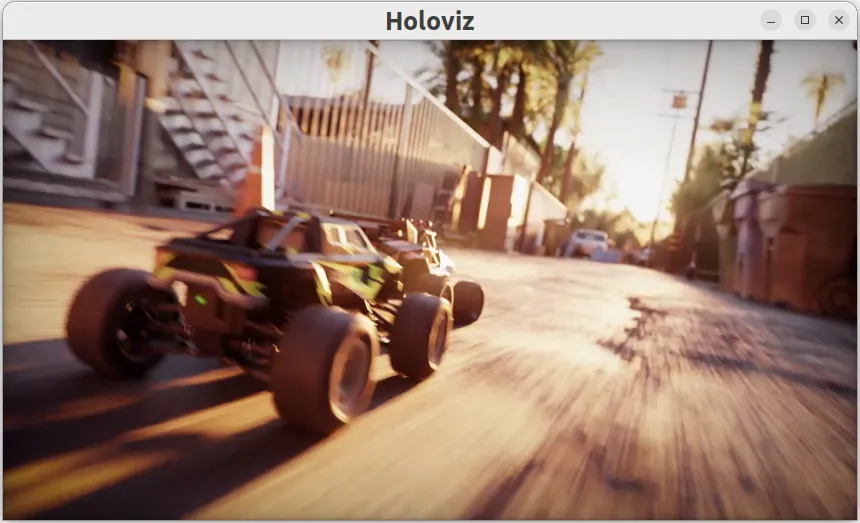
Instructions for running the distributed application involve calling the application from the “driver” node as well as from any worker nodes. For details, see the application run instructions in the examples directory on GitHub, or under /opt/nvidia/holoscan/examples/video_replayer_distributed in the NGC container and the Debian package.

Refer to UCX Network Interface Selection when running a distributed application across multiple nodes.