


XenServer vGPU Management#
You can perform XenServer advanced vGPU management techniques by using XenCenter and by using xe command line operations.
Management objects for GPUs#
XenServer uses four underlying management objects for GPUs: physical GPUs, vGPU types, GPU groups, and vGPUs. These objects are used directly when managing vGPU by using xe, and indirectly when managing vGPU by using XenCenter.
pgpu - Physical GPU#
A pgpu object represents a physical GPU, such as one of the multiple GPUs present on a Tesla M60 or M10 card. XenServer automatically creates pgpu objects at startup to represent each physical GPU present on the platform.
Listing the pgpu Objects Present on a Platform#
To list the physical GPU objects present on a platform, use xe pgpu-list.
For example, this platform contains a Tesla P40 card with a single physical GPU and a Tesla M60 card with two physical GPUs:
[root@xenserver ~]# xe pgpu-list
uuid ( RO)              : f76d1c90-e443-4bfc-8f26-7959a7c85c68
       vendor-name ( RO): NVIDIA Corporation
       device-name ( RO): GP102GL [Tesla P40]
    gpu-group-uuid ( RW): 134a7b71-5ceb-8066-ef1b-3b319fb2bef3

uuid ( RO)              : 4c5e05d9-60fa-4fe5-9cfc-c641e95c8e85
       vendor-name ( RO): NVIDIA Corporation
       device-name ( RO): GM204GL [Tesla M60]
    gpu-group-uuid ( RW): 3df80574-c303-f020-efb3-342f969da5de

uuid ( RO)              : 4960e63c-c9fe-4a25-add4-ee697263e04c
       vendor-name ( RO): NVIDIA Corporation
       device-name ( RO): GM204GL [Tesla M60]
    gpu-group-uuid ( RW): d32560f2-2158-42f9-d201-511691e1cb2b
[root@xenserver ~]#
Viewing Detailed Information About a pgpu Object#
To view detailed information about a pgpu, use xe pgpu-param-list:
[root@xenserver ~]# xe pgpu-param-list uuid=4960e63c-c9fe-4a25-add4-ee697263e04c
uuid ( RO)                        : 4960e63c-c9fe-4a25-add4-ee697263e04c
                 vendor-name ( RO): NVIDIA Corporation
                 device-name ( RO): GM204GL [Tesla M60]
                 dom0-access ( RO): enabled
    is-system-display-device ( RO): false
              gpu-group-uuid ( RW): d32560f2-2158-42f9-d201-511691e1cb2b
        gpu-group-name-label ( RO): 86:00.0 VGA compatible controller: NVIDIA Corporation GM204GL   [Tesla M60] (rev a1)
                   host-uuid ( RO): b55452df-1ee4-4e4e-bd97-3aee97b2123a
             host-name-label ( RO): xs7.1
                      pci-id ( RO): 0000:86:00.0
                dependencies (SRO):
                other-config (MRW):
        supported-VGPU-types ( RO): 5b9acd25-06fa-43e1-8b53-c35bceb8515c; 16326fcb-543f-4473-a4ae-2d30516a2779; 0f9fc39a-0758-43c8-88cc-54c8491aa4d4; cecb2033-3b4a-437c-a0c0-c9dfdb692d9b; 095d8939-5f84-405d-a39a-684738f9b957; 56c335be-4036-4a38-816c-c246a60556ac; ef0a94fd-2230-4fd4-aee0-d6d3f6ced4ef; 11615f73-47b8-4494-806e-2a7b5e1d7bea; dbd8f2ac-f548-4c40-804b-9133cfda8090; a33189f1-1417-4593-aa7d-978c4f25b953; 3f437337-3682-4897-a7ba-6334519f4c19; 99900aab-42b0-4cc4-8832-560ff6b60231
          enabled-VGPU-types (SRW): 5b9acd25-06fa-43e1-8b53-c35bceb8515c; 16326fcb-543f-4473-a4ae-2d30516a2779; 0f9fc39a-0758-43c8-88cc-54c8491aa4d4; cecb2033-3b4a-437c-a0c0-c9dfdb692d9b; 095d8939-5f84-405d-a39a-684738f9b957; 56c335be-4036-4a38-816c-c246a60556ac; ef0a94fd-2230-4fd4-aee0-d6d3f6ced4ef; 11615f73-47b8-4494-806e-2a7b5e1d7bea; dbd8f2ac-f548-4c40-804b-9133cfda8090; a33189f1-1417-4593-aa7d-978c4f25b953; 3f437337-3682-4897-a7ba-6334519f4c19; 99900aab-42b0-4cc4-8832-560ff6b60231
              resident-VGPUs ( RO):
[root@xenserver ~]#
Viewing physical GPUs in XenCenter#
To view physical GPUs in XenCenter, click on the server’s GPU tab:
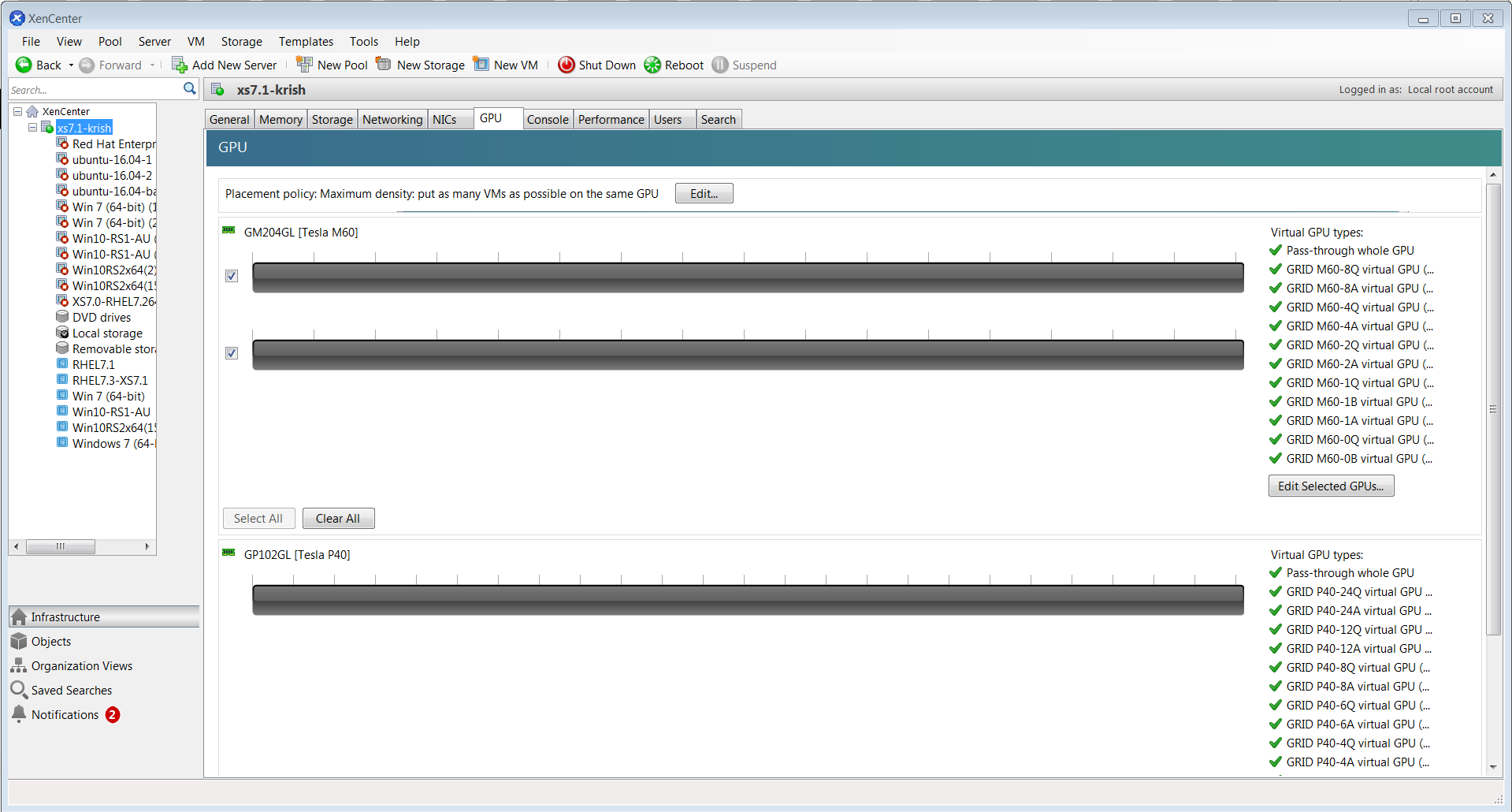
Figure 33 Physical GPU display in XenCenter#
vgpu-type - Virtual GPU Type#
A vgpu-type represents a type of virtual GPU, such as M60-0B, P40-8A, and P100-16Q. An additional, pass-through vGPU type is defined to represent a physical GPU that is directly assignable to a single guest VM.
XenServer automatically creates vgpu-type objects at startup to represent each virtual type supported by the physical GPUs present on the platform.
Listing the vgpu-type Objects Present on a Platform#
To list the vgpu-type objects present on a platform, use xe vgpu-type-list.
For example, as this platform contains Tesla P100, Tesla P40, and Tesla M60 cards, the vGPU types reported are the types supported by these cards:
[root@xenserver ~]# xe vgpu-type-list
uuid ( RO)              : d27f84a2-53f8-4430-ad15-0eca225cd974
       vendor-name ( RO): NVIDIA Corporation
        model-name ( RO): GRID P40-12A
         max-heads ( RO): 1
    max-resolution ( RO): 1280x1024


uuid ( RO)              : 57bb231f-f61b-408e-a0c0-106bddd91019
       vendor-name ( RO): NVIDIA Corporation
        model-name ( RO): GRID P40-3Q
         max-heads ( RO): 4
    max-resolution ( RO): 4096x2160


uuid ( RO)              : 9b2eaba5-565f-4cb4-ad9b-6347cfb03e93
       vendor-name ( RO): NVIDIA Corporation
        model-name ( RO): GRID P40-2Q
         max-heads ( RO): 4
    max-resolution ( RO): 4096x2160


uuid ( RO)              : af593219-0800-42da-a51d-d13b35f589e1
       vendor-name ( RO): NVIDIA Corporation
        model-name ( RO): GRID P40-4A
         max-heads ( RO): 1
    max-resolution ( RO): 1280x1024


uuid ( RO)              : 5b9acd25-06fa-43e1-8b53-c35bceb8515c
       vendor-name ( RO):
        model-name ( RO): passthrough
         max-heads ( RO): 0
    max-resolution ( RO): 0x0


uuid ( RO)              : af121387-0b58-498a-8d04-fe0305e4308f
       vendor-name ( RO): NVIDIA Corporation
        model-name ( RO): GRID P40-3A
         max-heads ( RO): 1
    max-resolution ( RO): 1280x1024


uuid ( RO)              : 3b28a628-fd6c-4cda-b0fb-80165699229e
       vendor-name ( RO): NVIDIA Corporation
        model-name ( RO): GRID P100-4Q
         max-heads ( RO): 4
    max-resolution ( RO): 4096x2160


uuid ( RO)              : 99900aab-42b0-4cc4-8832-560ff6b60231
       vendor-name ( RO): NVIDIA Corporation
        model-name ( RO): GRID M60-1Q
         max-heads ( RO): 2
    max-resolution ( RO): 4096x2160


uuid ( RO)              : 0f9fc39a-0758-43c8-88cc-54c8491aa4d4
       vendor-name ( RO): NVIDIA Corporation
        model-name ( RO): GRID M60-4A
         max-heads ( RO): 1
    max-resolution ( RO): 1280x1024


uuid ( RO)              : 4017c9dd-373f-431a-b36f-50e4e5c9f0c0
       vendor-name ( RO): NVIDIA Corporation
        model-name ( RO): GRID P40-6A
         max-heads ( RO): 1
    max-resolution ( RO): 1280x1024


uuid ( RO)              : 125fbbdf-406e-4d7c-9de8-a7536aa1a838
       vendor-name ( RO): NVIDIA Corporation
        model-name ( RO): GRID P40-24A
         max-heads ( RO): 1
    max-resolution ( RO): 1280x1024


uuid ( RO)              : 88162a34-1151-49d3-98ae-afcd963f3105
       vendor-name ( RO): NVIDIA Corporation
        model-name ( RO): GRID P40-2A
         max-heads ( RO): 1
    max-resolution ( RO): 1280x1024


uuid ( RO)              : ad00a95c-d066-4158-b361-487abf57dd30
       vendor-name ( RO): NVIDIA Corporation
        model-name ( RO): GRID P40-1A
         max-heads ( RO): 1
    max-resolution ( RO): 1280x1024


uuid ( RO)              : 11615f73-47b8-4494-806e-2a7b5e1d7bea
       vendor-name ( RO): NVIDIA Corporation
        model-name ( RO): GRID M60-0Q
         max-heads ( RO): 2
    max-resolution ( RO): 2560x1600


uuid ( RO)              : 6ea0cd56-526c-4966-8f53-7e1721b95a5c
       vendor-name ( RO): NVIDIA Corporation
        model-name ( RO): GRID P40-4Q
         max-heads ( RO): 4
    max-resolution ( RO): 4096x2160


uuid ( RO)              : 095d8939-5f84-405d-a39a-684738f9b957
       vendor-name ( RO): NVIDIA Corporation
        model-name ( RO): GRID M60-4Q
         max-heads ( RO): 4
    max-resolution ( RO): 4096x2160


uuid ( RO)              : 9626e649-6802-4396-976d-94c0ead1f835
       vendor-name ( RO): NVIDIA Corporation
        model-name ( RO): GRID P40-12Q
         max-heads ( RO): 4
    max-resolution ( RO): 4096x2160


uuid ( RO)              : a33189f1-1417-4593-aa7d-978c4f25b953
       vendor-name ( RO): NVIDIA Corporation
        model-name ( RO): GRID M60-0B
         max-heads ( RO): 2
    max-resolution ( RO): 2560x1600


uuid ( RO)              : dbd8f2ac-f548-4c40-804b-9133cfda8090
       vendor-name ( RO): NVIDIA Corporation
        model-name ( RO): GRID M60-1A
         max-heads ( RO): 1
    max-resolution ( RO): 1280x1024


uuid ( RO)              : ef0a94fd-2230-4fd4-aee0-d6d3f6ced4ef
       vendor-name ( RO): NVIDIA Corporation
        model-name ( RO): GRID M60-8Q
         max-heads ( RO): 4
    max-resolution ( RO): 4096x2160


uuid ( RO)              : 67fa06ab-554e-452b-a66e-a4048a5bfdf7
       vendor-name ( RO): NVIDIA Corporation
        model-name ( RO): GRID P40-6Q
         max-heads ( RO): 4
    max-resolution ( RO): 4096x2160


uuid ( RO)              : 739d7b8e-50e2-48a1-ae0d-5047aa490f0e
       vendor-name ( RO): NVIDIA Corporation
        model-name ( RO): GRID P40-8A
         max-heads ( RO): 1
    max-resolution ( RO): 1280x1024


uuid ( RO)              : 9fb62f31-7dfb-46f8-a4a9-cca8db48147e
       vendor-name ( RO): NVIDIA Corporation
        model-name ( RO): GRID P100-8Q
         max-heads ( RO): 4
    max-resolution ( RO): 4096x2160


uuid ( RO)              : 56c335be-4036-4a38-816c-c246a60556ac
       vendor-name ( RO): NVIDIA Corporation
        model-name ( RO): GRID M60-1B
         max-heads ( RO): 4
    max-resolution ( RO): 2560x1600


uuid ( RO)              : 3f437337-3682-4897-a7ba-6334519f4c19
       vendor-name ( RO): NVIDIA Corporation
        model-name ( RO): GRID M60-8A
         max-heads ( RO): 1
    max-resolution ( RO): 1280x1024


uuid ( RO)              : 25dbb2d3-a074-4f9f-92ce-b42d8b3d1de2
       vendor-name ( RO): NVIDIA Corporation
        model-name ( RO): GRID P40-1B
         max-heads ( RO): 4
    max-resolution ( RO): 2560x1600


uuid ( RO)              : cecb2033-3b4a-437c-a0c0-c9dfdb692d9b
       vendor-name ( RO): NVIDIA Corporation
        model-name ( RO): GRID M60-2Q
         max-heads ( RO): 4
    max-resolution ( RO): 4096x2160


uuid ( RO)              : 16326fcb-543f-4473-a4ae-2d30516a2779
       vendor-name ( RO): NVIDIA Corporation
        model-name ( RO): GRID M60-2A
         max-heads ( RO): 1
    max-resolution ( RO): 1280x1024


uuid ( RO)              : 7ca2399f-89ab-49dd-bf96-75071ced28fc
       vendor-name ( RO): NVIDIA Corporation
        model-name ( RO): GRID P40-24Q
         max-heads ( RO): 4
    max-resolution ( RO): 4096x2160


uuid ( RO)              : 9611a3f4-d130-4a66-a61b-21d4a2ca4663
       vendor-name ( RO): NVIDIA Corporation
        model-name ( RO): GRID P40-8Q
         max-heads ( RO): 4
    max-resolution ( RO): 4096x2160


uuid ( RO)              : d0e4a116-a944-42ef-a8dc-62a54c4d2d77
       vendor-name ( RO): NVIDIA Corporation
        model-name ( RO): GRID P40-1Q
         max-heads ( RO): 2
    max-resolution ( RO): 4096x2160

[root@xenserver ~]#
Viewing Detailed Information About a vgpu-type Object#
To see detailed information about a vgpu-type, use xe vgpu-type-param-list:
[root@xenserver ~]# xe xe vgpu-type-param-list uuid=7ca2399f-89ab-49dd-bf96-75071ced28fc
uuid ( RO)                       : 7ca2399f-89ab-49dd-bf96-75071ced28fc
                vendor-name ( RO): NVIDIA Corporation
                 model-name ( RO): GRID P40-24Q
           framebuffer-size ( RO): 24092082176
                  max-heads ( RO): 4
             max-resolution ( RO): 4096x2160
         supported-on-PGPUs ( RO): f76d1c90-e443-4bfc-8f26-7959a7c85c68
           enabled-on-PGPUs ( RO): f76d1c90-e443-4bfc-8f26-7959a7c85c68
    supported-on-GPU-groups ( RO): 134a7b71-5ceb-8066-ef1b-3b319fb2bef3
      enabled-on-GPU-groups ( RO): 134a7b71-5ceb-8066-ef1b-3b319fb2bef3
                 VGPU-uuids ( RO):
               experimental ( RO): false
[root@xenserver ~]#
gpu-group - collection of physical GPUs#
A gpu-group is a collection of physical GPUs, all of the same type. XenServer automatically creates gpu-group objects at startup to represent the distinct types of physical GPU present on the platform.
Listing the gpu-group Objects Present on a Platform#
To list the gpu-group objects present on a platform, use xe gpu-group-list.
For example, a system with a single Tesla P100 card, a single Tesla P40 card, and two Tesla M60 cards contains a single GPU group of type Tesla P100, a single GPU group of type Tesla P40, and two GPU groups of type Tesla M60:
[root@xenserver ~]# xe gpu-group-list
uuid ( RO)                : 3d652a59-beaf-ddb3-3b19-c8c77ef60605
          name-label ( RW): Group of NVIDIA Corporation GP100GL [Tesla P100 PCIe 16GB] GPUs
    name-description ( RW):

uuid ( RO)                : 3df80574-c303-f020-efb3-342f969da5de
          name-label ( RW): 85:00.0 VGA compatible controller: NVIDIA Corporation GM204GL [Tesla M60] (rev a1)
    name-description ( RW): 85:00.0 VGA compatible controller: NVIDIA Corporation GM204GL [Tesla M60] (rev a1)

uuid ( RO)                : 134a7b71-5ceb-8066-ef1b-3b319fb2bef3
          name-label ( RW): 87:00.0 3D controller: NVIDIA Corporation GP102GL [TESLA P40] (rev a1)
    name-description ( RW): 87:00.0 3D controller: NVIDIA Corporation GP102GL [TESLA P40] (rev a1)

uuid ( RO)                : d32560f2-2158-42f9-d201-511691e1cb2b
          name-label ( RW): 86:00.0 VGA compatible controller: NVIDIA Corporation GM204GL [Tesla M60] (rev a1)
    name-description ( RW): 86:00.0 VGA compatible controller: NVIDIA Corporation GM204GL [Tesla M60] (rev a1)
[root@xenserver ~]#
Viewing Detailed Information About a gpu-group Object#
To view detailed information about a gpu-group, use xe gpu-group-param-list:
[root@xenserver ~]# xe gpu-group-param-list uuid=134a7b71-5ceb-8066-ef1b-3b319fb2bef3
uuid ( RO)                    : 134a7b71-5ceb-8066-ef1b-3b319fb2bef3
              name-label ( RW): 87:00.0 3D controller: NVIDIA Corporation GP102GL [TESLA P40] (rev a1)
        name-description ( RW): 87:00.0 3D controller: NVIDIA Corporation GP102GL [TESLA P40] (rev a1)
              VGPU-uuids (SRO): 101fb062-427f-1999-9e90-5a914075e9ca
              PGPU-uuids (SRO): f76d1c90-e443-4bfc-8f26-7959a7c85c68
            other-config (MRW):
      enabled-VGPU-types ( RO): d0e4a116-a944-42ef-a8dc-62a54c4d2d77; 9611a3f4-d130-4a66-a61b-21d4a2ca4663; 7ca2399f-89ab-49dd-bf96-75071ced28fc; 25dbb2d3-a074-4f9f-92ce-b42d8b3d1de2; 739d7b8e-50e2-48a1-ae0d-5047aa490f0e; 67fa06ab-554e-452b-a66e-a4048a5bfdf7; 9626e649-6802-4396-976d-94c0ead1f835; 6ea0cd56-526c-4966-8f53-7e1721b95a5c; ad00a95c-d066-4158-b361-487abf57dd30; 88162a34-1151-49d3-98ae-afcd963f3105; 125fbbdf-406e-4d7c-9de8-a7536aa1a838; 4017c9dd-373f-431a-b36f-50e4e5c9f0c0; af121387-0b58-498a-8d04-fe0305e4308f; 5b9acd25-06fa-43e1-8b53-c35bceb8515c; af593219-0800-42da-a51d-d13b35f589e1; 9b2eaba5-565f-4cb4-ad9b-6347cfb03e93; 57bb231f-f61b-408e-a0c0-106bddd91019; d27f84a2-53f8-4430-ad15-0eca225cd974
    supported-VGPU-types ( RO): d0e4a116-a944-42ef-a8dc-62a54c4d2d77; 9611a3f4-d130-4a66-a61b-21d4a2ca4663; 7ca2399f-89ab-49dd-bf96-75071ced28fc; 25dbb2d3-a074-4f9f-92ce-b42d8b3d1de2; 739d7b8e-50e2-48a1-ae0d-5047aa490f0e; 67fa06ab-554e-452b-a66e-a4048a5bfdf7; 9626e649-6802-4396-976d-94c0ead1f835; 6ea0cd56-526c-4966-8f53-7e1721b95a5c; ad00a95c-d066-4158-b361-487abf57dd30; 88162a34-1151-49d3-98ae-afcd963f3105; 125fbbdf-406e-4d7c-9de8-a7536aa1a838; 4017c9dd-373f-431a-b36f-50e4e5c9f0c0; af121387-0b58-498a-8d04-fe0305e4308f; 5b9acd25-06fa-43e1-8b53-c35bceb8515c; af593219-0800-42da-a51d-d13b35f589e1; 9b2eaba5-565f-4cb4-ad9b-6347cfb03e93; 57bb231f-f61b-408e-a0c0-106bddd91019; d27f84a2-53f8-4430-ad15-0eca225cd974
    allocation-algorithm ( RW): depth-first
[root@xenserver ~]
vgpu - Virtual GPU#
A vgpu object represents a virtual GPU. Unlike the other GPU management objects, vgpu objects are not created automatically by XenServer. Instead, they are created as follows:
When a VM is configured through XenCenter or through
xeto use a vGPUBy cloning a VM that is configured to use vGPU, as explained in Cloning vGPU-Enabled VMs
Creating a vGPU Using xe#
Use xe vgpu-create to create a vgpu object, specifying the type of vGPU required, the GPU group it will be allocated from, and the VM it is associated with:
[root@xenserver ~]# xe vgpu-create vm-uuid=e71afda4-53f4-3a1b-6c92-a364a7f619c2 gpu-group-uuid=be825ba2-01d7-8d51-9780-f82cfaa64924 vgpu-type-uuid=3f318889-7508-c9fd-7134-003d4d05ae56b73cbd30-096f-8a9a-523e-a800062f4ca7
[root@xenserver ~]#
Creating the vgpu object for a VM does not immediately cause a virtual GPU to be created on a physical GPU. Instead, the virtual GPU is created whenever its associated VM is started. For more details on how vGPUs are created at VM startup, see Controlling vGPU allocation.
Note
The owning VM must be in the powered-off state in order for the vgpu-create command to succeed.
A vgpu object’s owning VM, associated GPU group, and vGPU type are fixed at creation and cannot be subsequently changed. To change the type of vGPU allocated to a VM, delete the existing vgpu object and create another one.
Controlling vGPU allocation#
Configuring a VM to use a vGPU in XenCenter, or creating a vgpu object for a VM using xe, does not immediately cause a virtual GPU to be created; rather, the virtual GPU is created at the time the VM is next booted, using the following steps:
The GPU group that the
vgpuobject is associated with is checked for a physical GPU that can host a vGPU of the required type (i.e. thevgpuobject’s associatedvgpu-type). Because vGPU types cannot be mixed on a single physical GPU, the new vGPU can only be created on a physical GPU that has no vGPUs resident on it, or only vGPUs of the same type, and less than the limit of vGPUs of that type that the physical GPU can support.If no such physical GPUs exist in the group, the
vgpucreation fails and the VM startup is aborted.Otherwise, if more than one such physical GPU exists in the group, a physical GPU is selected according to the GPU group’s allocation policy, as described in Modifying GPU Allocation Policy.
Determining the Physical GPU on Which a Virtual GPU is Resident#
The vgpu object’s resident-on parameter returns the UUID of the pgpu object for the physical GPU the vGPU is resident on.
To determine the physical GPU that a virtual GPU is resident on, use vgpu-param-get:
[root@xenserver ~]# xe vgpu-param-get uuid=101fb062-427f-1999-9e90-5a914075e9ca param-name=resident-on
f76d1c90-e443-4bfc-8f26-7959a7c85c68

[root@xenserver ~]# xe pgpu-param-list uuid=f76d1c90-e443-4bfc-8f26-7959a7c85c68
uuid ( RO)                        : f76d1c90-e443-4bfc-8f26-7959a7c85c68
                 vendor-name ( RO): NVIDIA Corporation
                 device-name ( RO): GP102GL [Tesla P40]
              gpu-group-uuid ( RW): 134a7b71-5ceb-8066-ef1b-3b319fb2bef3
        gpu-group-name-label ( RO): 87:00.0 3D controller: NVIDIA Corporation GP102GL [TESLA P40] (rev a1)
                   host-uuid ( RO): b55452df-1ee4-4e4e-bd97-3aee97b2123a
             host-name-label ( RO): xs7.1-krish
                      pci-id ( RO): 0000:87:00.0
                dependencies (SRO):
                other-config (MRW):
        supported-VGPU-types ( RO): 5b9acd25-06fa-43e1-8b53-c35bceb8515c; 88162a34-1151-49d3-98ae-afcd963f3105; 9b2eaba5-565f-4cb4-ad9b-6347cfb03e93; 739d7b8e-50e2-48a1-ae0d-5047aa490f0e; d0e4a116-a944-42ef-a8dc-62a54c4d2d77; 7ca2399f-89ab-49dd-bf96-75071ced28fc; 67fa06ab-554e-452b-a66e-a4048a5bfdf7; 9611a3f4-d130-4a66-a61b-21d4a2ca4663; d27f84a2-53f8-4430-ad15-0eca225cd974; 125fbbdf-406e-4d7c-9de8-a7536aa1a838; 4017c9dd-373f-431a-b36f-50e4e5c9f0c0; 6ea0cd56-526c-4966-8f53-7e1721b95a5c; af121387-0b58-498a-8d04-fe0305e4308f; 9626e649-6802-4396-976d-94c0ead1f835; ad00a95c-d066-4158-b361-487abf57dd30; af593219-0800-42da-a51d-d13b35f589e1; 25dbb2d3-a074-4f9f-92ce-b42d8b3d1de2; 57bb231f-f61b-408e-a0c0-106bddd91019
          enabled-VGPU-types (SRW): 5b9acd25-06fa-43e1-8b53-c35bceb8515c; 88162a34-1151-49d3-98ae-afcd963f3105; 9b2eaba5-565f-4cb4-ad9b-6347cfb03e93; 739d7b8e-50e2-48a1-ae0d-5047aa490f0e; d0e4a116-a944-42ef-a8dc-62a54c4d2d77; 7ca2399f-89ab-49dd-bf96-75071ced28fc; 67fa06ab-554e-452b-a66e-a4048a5bfdf7; 9611a3f4-d130-4a66-a61b-21d4a2ca4663; d27f84a2-53f8-4430-ad15-0eca225cd974; 125fbbdf-406e-4d7c-9de8-a7536aa1a838; 4017c9dd-373f-431a-b36f-50e4e5c9f0c0; 6ea0cd56-526c-4966-8f53-7e1721b95a5c; af121387-0b58-498a-8d04-fe0305e4308f; 9626e649-6802-4396-976d-94c0ead1f835; ad00a95c-d066-4158-b361-487abf57dd30; af593219-0800-42da-a51d-d13b35f589e1; 25dbb2d3-a074-4f9f-92ce-b42d8b3d1de2; 57bb231f-f61b-408e-a0c0-106bddd91019
              resident-VGPUs ( RO): 101fb062-427f-1999-9e90-5a914075e9ca
[root@xenserver ~]#
Note
If the vGPU is not currently running, the resident-on parameter is not instantiated for the vGPU, and the vgpu-param-get operation returns:
<not in database>
Controlling the vGPU types enabled on specific physical GPUs#
Physical GPUs support several vGPU types, as defined in Virtual GPU Types for Supported GPUs and the “pass-through” type that is used to assign an entire physical GPU to a VM (see Using GPU Pass-Through on XenServer).
Controlling vGPU types enabled on specific physical GPUs by using XenCenter#
To limit the types of vGPU that may be created on a specific physical GPU:
Open the server’s GPU tab in XenCenter.
Select the box beside one or more GPUs on which you want to limit the types of vGPU.
Select Edit Selected GPUs.
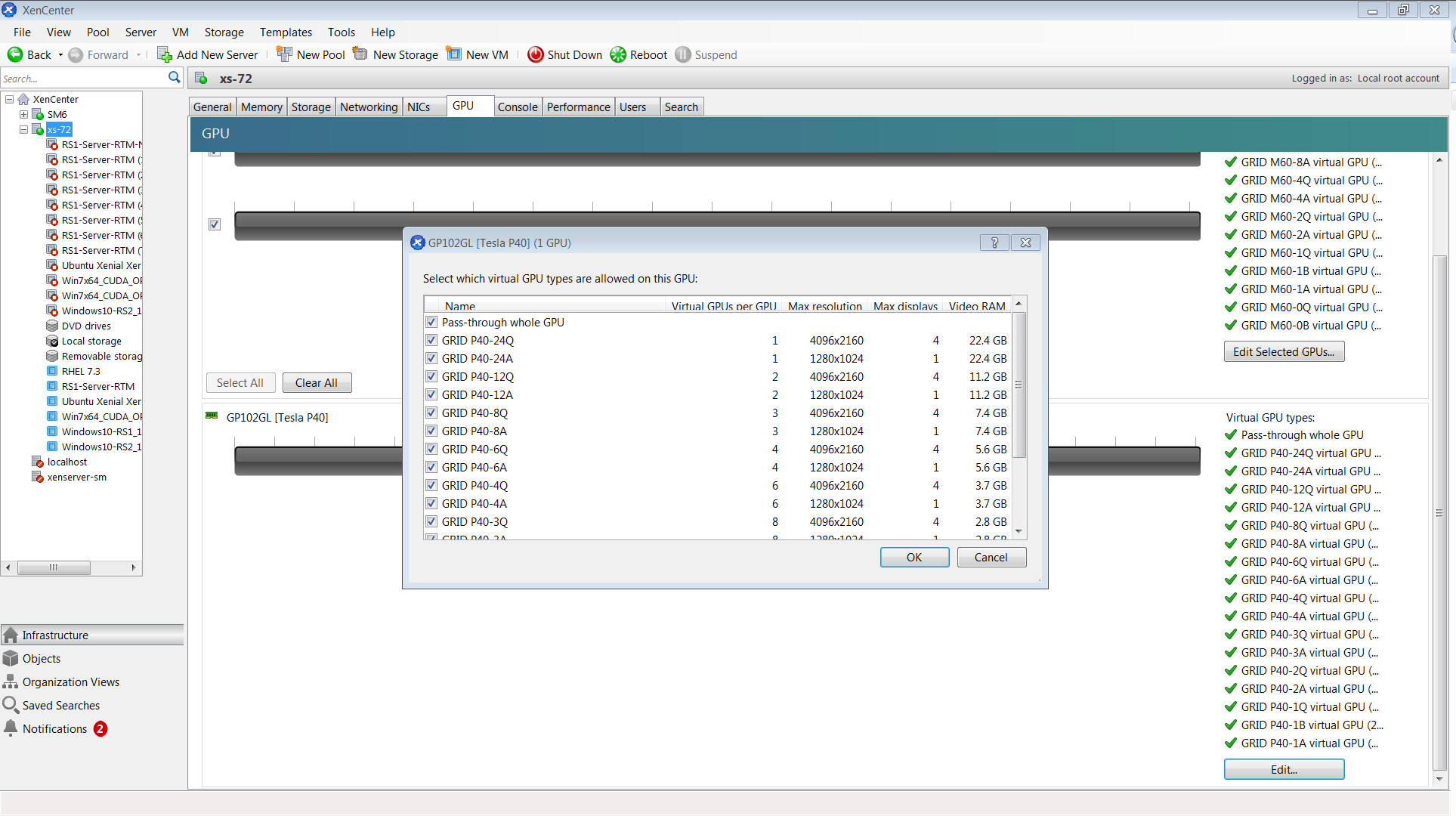
Figure 34 Editing a GPU’s enabled vGPU types using XenCenter#
Controlling vGPU Types Enabled on Specific Physical GPUs by Using xe#
The physical GPU’s pgpu object’s enabled-vGPU-types parameter controls the vGPU types enabled on specific physical GPUs.
To modify the pgpu object’s enabled-vGPU-types parameter , use xe pgpu-param-set:
[root@xenserver ~]# xe pgpu-param-list uuid=cb08aaae-8e5a-47cb-888e-60dcc73c01d3
uuid ( RO)	                : cb08aaae-8e5a-47cb-888e-60dcc73c01d3
             vendor-name ( RO): NVIDIA Corporation
			 device-name ( RO): GP102GL [Tesla P40]
             domO-access ( RO): enabled
is-system-display-device ( RO): false
          gpu-group-uuid ( RW): bfel603d-c526-05f3-e64f-951485ef3b49
	gpu-group-name-label ( RO): 87:00.0 3D controller: NVIDIA Corporation GP102GL [Tesla P40] (rev al)
	           host-uuid ( RO): fdeb6bbb-e460-4cfl-ad43-49ac81c20540
		 host-name-label ( RO): xs-72
                  pci-id ( RO): 0000:87:00.0
			dependencies (SRO):
			other-config (MRW):
    supported-VGPU-types ( RO): 23e6b80b-le5e-4c33-bedb-e6dlae472fec; f5583e39-2540-440d-a0ee-dde9f0783abf; al8e46ff-4d05-4322-b040-667ce77d78a8; adell9a9-84el-435f-b0e9-14cl62e212fb; 2560d066-054a-48a9-a44d-3f3f90493a00; 47858f38-045d-4a05-9blc-9128fee6b0ab; Ifb527f6-493f-442b-abe2-94a6fafd49ce; 78b8e044-09ae-4a4c-8a96-b20c7a585842; 18ed7e7e-f8b7-496e-9784-8ba4e35acaa3; 48681d88-c4e5-4e39-85ff-c9bal2e8e484 ; cc3dbbfb-4b83-400d-8c52-811948b7f8c4; 8elad75a-ed5f-4609-83ff-5f9bca9aaca2; 840389a0-f511-4f90-8153-8a749d85b09e; a2042742-da67-4613-a538-ldl7d30dccb9; 299e47c2-8fcl-4edf-aa31-e29db84168c6; e95c636e-06e6-4 47e-8b49-14b37d308922; 0524a5d0-7160-48c5-a9el-cc33e76dc0de; 09043fb2-6d67-4443-b312-25688f13e012
      enabled-VGPU-types (SRW): 23e6b80b-le5e-4c33-bedb-e6dlae472fec; f5583e39-2540-440d-a0ee-dde9f0783abf; al8e46ff-4d05-4322-b040-667ce77d78a8; adell9a9-84el-435f-b0e9-14cl62e212fb; 2560d066-054a-48a9-a44d-3f3f90493a00; 47858f38-045d-4a05-9blc-9128fee6b0ab; Ifb527f6-493f-442b-abe2-94a6fafd49ce; 78b8e044-09ae-4a4c-8a96-b20c7a585842; 18ed7e7e-f8b7-496e-9784-8ba4e35acaa3; 48681d88-c4e5-4e39-85ff-c9bal2e8e484 ; cc3dbbfb-4b83-400d-8c52-811948b7f8c4; 8elad75a-ed5f-4609-83ff-5f9bca9aaca2; 840389a0-f511-4f90-8153-8a749d85b09e; a2042742-da67-4613-a538-ldl7d30dccb9; 299e47c2-8fcl-4edf-aa31-e29db84168c6; e95c636e-06e6-4 47e-8b49-14b37d308922; 0524a5d0-7160-48c5-a9el-cc33e76dc0de; 09043fb2-6d67-4443-b312-25688f13e012
	      resident-VGPUs ( RO):

[root@xenserver-vgx-test ~]#  xe pgpu-param-set uuid=cb08aaae-8e5a-47cb-888e-60dcc73c01d3 enabled-VGPU-types=23e6b80b-le5e-4c33-bedb-e6dlae472fec
Creating vGPUs on Specific Physical GPUs#
To precisely control allocation of vGPUs on specific physical GPUs, create separate GPU groups for the physical GPUs you wish to allocate vGPUs on. When creating a virtual GPU, create it on the GPU group containing the physical GPU you want it to be allocated on.
For example, to create a new GPU group for the physical GPU at PCI bus ID 0000:87:00.0, follow these steps:
Create the new GPU group with an appropriate name:
[root@xenserver ~]# xe gpu-group-create name-label="GRID P40 87:0.0" 3f870244-41da-469f-71f3-22bc6d700e71
[root@xenserver ~]#
Find the UUID of the physical GPU at
0000:87:0.0that you want to assign to the new GPU group:[root@xenserver ~]# xe pgpu-list pci-id=0000:87:00.0 uuid ( RO) : f76d1c90-e443-4bfc-8f26-7959a7c85c68 vendor-name ( RO): NVIDIA Corporation device-name ( RO): GP102GL [Tesla P40] gpu-group-uuid ( RW): 134a7b71-5ceb-8066-ef1b-3b319fb2bef3 [root@xenserver ~]
Note
The
pci-idparameter passed to thepgpu-listcommand must be in the exact format shown, with the PCI domain fully specified (for example,0000) and the PCI bus and devices numbers each being two digits (for example,87:00.0).Ensure that no vGPUs are currently operating on the physical GPU by checking the
resident-VGPUsparameter:[root@xenserver ~]# xe pgpu-param-get uuid=f76d1c90-e443-4bfc-8f26-7959a7c85c68 param-name=resident-VGPUs [root@xenserver ~]#
If any vGPUs are listed, shut down the VMs associated with them.
Change the
gpu-group-uuidparameter of the physical GPU to the UUID of the newly-created GPU group:[root@xenserver ~]# xe pgpu-param-set uuid=7c1e3cff-1429-0544-df3d-bf8a086fb70a gpu-group-uuid=585877ef-5a6c-66af-fc56-7bd525bdc2f6 [root@xenserver ~]#
Any vgpu object now created that specifies this GPU group UUID will always have its vGPUs created on the GPU at PCI bus ID 0000:05:0.0.
Note
You can add more than one physical GPU to a manually-created GPU group – for example, to represent all the GPUs attached to the same CPU socket in a multi-socket server platform - but as for automatically-created GPU groups, all the physical GPUs in the group must be of the same type.
In XenCenter, manually-created GPU groups appear in the GPU type listing in a VM’s GPU Properties. Select a GPU type within the group from which you wish the vGPU to be allocated:
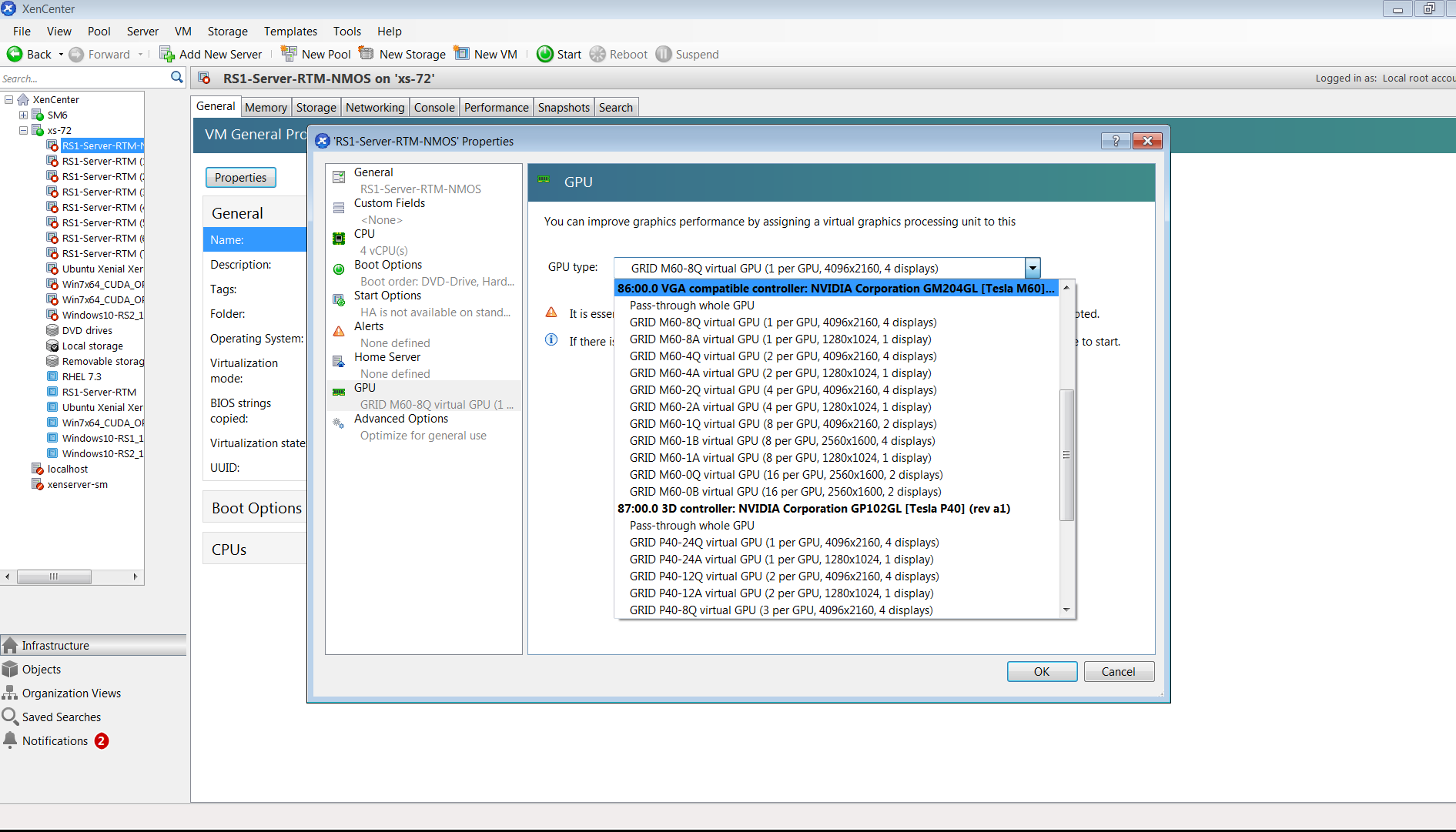
Figure 35 Using a custom GPU group within XenCenter#
Cloning vGPU-Enabled VMs#
The fast-clone or copying feature of XenServer can be used to rapidly create new VMs from a “golden” base VM image that has been configured with NVIDIA vGPU, the NVIDIA driver, applications, and remote graphics software.
When a VM is cloned, any vGPU configuration associated with the base VM is copied to the cloned VM. Starting the cloned VM will create a vGPU instance of the same type as the original VM, from the same GPU group as the original vGPU.
Cloning a vGPU-enabled VM by using xe#
To clone a vGPU-enabled VM from the dom0 shell, use vm-clone:
[root@xenserver ~]# xe vm-clone new-name-label="new-vm" vm="base-vm-name" 7f7035cb-388d-1537-1465-1857fb6498e7
[root@xenserver ~]#
Cloning a vGPU-enabled VM by using XenCenter#
To clone a vGPU-enabled VM by using XenCenter, use the VM’s Copy VM command as shown in Figure 36.
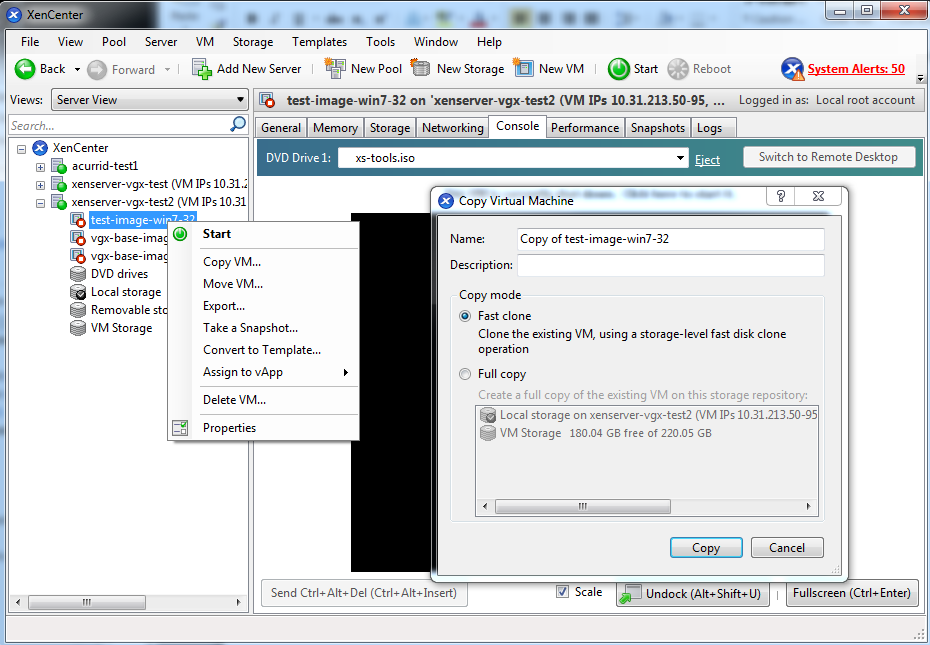
Figure 36 Cloning a VM using XenCenter#