


Troubleshooting#
This chapter describes basic troubleshooting steps for NVIDIA vGPU on Linux-style hypervisors and how to collect debug information when filing a bug report.
Known issues#
Before troubleshooting or filing a bug report, review the release notes that accompany each driver release, for information about known issues with the current release, and potential workarounds.
Troubleshooting steps#
If a vGPU-enabled VM fails to start, or doesn’t display any output when it does start, follow these steps to narrow down the probable cause.
Verifying the NVIDIA Kernel Driver Is Loaded#
Use the command that your hypervisor provides to verify that the kernel driver is loaded:
On Linux-style hypervisors except VMware vSphere, use
lsmod:[root@xenserver ~]# lsmod|grep <module> nvidia 9604895 84 i2c_core 20294 2 nvidia,i2c_i801 [root@xenserver ~]#
On VMware vSphere, use
vmkload_mod:[root@esxi:~] vmkload_mod -l | grep <module> nvidia 5 8420
<module>depends on the GPU architecture of your GPU:For the NVIDIA Ada Lovelace GPU architecture and later GPU architectures,
<module>isnvidia-gpu.For GPU architectures before NVIDIA Ada Lovelace,
<module>isnvidia.
If the
nvidiaornvidia-gpudriver is not listed in the output, checkdmesgfor any load-time errors reported by the driver (see Examining NVIDIA kernel driver output).On XenServer and Red Hat Enterprise Linux KVM, also use the
rpm -qcommand to verify that the NVIDIA GPU Manager package is correctly installed.rpm -q <vgpu-manager-rpm-package-name><vgpu-manager-rpm-package-name>The RPM package name of the NVIDIA GPU Manager package, for example
NVIDIA-vGPU-NVIDIA-vGPU-CitrixHypervisor-8.2-595.112.08for XenServer.
This example verifies that the NVIDIA GPU Manager package for XenServer is correctly installed.
[root@xenserver ~]# rpm -q NVIDIA-vGPU-NVIDIA-vGPU-CitrixHypervisor-8.2-595.112.08
[root@xenserver ~]#
If an existing NVIDIA GRID package is already installed and you don’t select the upgrade (-U) option when installing a newer GRID package, the rpm command will return many conflict errors.
Preparing packages for installation...
        file /usr/bin/nvidia-smi from install of NVIDIA-vGPU-NVIDIA-vGPU-CitrixHypervisor-8.2-595.112.08.x86_64 conflicts with file from package NVIDIA-vGPU-xenserver-8.2-595.91.04.x86_64
        file /usr/lib/libnvidia-ml.so from install of NVIDIA-vGPU-NVIDIA-vGPU-CitrixHypervisor-8.2-595.112.08.x86_64 conflicts with file from package NVIDIA-vGPU-xenserver-8.2-595.91.04.x86_64
        ...
Verifying that nvidia-smi works#
If the NVIDIA kernel driver is correctly loaded on the physical GPU, run nvidia-smi and verify that all physical GPUs not currently being used for GPU pass-through are listed in the output. For details on expected output, see NVIDIA System Management Interface nvidia-smi.
If nvidia-smi fails to report the expected output, check dmesg for NVIDIA kernel driver messages.
Examining NVIDIA kernel driver output#
Information and debug messages from the NVIDIA kernel driver are logged in kernel logs, prefixed with NVRM or nvidia.
Run dmesg on a supported Linux-style hypervisor and check for the NVRM and nvidia prefixes:
[root@xenserver ~]# dmesg | grep -E "NVRM|nvidia"
[   22.054928] nvidia: module license 'NVIDIA' taints kernel.
[   22.390414] NVRM: loading
[   22.829226] nvidia 0000:04:00.0: enabling device (0000 -> 0003)
[   22.829236] nvidia 0000:04:00.0: PCI INT A -> GSI 32 (level, low) -> IRQ 32
[   22.829240] NVRM: This PCI I/O region assigned to your NVIDIA device is invalid:
[   22.829241] NVRM: BAR0 is 0M @ 0x0 (PCI:0000:00:04.0)
[   22.829243] NVRM: The system BIOS may have misconfigured your GPU.
Examining NVIDIA Virtual GPU Manager Messages#
Information and debug messages from the NVIDIA Virtual GPU Manager are logged to the hypervisor’s log files, prefixed with vmiop.
Examining XenServer vGPU Manager Messages#
For XenServer, NVIDIA Virtual GPU Manager messages are written to /var/log/messages.
Look in the /var/log/messages file for the vmiop prefix:
[root@xenserver ~]# grep vmiop /var/log/messages
May 18 10:34:03 localhost vgpu-ll[25698]: notice: vmiop_log: gpu-pci-id : 0000:05:00.0
May 18 10:34:03 localhost vgpu-ll[25698]: notice: vmiop_log: vgpu_type : quadro
May 18 10:34:03 localhost vgpu-ll[25698]: notice: vmiop_log: Framebuffer: 0x74000000
May 18 10:34:03 localhost vgpu-ll[25698]: notice: vmiop_log: Virtual Device Id: 0xl3F2:0xll4E
May 18 10:34:03 localhost vgpu-ll[25698]: notice: vmiop_log: ######## vGPU Manager Information: ########
May 18 10:34:03 localhost vgpu-ll[25698]: notice: vmiop_log: Driver Version: 595.112.08
May 18 10:34:03 localhost vgpu-ll[25698]: notice: vmiop_log: Init frame copy engine: syncing...
May 18 10:35:31 localhost vgpu-ll[25698]: notice: vmiop_log: ######## Guest NVIDIA Driver Information: ########
May 18 10:35:31 localhost vgpu-ll[25698]: notice: vmiop_log: Driver Version: 597.30
May 18 10:35:36 localhost vgpu-ll[25698]: notice: vmiop_log: Current max guest pfn = 0xllbc84!
May 18 10:35:40 localhost vgpu-ll[25698]: notice: vmiop_log: Current max guest pfn = 0xlleff0!
[root@xenserver ~]#
Examining Red Hat Enterprise Linux KVM vGPU Manager Messages#
For Red Hat Enterprise Linux KVM , NVIDIA Virtual GPU Manager messages are written to /var/log/messages.
Look in these files for the vmiop_log: prefix:
# grep vmiop_log: /var/log/messages
[2026-05-15 04:46:12] vmiop_log: [2026-05-15 04:46:12] notice: vmiop-env: guest_max_gpfn:0x11f7ff
[2026-05-15 04:46:12] vmiop_log: [2026-05-15 04:46:12] notice: pluginconfig: /usr/share/nvidia/vgx/grid_m60-1q.conf,gpu-pci-id=0000:06:00.0
[2026-05-15 04:46:12] vmiop_log: [2026-05-15 04:46:12] notice: Loading Plugin0: libnvidia-vgpu
[2026-05-15 04:46:12] vmiop_log: [2026-05-15 04:46:12] notice: Successfully update the env symbols!
[2026-05-15 04:46:12] vmiop_log: [2026-05-15 04:46:12] notice: vmiop_log: gpu-pci-id : 0000:06:00.0
[2026-05-15 04:46:12] vmiop_log: [2026-05-15 04:46:12] notice: vmiop_log: vgpu_type : quadro
[2026-05-15 04:46:12] vmiop_log: [2026-05-15 04:46:12] notice: vmiop_log: Framebuffer: 0x38000000
[2026-05-15 04:46:12] vmiop_log: [2026-05-15 04:46:12] notice: vmiop_log: Virtual Device Id: 0x13F2:0x114D
[2026-05-15 04:46:12] vmiop_log: [2026-05-15 04:46:12] notice: vmiop_log: ######## vGPU Manager Information: ########
[2026-05-15 04:46:12] vmiop_log: [2026-05-15 04:46:12] notice: vmiop_log: Driver Version: 595.112.08
[2026-05-15 04:46:12] vmiop_log: [2026-05-15 04:46:12] notice: vmiop_log: Init frame copy engine: syncing...
[2026-05-15 05:09:14] vmiop_log: [2026-05-15 05:09:14] notice: vmiop_log: ######## Guest NVIDIA Driver Information: ########
[2026-05-15 05:09:14] vmiop_log: [2026-05-15 05:09:14] notice: vmiop_log: Driver Version: 597.30
[2026-05-15 05:09:14] vmiop_log: [2026-05-15 05:09:14] notice: vmiop_log: Current max guest pfn = 0x11a71f!
[2026-05-15 05:12:09] vmiop_log: [2026-05-15 05:12:09] notice: vmiop_log: vGPU license state: (0x00000001)
#
Examining VMware vSphere vGPU Manager Messages#
For VMware vSphere, NVIDIA Virtual GPU Manager messages are written to the vmware.log file in the guest VM’s storage directory.
Look in the vmware.log file for the vmiop prefix:
[root@esxi:~] grep vmiop /vmfs/volumes/datastore1/wind-vgpu-test1/vmware.log
2026-05-15T14:02:21.275Z| vmx| I120: DICT   pciPassthru0.virtualDev = "vmiop"
2026-05-15T14:02:21.344Z| vmx| I120: GetPluginPath testing /usr/lib64/vmware/plugin/libvmx-vmiop.so
2026-05-15T14:02:21.344Z| vmx| I120: PluginLdr_LoadShared: Loaded shared plugin libvmx-vmiop.so from /usr/lib64/vmware/plugin/libvmx-vmiop.so
2026-05-15T14:02:21.344Z| vmx| I120: VMIOP: Loaded plugin libvmx-vmiop.so:VMIOP_InitModule
2026-05-15T14:02:21.359Z| vmx| I120: VMIOP: Initializing plugin vmiop-display
2026-05-15T14:02:21.365Z| vmx| I120: vmiop_log: gpu-pci-id : 0000:04:00.0
2026-05-15T14:02:21.365Z| vmx| I120: vmiop_log: vgpu_type : quadro
2026-05-15T14:02:21.365Z| vmx| I120: vmiop_log: Framebuffer: 0x74000000
2026-05-15T14:02:21.365Z| vmx| I120: vmiop_log: Virtual Device Id: 0x11B0:0x101B
2026-05-15T14:02:21.365Z| vmx| I120: vmiop_log: ######## vGPU Manager Information: ########
2026-05-15T14:02:21.365Z| vmx| I120: vmiop_log: Driver Version: 595.112.08
2026-05-15T14:02:21.365Z| vmx| I120: vmiop_log: VGX Version: 20.2
2026-05-15T14:02:21.445Z| vmx| I120: vmiop_log: Init frame copy engine: syncing...
2026-05-15T14:02:37.031Z| vthread-12| I120: vmiop_log: ######## Guest NVIDIA Driver Information: ########
2026-05-15T14:02:37.031Z| vthread-12| I120: vmiop_log: Driver Version: 597.30
2026-05-15T14:02:37.031Z| vthread-12| I120: vmiop_log: VGX Version: 20.2
2026-05-15T14:02:37.093Z| vthread-12| I120: vmiop_log: Clearing BAR1 mapping
2026-05-18T23:39:55.726Z| vmx| I120: VMIOP: Shutting down plugin vmiop-display
[root@esxi:~]
Capturing configuration data for filing a bug report#
When filing a bug report with NVIDIA, capture relevant configuration data from the platform exhibiting the bug in one of the following ways:
On any supported hypervisor, run
nvidia-bug-report.sh.On Citrix XenServer, create a XenServer server status report.
Capturing configuration data by running nvidia-bug-report.sh#
The nvidia-bug-report.sh script captures debug information into a gzip-compressed log file on the server.
Run nvidia-bug-report.sh from the XenServer dom0 shell, the host shell of a supported Linux with KVM hypervisor, or the VMware ESXi host shell.
This example runs nvidia-bug-report.sh on XenServer, but the procedure is the same on any supported Linux with KVM hypervisoror or VMware vSphere ESXi.
[root@xenserver ~]# nvidia-bug-report.sh

nvidia-bug-report.sh will now collect information about your
system and create the file 'nvidia-bug-report.log.gz' in the current
directory.  It may take several seconds to run.  In some
cases, it may hang trying to capture data generated dynamically
by the Linux kernel and/or the NVIDIA kernel module.  While
the bug report log file will be incomplete if this happens, it
may still contain enough data to diagnose your problem.

For Xen open source/XCP users, if you are reporting a domain issue,
please run: nvidia-bug-report.sh --domain-name <"domain_name">

Please include the 'nvidia-bug-report.log.gz' log file when reporting
your bug via the NVIDIA Linux forum (see devtalk.nvidia.com)
or by sending email to 'linux-bugs@nvidia.com'.

Running nvidia-bug-report.sh...

If the bug report script hangs after this point consider running with
--safe-mode command line argument.

 complete

[root@xenserver ~]#
Capturing Configuration Data by Creating a XenServer Status Report#
In XenCenter, from the Tools menu, choose Server Status Report.
Select the XenServer instance from which you want to collect a status report.
Select the data to include in the report.
To include NVIDIA vGPU debug information, select NVIDIA-logs in the Report Content Item list.
Generate the report.
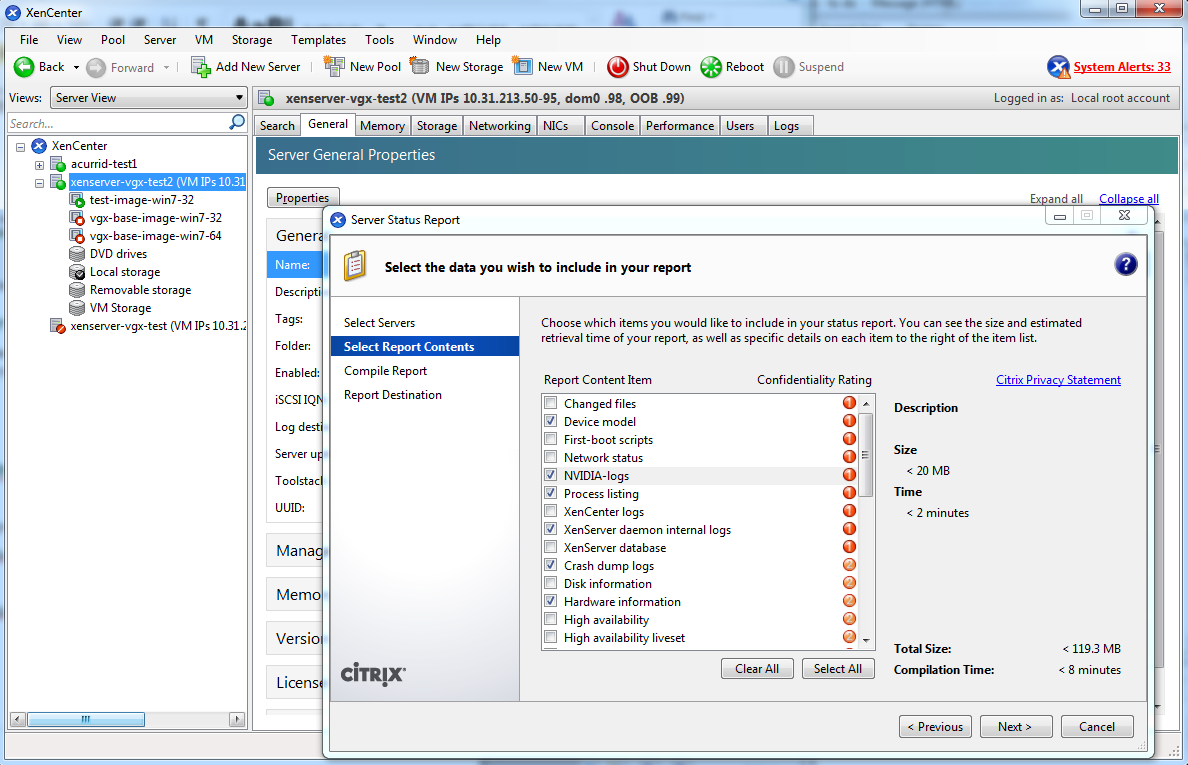
Figure 29 Including NVIDIA logs in a XenServer status report#
Gathering Troubleshooting Information for XID 119 Errors#
If you experience XID 119 errors, ensure that you have upgraded the NVIDIA vGPU software graphics driver to a release that provides information specifically for troubleshooting these errors. You can provide this information to NVIDIA Enterprise Support for troubleshooting these errors. Upgrading the NVIDIA vGPU software graphics driver does not provide a fix for these errors.
Note
XID 119 errors are caused by a GPU System Processor (GSP) RPC timeout. Therefore, these errors occur only with NVIDIA vGPU deployments on GPUs based on the NVIDIA Ada Lovelace and Hopper GPU architectures.
To gather the additional information about XID 119 errors that the NVIDIA vGPU software graphics drivers provide, download and run the script from NVIDIA Enterprise Support for this purpose. For more information about this script, refer to the article about capturing XID 119 and XID 120 error information in the NVIDIA knowledge base.